
Top
Search
People also search for:
Stay Inspired with Instagram




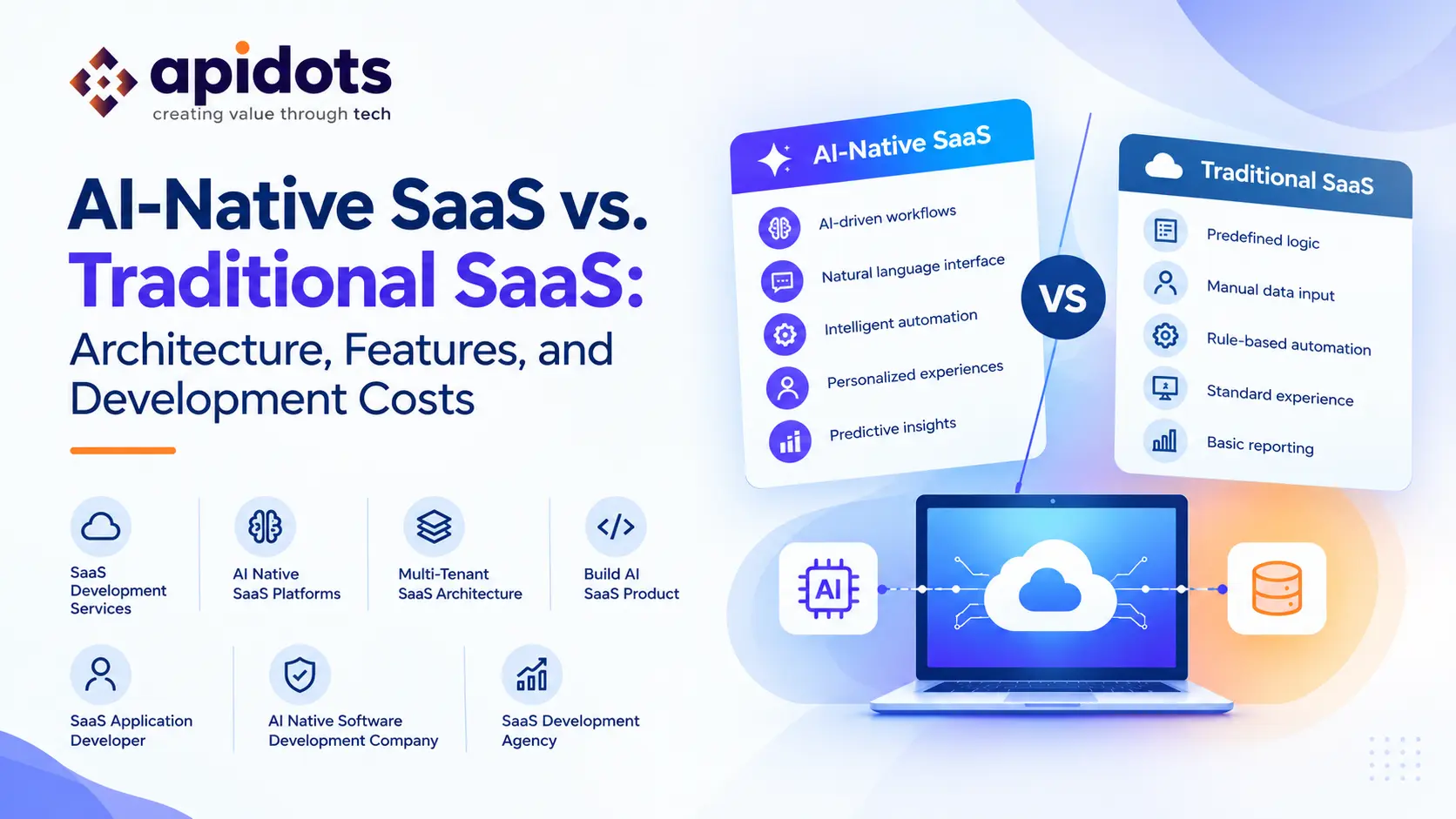
Software as a Service (SaaS) has transformed how businesses build, deliver, and consume software. Instead of installing applications on individual computers or maintaining on-premises infrastructure, customers can access cloud-hosted products through subscriptions. Traditional SaaS platforms have made business software more accessible, scalable, and easier to maintain.
Artificial intelligence is now changing how these platforms are designed and used.
While traditional SaaS applications primarily rely on predefined business logic, databases, and user-driven workflows, AI-native SaaS platforms are designed around artificial intelligence as a core part of the product experience. They can interpret natural language, generate content, analyze complex information, recommend decisions, and automate tasks that previously required substantial manual effort.
Consider a traditional project management platform. Users create tasks, assign deadlines, update statuses, and generate reports. An AI-native alternative could also interpret project requirements, identify potential delays, summarize discussions, and recommend or execute approved actions.
The difference is not simply the presence of an AI chatbot. It is how deeply intelligence is integrated into the product’s architecture, workflows, and value proposition.
For founders and businesses planning to build AI SaaS products, understanding these differences is essential. Architecture decisions affect scalability, security, user experience, development timelines, and long-term operating costs.
In this guide, we compare AI-native SaaS and traditional SaaS, explore their architectural differences, explain the features that distinguish them, and examine the factors that influence development costs.
Traditional SaaS is a software delivery model in which a provider hosts and maintains an application that customers access over the internet.
The application generally follows predefined rules and workflows. Users interact with the interface, submit information, and receive results based on programmed business logic.
Examples include accounting platforms, customer relationship management systems, project management tools, and inventory applications.
A traditional SaaS application commonly includes:
Many traditional SaaS products use a multi-tenant architecture, where customers share some application components while their data and permissions remain appropriately separated.
Microsoft’s Azure Architecture Center explains that SaaS is a business model, while multitenancy is an architectural approach. The two are related, but they are not interchangeable concepts. Source: Microsoft Learn
Imagine an inventory management platform.
A user enters product details, updates stock quantities, and creates a purchase order. The backend validates the input, applies business rules, updates the database, and returns the result.
The system is effective because its operations are predictable and testable.
However, users still need to perform many tasks themselves. They must interpret reports, identify unusual patterns, decide when to reorder products, and determine what action to take next.
Traditional SaaS can automate these activities through rules and integrations. But when the workflow requires flexible interpretation of unstructured information or adaptation to changing context, conventional programming alone can become more difficult to maintain.
AI-native SaaS is software designed around AI capabilities from the beginning, rather than treating AI as an optional feature added after the core product is built.
In an AI-native application, intelligence can be central to how users complete their work.
For example, an AI-native financial operations platform might allow a user to ask, “Which invoices are overdue, and which customers should we follow up with first?”
The application could retrieve authorized financial records, analyze payment history, prioritize accounts using defined criteria, and prepare follow-up recommendations.
Depending on the product’s permissions and design, it could also initiate approved workflows.
AI-native products may use large language models (LLMs), machine learning models, retrieval-augmented generation (RAG), recommendation systems, or AI agents. Not every product needs all these technologies.
The key characteristic is that AI performs an important part of the product’s core job, rather than simply adding convenience to an otherwise conventional application.
These terms are related, but there is a useful distinction.
An AI-enabled SaaS product adds AI features to an existing application. For example, a CRM introduces an AI feature that summarizes customer meetings.
An AI-native product is designed around AI-driven functionality from the outset. For example, a sales platform might use AI to interpret customer signals, prioritize opportunities, prepare outreach, and coordinate follow-up workflows.
A practical test is to ask: if the AI capabilities were removed, would the product still deliver most of its core value?
If the answer is yes, the product may be AI-enabled. If removing AI fundamentally changes what the product does, it is more likely to be AI-native.
| Comparison factor | Traditional SaaS | AI-Native SaaS |
| Core functionality | Predominantly predefined business logic | AI is central to core workflows |
| User interaction | Forms, menus, dashboards, and commands | May include natural-language and conversational interfaces |
| Decision support | Rules, filters, and reports | Contextual analysis, predictions, and recommendations |
| Automation | Rule-based workflows | AI-driven workflows, potentially including agents |
| Data processing | Primarily structured queries and programmed operations | Structured and unstructured data, depending on the design |
| Output consistency | Generally predictable for the same inputs and state | May vary because model outputs are probabilistic |
| Testing | Unit, integration, and functional testing | Traditional testing plus AI-specific evaluations |
| Operating costs | Infrastructure, storage, support, and services | Those costs plus model inference and AI-related operations |
| Governance | Access controls, audit logs, and business rules | These controls plus AI-specific safeguards and monitoring |
Neither approach is automatically better. Traditional SaaS remains highly effective for predictable, transactional, and rule-driven applications. AI-native SaaS becomes attractive when intelligence, interpretation, personalization, or adaptive automation provides meaningful value.
Architecture is one of the most important differences between the two approaches.
Traditional SaaS generally centers on application logic, databases, APIs, and infrastructure. AI-native SaaS retains these foundations but adds an intelligence layer that must be designed, tested, secured, and monitored.
Both application types need reliable data storage, but AI-native products may need to process additional data formats.
These can include documents, conversations, images, transcripts, and other unstructured information.
Depending on the use case, the data layer may include:
Not every AI-native application needs a vector database. Select data technologies based on actual retrieval and processing requirements.
Traditional applications execute programmed business logic. AI-native applications also need a layer for managing model interactions.
This layer may handle:
Keeping model integration behind a dedicated application interface makes it easier to change providers or models without rewriting the entire product.
An AI model may need information from the customer’s own documents, database, or business systems to provide useful responses.
Retrieval-augmented generation can help by retrieving relevant information and supplying it as context to the model.
For instance, an AI-powered HR platform could retrieve approved company policies before answering an employee’s question about leave procedures.
Retrieval must respect user permissions and tenant boundaries. A technically accurate answer is still a security failure if it reveals information from another customer.
Some AI-native products need to coordinate multiple steps rather than return a single response.
A workflow might retrieve data, analyze it, call an external API, validate a result, request approval, and update a business record.
The orchestration layer manages the order of operations, failure handling, and execution limits.
For high-impact actions, use deterministic business rules and human approval where appropriate instead of allowing an AI model to make unrestricted decisions.
Traditional software testing remains essential, but AI-native applications require additional checks because model outputs can be variable.
Teams should evaluate:
Production monitoring should identify regressions after model changes, prompt updates, or changes to retrieved data.
The result is an architecture that combines conventional software engineering with AI-specific evaluation and operational controls.
The right features depend on the product’s purpose. However, several capabilities frequently appear in AI-native SaaS platforms.
Users can describe goals or ask questions in everyday language instead of navigating complex workflows.
This is particularly useful when the product manages large amounts of information or supports users with different levels of technical expertise.
AI can identify patterns, summarize information, and suggest relevant actions.
Recommendations should be explainable enough for users to understand the evidence and limitations behind important outputs.
AI can help automate multi-step processes such as document processing, ticket classification, report preparation, and lead qualification.
The system should distinguish between actions it can execute automatically and those requiring approval.
AI can tailor recommendations, content, and workflows to the user’s context and preferences.
Personalization should respect consent, access permissions, data minimization, and applicable privacy requirements.
User corrections and feedback can help teams identify weaknesses and improve the product.
However, user feedback should not automatically be treated as training data. Teams need clear policies for data collection, retention, evaluation, and any model-training process.
AI usage can vary considerably between users and tasks.
Useful controls include usage quotas, model selection policies, rate limits, cost dashboards, and alerts when consumption exceeds expected levels.
These capabilities help businesses balance product quality with sustainable operating costs.
Building an AI SaaS product requires more than choosing an AI model and connecting it to a user interface. The development process should begin with a real customer problem and a clear definition of how AI improves the outcome.
Identify the task customers struggle with and determine whether AI is an appropriate solution.
Interview prospective users, examine existing workflows, and define how success will be measured.
For example, a document-processing platform might measure the time needed to extract and validate information rather than simply counting how many AI responses it generates.
Start with one high-value workflow rather than attempting to make every feature intelligent.
An MVP might support document extraction, semantic search, meeting summaries, or an AI assistant for a specific business process.
The objective is to verify that the AI produces useful results for real users before expanding the scope.
Plan the frontend, backend, data storage, authentication, billing, integrations, and AI services.
If multiple organizations will use the product, define the tenant model and data-isolation strategy early.
A secure multi tenant SaaS architecture must enforce tenant boundaries across databases, files, caches, background jobs, APIs, and AI retrieval systems.
Select models and supporting technologies according to task requirements, accuracy, latency, privacy, and cost.
Hosted model APIs can help teams validate an idea without operating their own models. Self-hosted or specialized models may be appropriate when control, deployment constraints, or usage economics justify the additional complexity.
Create a representative evaluation dataset and measure the AI against realistic scenarios.
Test normal cases, ambiguous inputs, incorrect information, security boundaries, and failure conditions.
AI evaluation should be part of the development process, not something performed only before launch.
Track user adoption, task completion, response quality, latency, and cost.
Use the findings to improve prompts, retrieval, models, and user experience. Expand into additional workflows only when the initial capability demonstrates meaningful value.
Many SaaS products serve multiple organizations through a shared application. This is known as a multi-tenant architecture.
Traditional SaaS platforms commonly use this approach to share infrastructure and simplify product maintenance. AI-native products can use the same principle, but they must also isolate AI-related data and operations.
For example, a multi-tenant AI knowledge platform might allow each company to upload internal documents and ask questions about them.
The platform must ensure that one company’s users cannot retrieve another company’s documents, embeddings, conversations, or generated outputs.
Key design considerations include:
There is no single architecture that suits every product. Shared databases may be appropriate for some workloads, while separate schemas, databases, or dedicated environments may be necessary for others.
The correct choice depends on customer requirements, security obligations, scale, and operating costs.
One of the most common questions from founders is how much it costs to build an AI SaaS product.
There is no universal price because costs depend on functionality, team composition, integrations, security, model selection, and expected usage.
AI-native development typically introduces additional work in model integration, evaluation, monitoring, and usage management. It can also introduce recurring inference costs that are not present in the same way in conventional software.
The following are illustrative planning ranges in US dollars, not verified market averages or a quotation from APIDOTS.
| Project type | Illustrative initial development budget |
| Traditional SaaS MVP | 15,000–40,000 |
| AI-enabled SaaS MVP | 25,000–60,000 |
| AI-native SaaS MVP with a focused core workflow | 30,000–80,000 |
| Complex AI-native, multi-tenant platform | 80,000–200,000+ |
Actual budgets can fall outside these ranges. The table assumes different levels of functionality and complexity, so it should not be interpreted as a direct price comparison for identical products.
Product complexity: More workflows, roles, dashboards, and integrations increase development and testing effort.
AI capabilities: A simple summarization feature differs significantly from a product that coordinates multiple agents or processes large document collections.
Data preparation: Cleaning, organizing, indexing, and securing customer data can require substantial engineering effort.
Model selection: Different models have different pricing, latency, and quality characteristics. Some products may require multiple models for different tasks.
Multi-tenancy and security: Tenant isolation, enterprise access controls, audit logs, and compliance-related requirements can increase the initial scope.
Evaluation and monitoring: Reliable AI products need ongoing quality testing, observability, and mechanisms for handling failures.
Third-party integrations: Payments, identity providers, business APIs, and external data sources can add implementation and maintenance costs.
Initial development is only part of the total cost of ownership.
AI-native SaaS operating expenses may include:
A product with heavy AI usage can have very different economics from a product where AI is used occasionally.
Before launching, estimate the cost of delivering a typical task and compare it with the revenue generated by the relevant subscription or usage fee. Include retries, long prompts, larger documents, and peak usage in the calculation.
A sustainable product needs both a useful AI experience and a pricing model that supports its operating costs.
AI-native SaaS is a strong candidate when intelligence is central to the customer’s desired outcome.
Consider this approach when:
Traditional SaaS may be more appropriate when requirements are primarily transactional, deterministic, or rule-based.
For many products, a hybrid approach is the most practical option: conventional software handles authentication, billing, data integrity, and business rules, while AI supports selected workflows where it adds measurable value.
The objective should not be to use AI everywhere. It should be to apply AI where it improves the product enough to justify its cost and complexity.
Building a successful AI-native product requires experience across SaaS architecture, software engineering, AI integration, and production operations.
When evaluating a SaaS development agency, look for a team that can explain its architectural decisions and the trade-offs behind them.
Ask prospective partners about:
A capable SaaS application developer should understand both the product requirements and the technical constraints. Similarly, an AI-native software development company should be able to explain how AI quality, data security, reliability, and operating costs will be managed after launch.
Look for a partner that prioritizes measurable business outcomes over unnecessary technical complexity.
AI-native SaaS represents an important evolution in software development. Traditional SaaS remains an effective choice for predictable business workflows, while AI-native products can make intelligence, contextual understanding, and task automation central to the customer experience.
The right decision depends on the problem you want to solve, the data available, the expected user experience, and the economics of operating the product.
Before you build an AI SaaS product, validate the core use case, choose an architecture that supports secure growth, test AI outputs against real requirements, and plan for ongoing inference and maintenance costs. For products serving multiple organizations, a well-designed multi-tenant SaaS architecture is especially important for protecting customer data and managing usage reliably.
At APIDOTS, we help businesses turn product ideas into scalable software through our expertise in SaaS development services and custom software development. From architecture planning and multi-tenant implementation to AI integration, product engineering, and ongoing optimization, our focus is on building solutions around real business needs.
Whether you are launching a new AI-native saas platform, adding intelligent workflows to an existing SaaS application, or looking for an experienced SaaS development agency, APIDOTS can help you assess the right technical approach and plan your product’s development journey.
The goal is not simply to build software with AI. It is to build a useful, secure, scalable product whose intelligence creates measurable value for its users.
Traditional SaaS primarily relies on programmed business logic and predefined workflows. AI-native SaaS makes AI a central part of the product, enabling capabilities such as contextual analysis, natural-language interaction, intelligent recommendations, and AI-driven automation.
The cost depends on the product’s complexity, AI capabilities, integrations, data requirements, and security needs. As an illustrative estimate, a focused AI-native MVP might cost 30,000–80,000, while complex platforms can cost $200,000 or more. Model usage, hosting, and maintenance are additional ongoing expenses.
Common components include frontend and backend frameworks, relational databases, cloud infrastructure, model APIs, retrieval systems, vector search where needed, workflow orchestration, and monitoring tools. The appropriate stack depends on the product’s requirements rather than a single universal technology choice.
Yes. Multi-tenancy can allow multiple customers to share application infrastructure while keeping their data and permissions separate. AI applications must also secure tenant-specific documents, retrieval indexes, conversation history, caches, and model access.
Yes, although the amount of work depends on the existing product. Businesses can begin by introducing AI into a high-value workflow, evaluating the results, and gradually redesigning parts of the architecture as requirements evolve. A full rebuild is not always necessary.
Look for a partner with experience in SaaS architecture, AI integration, multi-tenancy, security, testing, and production monitoring. Ask how the team will measure AI quality, manage operating costs, protect customer data, and support the product after launch.
We engineer robust, future-ready software solutions.Built using modern architectures and proven development practices.
Hire Developers