
Top
Search
People also search for:

Stay Inspired with Instagram




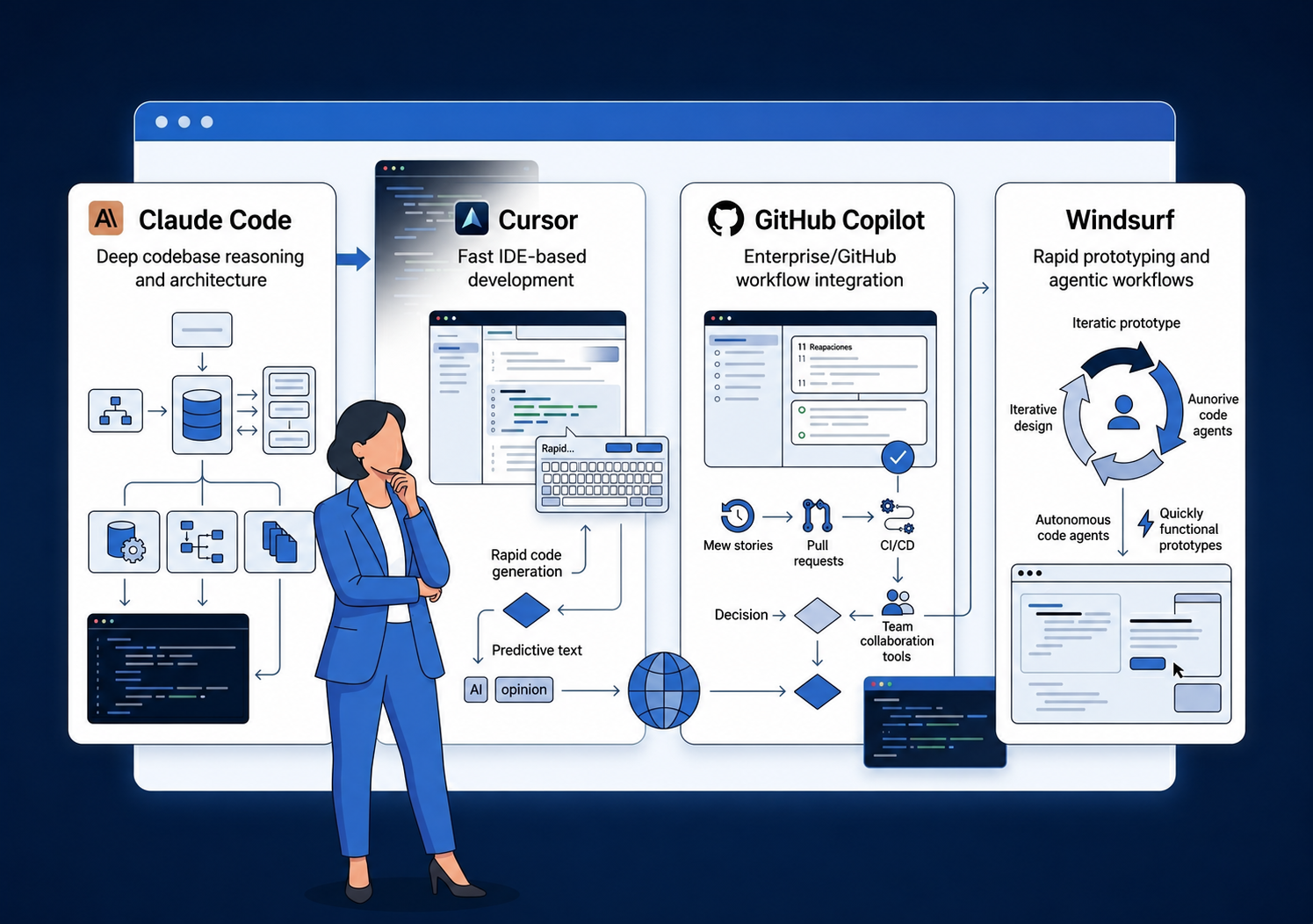
Most comparisons are written for developers choosing a personal editor. This guide is for CTOs, founders, and product leaders who need to understand how these tools affect delivery speed, code quality, security review, and long-term maintainability.
At API DOTS, we evaluate AI coding tools from a delivery perspective, focused on what affects the quality and reliability of what reaches production. As part of our work on debugging AI-generated code across client projects, we have seen where agentic tools add real value and where they quietly introduce risk.
This guide reflects that evaluation, written for the people who fund and oversee development, not just the developers who use the tools day to day. If you already know you want to build with Claude Code, read our full step-by-step guide on how to build an app with Claude Code. This article is for teams still deciding whether Claude Code, Cursor, GitHub Copilot, Windsurf, or a mixed stack is the right fit.
Methodology: We evaluated these tools based on public documentation, vendor pricing pages, published benchmark disclosures, and agency delivery considerations including maintainability, security review, and team adoption. Not every vendor publishes directly comparable benchmark results. Where comparisons are incomplete, we say so.
If you only read one section, use this table. These tools are often grouped together under “AI coding assistant,” but they solve different problems for different buyers. The safest decision is not to crown one universal winner. It is to match the tool to the project stage, team maturity, and risk profile.
| Tool | Category | Best for | Main limitation | Best buyer fit |
|---|---|---|---|---|
| Claude Code | Terminal agent | Architecture, debugging, complex refactors, and codebase-wide reasoning | Can be expensive and slower for routine feature work | Senior engineering teams, SaaS products, and legacy modernization projects |
| Cursor | AI-native IDE | Daily feature work, multi-file edits, and fast developer iteration | Requires teams to adopt a VS Code-based workflow | Product teams, startups, SaaS builders, and agency delivery teams |
| GitHub Copilot | IDE plugin and GitHub-native assistant | Low-friction adoption, enterprise rollout, and teams already using GitHub | Less differentiated for deep autonomous codebase reasoning | Enterprise teams, regulated buyers, and Microsoft/GitHub organizations |
| Windsurf | AI-native IDE | Rapid prototyping, agentic workflows, and fast demo cycles | Recent ownership transition creates vendor-risk questions | Startups, prototype-heavy teams, and developers testing AI-native IDEs |
This table is designed for CTOs and product leaders. Developers may evaluate these tools differently based on personal workflow preference.
Most comparison articles treat these four tools as the same product category. They are not. The comparison only makes sense once you understand what each one is designed to do.
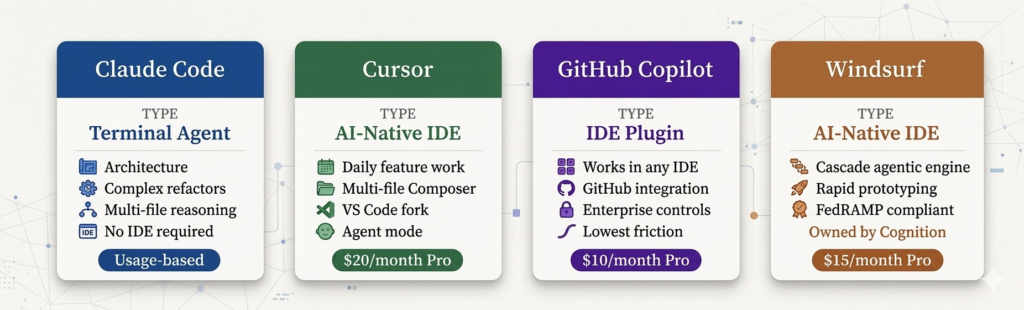
The four leading AI coding tools mapped by interface type and primary use case. Pricing from vendor pages at time of writing. Sources: Anthropic, Cursor, GitHub, Windsurf.
Individual Pro plan pricing is relatively consistent across these tools. The real differences appear at team scale and under heavy agentic use. The cost-efficient pattern for most product teams is using Copilot or Cursor as the daily driver and reserving Claude Code credits for architecture-level and complex refactoring work.
Running Claude Code Max across a full team for daily development is the most expensive combination in this category. For a full breakdown of how AI tool costs fit into the wider picture, see our guide to custom software development costs.
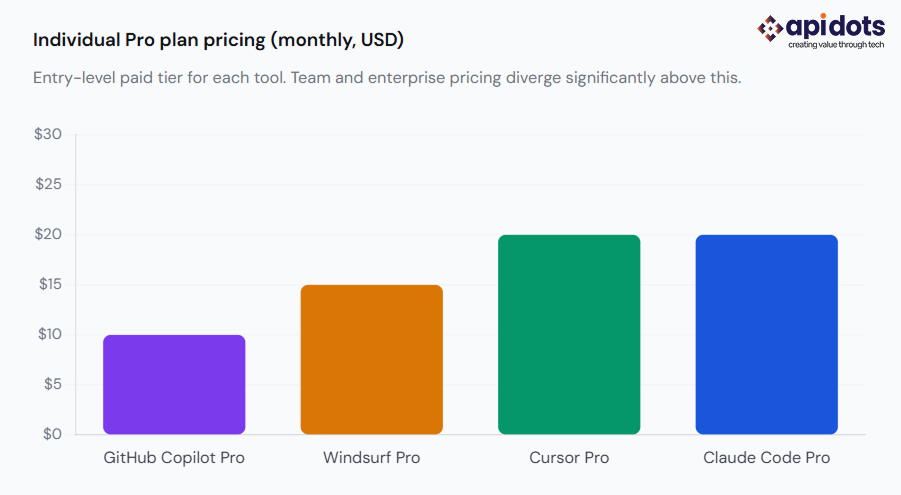
Source: Vendor pricing pages verified May 2026: GitHub Copilot, Windsurf, Cursor, Claude Code. Confirm current pricing before purchasing.
Buyers often compare two tools at a time before they decide on a team workflow. The sections below answer the highest-intent sub-comparisons directly, while keeping the buyer perspective.
Claude Code is stronger when the task requires deep reasoning across a large codebase, such as refactoring a shared authentication layer, tracing a bug through multiple services, or reviewing architectural tradeoffs before a build starts.
Cursor is stronger when a developer is writing and modifying features all day inside an IDE. For production development, the better setup is usually Cursor for daily velocity and Claude Code for harder moments where context depth matters more than speed.
For CTOs, the decision should not be framed as “Claude Code or Cursor.” A team using Cursor without senior review can still ship fragile AI-generated code. A team using Claude Code without clear task boundaries can create expensive, hard-to-audit sessions. The safer question is whether the team knows when to switch from fast IDE assistance to deliberate codebase-level reasoning.
GitHub Copilot is usually easier to roll out in larger organizations because it fits inside existing IDEs and GitHub workflows. Procurement, governance, and developer adoption are often simpler when the team already uses GitHub or Microsoft tooling. Claude Code is more powerful for autonomous codebase tasks, but it requires more intentional usage policies, especially for production repositories, regulated data, and usage-based cost control.
For enterprise teams, Copilot often works best as the default baseline assistant. Claude Code can then be introduced for specific use cases: migration planning, test generation across modules, architectural analysis, or large refactors that would take too long to coordinate manually. This avoids the common mistake of trying to make one tool responsible for every engineering activity.
Cursor has stronger mindshare among developers who want an AI-first version of a familiar VS Code-style environment. Windsurf is compelling for agentic workflows and rapid prototyping through Cascade. If your team is building an MVP or internal prototype, Windsurf may feel faster in early exploration. If your team is standardizing a delivery workflow across several developers, Cursor may be easier to evaluate because adoption patterns and community documentation are more mature.
The buyer concern is not only speed. Fast prototyping can hide technical debt. If an agency uses Windsurf or Cursor to move quickly, ask how they review generated code, how they test integrations, and how they prevent prototype patterns from becoming production architecture by accident.
There is no clean, universal answer because vendors do not publish fully comparable product-level benchmarks. SWE-bench gives useful signals about model capability, but the quality of a real software build also depends on prompts, repository structure, test coverage, developer review, and whether the task is appropriate for the tool. Claude-family models are strong for reasoning-heavy work. Cursor and Windsurf are strong for iteration speed. Copilot is strong for broad adoption and everyday assistance.
For client projects, the better quality signal is process maturity. A team that pairs AI-generated code with automated tests, human code review, security checks, and architectural ownership is safer than a team using the highest-scoring model with weak review habits.
The question “which tool is best?” only makes sense when you specify which phase of development you are in. Understanding this framing is a core part of how we approach AI adoption decisions with clients. Each tool has a different value proposition depending on where you are in a build.
When making structural decisions about a product, you need a tool that can reason across the full codebase at once. Claude Code’s large context window (up to 200K tokens) is best suited here. Copilot is weakest at this phase as it was designed for file-level assistance, not project-level reasoning.Claude Code or Cursor
Most development time lives here. Cursor and Windsurf are the practical choice for daily feature work because of their speed and IDE integration. Copilot works for teams that want low-friction assistance without switching editors. Claude Code is slower here and costs more per session at volume.Cursor, Windsurf, or Copilot
GitHub Copilot Enterprise has the most established documentation for regulated-industry buyers: SOC 2, audit logs, and Microsoft governance compatibility. This does not make it automatically compliant. Teams must independently validate data handling policies with their legal and security teams.GitHub Copilot Enterprise
When a task spans many files, such as a large refactor, a security audit across a codebase, or resolving a complex cross-cutting bug, Claude Code is where engineering teams most commonly reach. The context window and autonomous execution loop handle this work better than IDE-bound tools.Claude Code
This framing is more useful than a flat ranking. For teams building AI-native SaaS products, the architecture phase has outsized consequences and warrants a different tool choice than a rapid MVP. For healthcare software or fintech builds, the compliance and data handling questions cannot be answered by tool marketing materials alone.
| Project type | Recommended starting stack | Why |
|---|---|---|
| Early MVP | Cursor or Windsurf, with senior review on all AI-generated code | Fast path to demo while reviewing technical debt before it compounds |
| SaaS product | Cursor or Copilot for daily development, Claude Code for architecture | Balances development speed with quality on foundational decisions |
| Fintech or healthcare | Copilot Enterprise as baseline, with all data policies validated by legal and security teams | Supports governance requirements, audit needs, and regulated development workflows |
| Legacy modernisation | Claude Code for codebase reasoning, with human-led architecture review | Large context window helps with older codebases that were not written to be AI-readable |
| Agency delivery team | Mixed stack by phase | Different build phases have different requirements. One tool for everything is a signal worth questioning |
Recommendations based on delivery considerations, not rankings. Most experienced teams use more than one tool.
For software agencies, the best answer is rarely a single license. Agency teams need a workflow that can move quickly during discovery and feature delivery, but still protect the client from security issues, maintainability problems, and hidden technical debt. That makes a mixed stack more practical than a one-tool policy.
A sensible agency workflow looks like this: use Cursor or GitHub Copilot for day-to-day development, use Claude Code selectively for architecture review and complex refactoring, and use Windsurf when rapid prototyping or agentic experimentation is useful. The exact mix matters less than the review process.
Every AI-generated change that touches authentication, payments, permissions, data handling, or core business logic should be reviewed by a senior engineer before it reaches production.
Agency verdict
Best daily driver: Cursor or GitHub Copilot, depending on the team’s existing IDE and GitHub workflow.
Best specialist tool: Claude Code for architecture, debugging, and multi-file refactoring.
Best rapid-prototype option: Windsurf, especially when speed matters more than long-term maintainability during the first exploration pass.
Best client-safety rule: No AI-generated production code should bypass human review, tests, and security checks.
This section does not appear in most AI coding tool comparisons, because those comparisons are written for developers, not for the people evaluating a development company or managing a team that uses AI tools. Whether you are working with an external agency or an internal team, these five questions matter.
A team that cannot answer this clearly is not thinking carefully about the tradeoffs. A team that uses one tool for everything, from architecture through security review, is taking a shortcut that often surfaces in production.
Agentic tools can generate large volumes of code quickly. The review process matters as much as the tool quality. Ask for specifics, not general assurances. This is central to how we describe our own AI code review process on client projects.
Independent testing consistently identifies these as the areas where AI tools produce the most subtle errors. An agency that treats them the same as boilerplate generation is taking on risk that lands with you in production.
Vendor marketing pages are not sufficient due diligence. Your legal team may also want this question answered before the contract is signed. The same applies to teams considering offshore development partnerships, where the review process can be harder to observe directly.
Usage-based tools like Claude Code can be efficient or expensive depending on how they are used. Understanding this upfront prevents surprises in the final invoice.
Red flags to watch for: They cannot describe their review process in specific terms. They use a single tool for every phase. AI-generated code is delivered without test coverage. They cannot name the data handling policies that apply to the tools they use. Authentication and payment code is treated identically to boilerplate generation.
Claude Code, Cursor, GitHub Copilot, and Windsurf are not competing answers to the same question. They are different tools built for different parts of the development process. The most effective teams in 2026 are not picking one and using it for everything. They are assigning tools to the phases where each performs best, and they have a human review process that does not rely on AI to catch its own mistakes.
For CTOs and founders evaluating a development partner, the most important signal is not which tools they use. It is whether they can explain how they use them, when, and what review sits between AI output and production code. The same principles that apply to evaluating AI-assisted development quality apply whether you are working with an internal team or an external agency.
There is no single best tool for every development team. Claude Code is strongest for complex reasoning, debugging, architecture, and large refactors; Cursor is better for daily feature development; GitHub Copilot is best for low-friction enterprise adoption; and Windsurf is useful for rapid prototyping and agentic IDE workflows. The best choice depends on your product type, team workflow, security needs, and whether you are optimizing for speed, quality, or governance.
Claude Code is usually better for architecture-level work, codebase-wide reasoning, debugging, and complex refactoring, while Cursor is usually better for daily coding inside an IDE. For production software, many teams use Cursor for fast iteration and Claude Code for deeper review, structural decisions, and high-complexity tasks. Claude Code should not be treated as a full replacement for Cursor because the two tools solve different workflow problems.
Development teams should use GitHub Copilot when they need fast adoption, IDE compatibility, GitHub integration, and enterprise governance controls. Claude Code is a better fit when the team needs deeper reasoning across a larger codebase, multi-file refactoring, or complex debugging. For many teams, the best setup is not Copilot or Claude Code, but Copilot for everyday coding support and Claude Code for high-value engineering tasks.
Windsurf can be a strong choice for startups that need fast prototyping, demo creation, and agentic workflows inside an AI-native IDE. Cursor is often stronger for teams that want a more established VS Code-based workflow and broader daily development use. Startups should compare both tools based on developer adoption, project complexity, cost, and how much senior review is available before AI-generated code reaches production.
For software agencies, the best AI coding tool is usually a mixed stack rather than a single product. Cursor or GitHub Copilot can support daily development, Claude Code can help with architecture, debugging, and complex refactors, and Windsurf can support rapid prototyping. For client projects, the more important question is not which tool the agency uses, but how the agency reviews AI-generated code before shipping it to production.
If your team decides Claude Code is the right tool for architecture, scaffolding, or complex refactoring, the next step is learning how to use it safely. Our Claude Code app development guide walks through requirements, setup, CLAUDE.md, feature-by-feature development, deployment, security review, and maintenance planning.
We build and deploy end-to-end AI software solutions for businesses. Accelerating efficiency, automation, and intelligent decision-making.
Get AI Development Services
Hi! I’m Aminah Rafaqat, a technical writer, content designer, and editor with an academic background in English Language and Literature. Thanks for taking a moment to get to know me. My work focuses on making complex information clear and accessible for B2B audiences. I’ve written extensively across several industries, including AI, SaaS, e-commerce, digital marketing, fintech, and health & fitness , with AI as the area I explore most deeply. With a foundation in linguistic precision and analytical reading, I bring a blend of technical understanding and strong language skills to every project. Over the years, I’ve collaborated with organizations across different regions, including teams here in the UAE, to create documentation that’s structured, accurate, and genuinely useful. I specialize in technical writing, content design, editing, and producing clear communication across digital and print platforms. At the core of my approach is a simple belief: when information is easy to understand, everything else becomes easier. Reach me at amysbrew.com