Macro tracking apps have transformed nutrition logging by combining barcode scanners with massive food databases. With a quick scan, users can instantly log calories, protein, carbs, and fats without manual entry. Behind this simplicity lie complex backend systems, localized food data, and innovative UX design. This article breaks down how these apps work, why they are growing fast, and what it takes to build one that users actually stick with.
Why is the Macro Tracking App Magic needed?
Ever wondered how a simple barcode scan on a cereal box can instantly log calories, protein, carbs, almost like magic? If you use a macro tracking app, calorie tracker app, or food logging app, you’re leveraging far more behind the scenes than meets the eye.
Modern nutrition platforms built with scalable platforms like APIDOTS rely on powerful food databases, barcode indexing, and intelligent logging flows to make this experience seamless for users.
In an era where health, wellness, and smart tech intersect, these nutrition app development tools are changing how people in Europe, the Middle East, and beyond approach food. Whether you’re managing macros for fat loss, muscle gain, or general health, understanding the technology behind diet tracking makes you a smarter, more informed user.
In this blogpost, we go behind the scenes — exploring the food databases, barcode scanners, and design choices that power today’s top nutrition tracker apps.
Why Macro Tracking Apps Have Exploded in Popularity
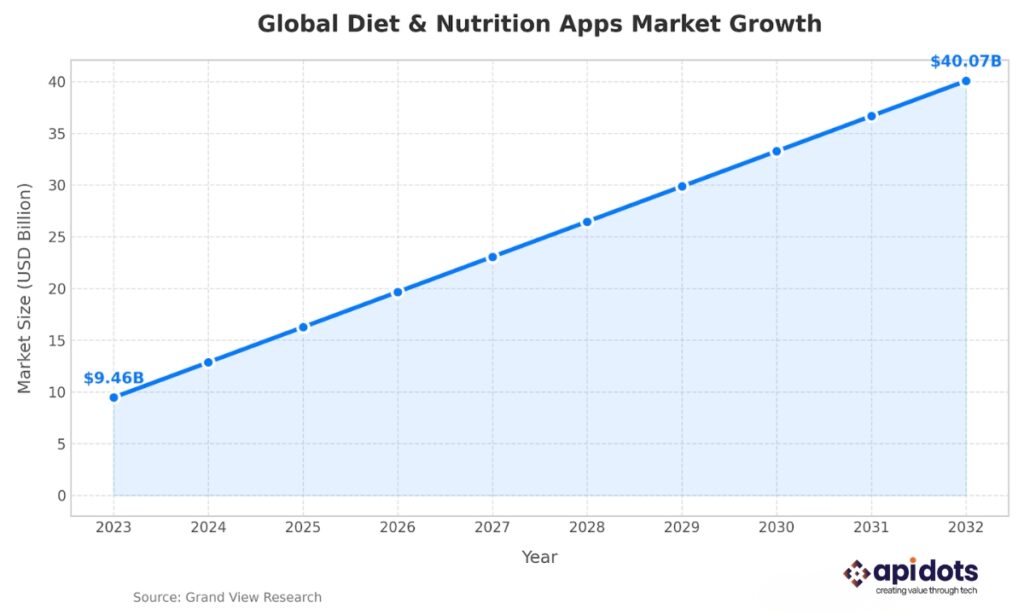
The global diet and nutrition apps market is growing rapidly: from USD 9.46 billion in 2023 to a projected USD 40.07 billion by 2032.
Market reports specific to Europe suggest that the calorie-counting app segment is forecast to grow significantly, driven by rising health awareness and smartphone adoption.
As users globally become more health-conscious and busy lifestyles demand convenience, the idea of tapping a button (or scanning a barcode) instead of manually writing food diaries is a big draw.
With that backdrop, it’s clear why macro tracking apps are not just a fad — they’re shaping up to become a staple in modern nutrition and fitness.
The global diet and nutrition apps market is growing rapidly: from USD 9.46 billion in 2023 to a projected USD 40.07 billion by 2032.
How Barcode Scanner Nutrition Apps Work
The Role of Food Composition Databases (FCDs)
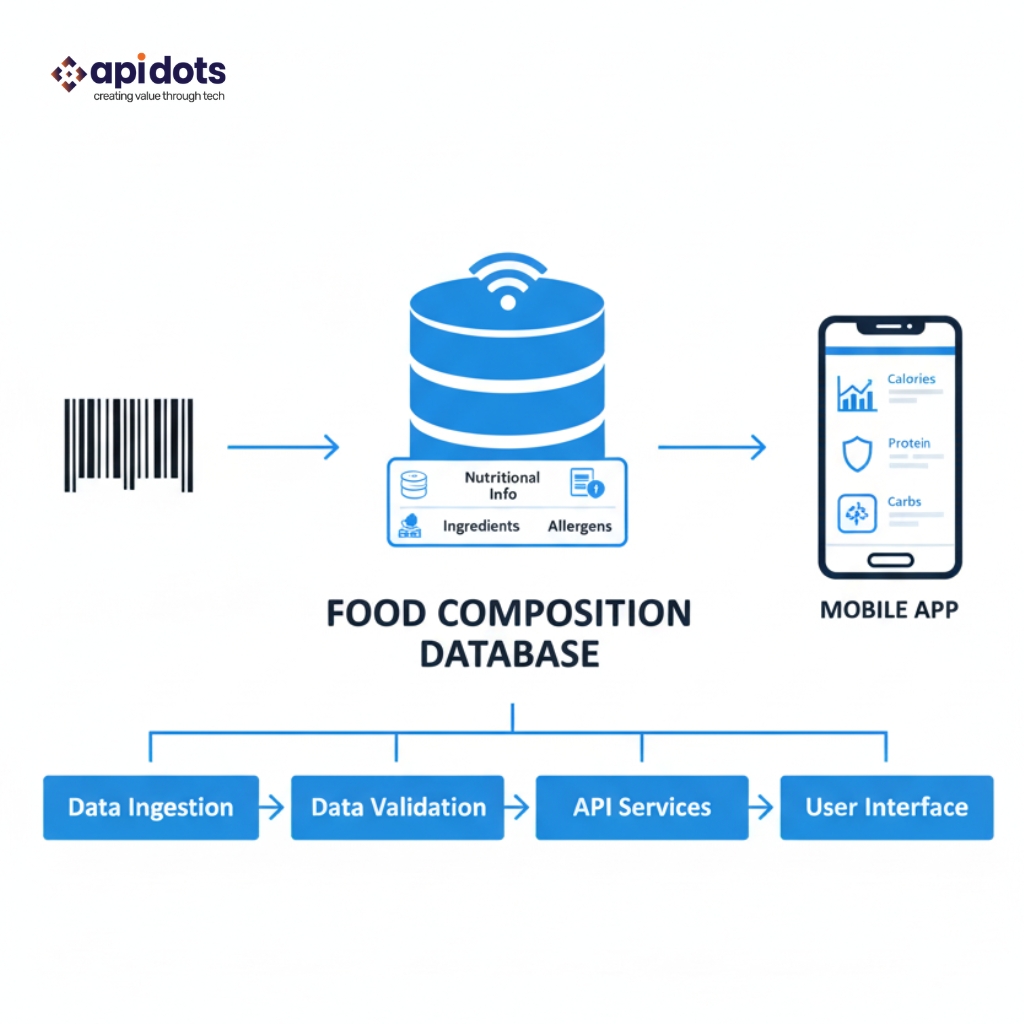
At the heart of most nutrition apps lies an extensive food composition database (FCD). These databases contain nutritional information — calories, macronutrients (protein, fat, carbs), sometimes micronutrients, per 100 g or per serving.
When a food item is logged, either manually or via barcode, the app fetches the nutritional data from the FCD.
For packaged foods (with barcodes), a unique barcode links to the correct database entry — mitigating errors from name-based searches or manual estimates.
For region-specific foods (common in Europe or the Middle East), robust, localized databases help keep macro tracking relevant and accurate.
Barcode Scanning
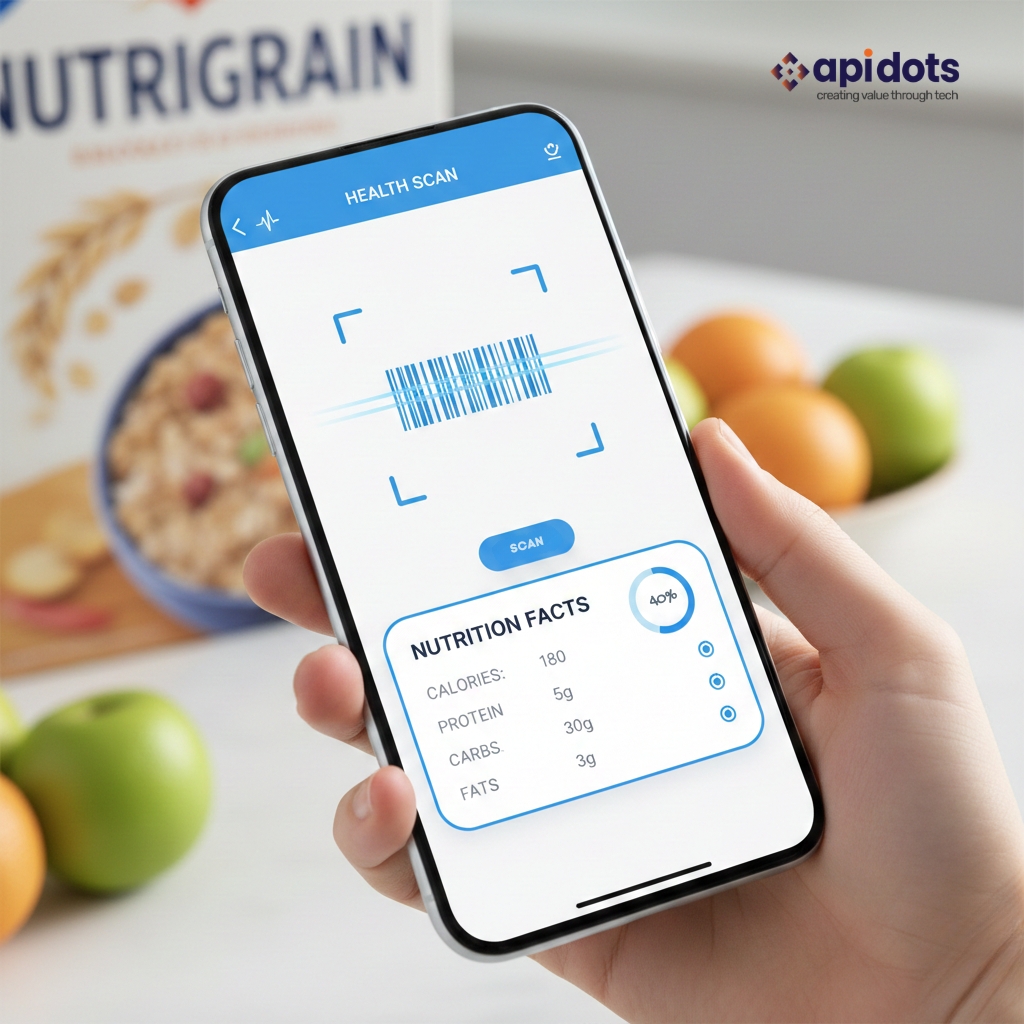
Barcode scanner nutrition apps dramatically reduce friction in food logging. Here’s how they typically work:
Scan the barcode with your phone’s camera.
The app checks its database for a matching barcode entry.
If found, nutritional values load instantly (calories, macros, other details).
You enter portion size/serving quantity, and macros are scaled accordingly — logged into your daily tally.
This process turns a potentially tedious manual log into a quick tap-and-go action. According to one recent review of top calorie counter apps, “many fitness apps have advanced features, like barcode scanners for easy logging, advanced metric tracking, and integration with fitness trackers.”
AI & Image Recognition for the Next Level
Beyond barcodes, some of the most cutting-edge nutrition apps are experimenting with photo-based food logging.
Systems like NutriVision employ computer-vision models (e.g., deep learning via convolutional neural networks) to detect food items in photos, estimate portion sizes, and output nutritional breakdown — an actual “point, shoot, log” experience.
Another app example implementing food image recognition is Foodvisor. Researchers have noted it can automatically recognise food items and estimate nutritional information, though such features are still rare among mainstream apps.
For developers building the next generation of nutrition or calorie-tracking apps, combining FCDs, barcode scanning, and AI image recognition is increasingly the competitive differentiator.
Key Components of Nutrition App Development
If you’re a developer or product manager exploring nutrition app development, these are the parts you need to build (or integrate):
Core Backend: Food Database plus Barcode Index
Comprehensive Food Database (global + local items): Ideally covers packaged products, raw ingredients, regional foods common in Europe and the Middle East, and brand variations.
Barcode Indexing Layer: Map barcodes (UPC, EAN, etc.) to database entries; support for multi-region codes and duplicate barcodes (standard in imported goods).
Portion scaling logic: Convert per-100 g data to per-serving/gram values; allow custom servings (grams, ml, cups, pieces) for flexibility.
Frontend UI / UX: Fast Logging & Data Entry
Smooth UX is vital — if logging food is tedious, users won’t stick around. Features developers should aim for:
Fast barcode scanning with camera access and live feedback (e.g., “Barcode recognised — macros loaded”)
Search fallback if barcode missing (free-text search, ingredient-based search, or crowd-sourced entries)
Manual entry option — always essential for homemade meals, regional dishes, or unbranded food.
Sync with activity trackers/wearables (to account for burn, activity levels)
Meal timing, macro distribution across the day, diet plan/preset templates (e.g., low-carb, high-protein, balanced)
Indeed, some modern apps already offer much of this.
Challenges: Accuracy, Region-Specific Foods & User Compliance
While the tech looks great on paper, real-world nutrition tracking has its challenges:
Database coverage gaps: Many databases focus on US or Western foods; regional dishes common in the Middle East or certain European countries may be missing or inaccurate.
Barcode mismatches or missing entries: Imported goods or local store brands may lack entries.
Portion-size estimation issues: Even with accurate per-100 g data, estimating how much you ate (especially forhomemade meals) remains tricky.
User compliance: Logging every meal — even with scanning — still requires discipline and consistency. Research has shown that even widely used apps can underperform expectations over the long term.
Real-World Impact: How Nutrition Tracker Apps Influence Eating Habits
Why People Stick
Apps give immediate feedback: scan → see macros → decide if it fits your diet plan. Real-time feedback encourages mindful choices. According to a study on food-scanner apps, these tools can influence healthier food choices.
For macro-focused eaters (e.g., body-composition goals, bodybuilding, fat loss), seeing exact protein/carbs/fat per meal helps plan and manage nutrients precisely rather than estimating broadly.
For busy lifestyles — especially in fast-moving urban areas across Europe and the Middle East — scanning barcodes or quickly searching for foods is far more practical than writing out food diaries.
What’s Working Now: Popular Apps & What They Demonstrate
MyFitnessPal remains one of the most widely used calorie tracker apps. Its database spans 14 million foods; it supports barcode scanning and even “Meal Scan” (camera-based logging).
Cronometer is praised for accuracy and a vast food database, making it suitable for serious macro tracking — even beyond just calories, with micronutrients and water intake tracking.
Niche/specialized macro trackers (for those focused strictly on protein/carbs/fat goals) demonstrate that simpler doesn’t always mean worse. Fewer distractions, direct macro focus, streamlined UI — sometimes that appeals more than bells and whistles.
What’s Next:The Future of Nutrition App Development
AI-Powered Food Recognition & Automated Logging
As highlighted earlier, systems like NutriVision show how AI and computer vision are being leveraged to:
Detect multiple food items in a single meal photo.
Estimate portion sizes.
Provide a full nutritional breakdown in under seconds.
This could dramatically reduce user friction — no scanning, no searching — just snap a picture and log.
Personalized Nutrition & Integration with Health Data
Future apps could combine macro tracking with:
Biomarker data (e.g., blood sugar, metabolic markers)
Activity and wearables data (exercise, heart rate, sleep)
Personalized meal suggestions, diet plans, and adaptive macros based on goals
Some apps are already moving in this direction.
Expanding Regional Food Databases & Cultural Localization
For global relevance, especially in diverse regions like Europe and the Middle East, successful nutrition apps will need:
Large databases covering regional cuisines, local ingredients, and imported brands.
Support for local languages, portion norms, and regional dietary habits.
Community-driven or crowd-sourced entries to fill gaps where official data is unavailable.
Planning to build a barcode-enabled nutrition app for your region? Let’s explore how a scalable food database can make the difference.
Practical Tips for Users in Europe & the Middle East
If you use a macro tracking app (or plan to):
Choose an app with a comprehensive food database or one that allows crowd-sourced additions — this helps with regional foods and imported brand items.
Be consistent with logging — scanning or picture-based logging is quick, but you still need to log each meal to get accurate macro & calorie totals.
Don’t blindly trust database values; when possible (especially home-cooked meals), weigh your food or estimate portions carefully.
Combine food logging with activity and water/sleep tracking (if the app supports it) — holistic monitoring often leads to better results.
Re-evaluate your macro goals periodically — as you lose fat or gain muscle, caloric needs change.
Conclusion
Barcode scanner and food database-powered macro tracking apps have revolutionized how we log food — transforming tedious food diaries into quick, data-driven habits. For users aiming to manage macros, maintain muscle, or lose fat, the convenience and feedback these apps offer are powerful.
For developers, building a next-gen nutrition app means combining robust food databases, intuitive logging (barcode or AI-based), localized food entries, and optional integrations (activity, biometrics).
If you’re serious about macros: start logging consistently. If you’re building apps, consider what your database, UI, and regional coverage look like. Want to Build a Nutrition App With Barcode Scanning and Accurate Food Data? Start with APIDOTS today.
Looking to develop a macro tracking app with accurate food data and seamless UX? Talk to the APIDOTS team.
FAQ Section
Q: Are barcode scanner nutrition apps accurate? A: They are reasonably accurate for packaged foods, as they pull data from food composition databases linked to unique barcodes. However, for homemade meals or foods without barcodes, accuracy depends heavily on how precisely you estimate portions.
Q: Can I track macros (protein, carbs, fats) and calories only, or also micronutrients? A: Many macro tracking apps go beyond macros. For example, Cronometer offers tracking of micro- and macronutrients, water intake, and other nutrient data.
Q: What if I eat a local dish not present in the database? A: Manual entry or user-added custom foods is often the fallback. Some apps let you enter your own food data or add a new item to the database — helpful for regional dishes.
Q: Is AI food recognition reliable now? A: Promising, but not perfect. Systems like NutriVision report around 80% accuracy in identifying items and estimating portions. Users should double-check results where possible.
Q: Does using a nutrition app guarantee weight loss/health improvements? A: Not automatically. Apps provide tools and data — results depend on how you act on them. Also, some research suggests app-based tracking alone (without consistent adherence) may not outperform standard dietary advice in the long run.
We Build Fitness & Nutrition Platforms Designed to Scale
We develop performance-driven wellness and fitness applications.Enabling integrations, tracking, and user engagement.
Hey! I’m Mohsin Khan, Technical Head at apidots.com — the guy who makes sure our projects don’t go off the rails and our developers don’t run away from complex requirements. I started out as a developer myself, so I still love jumping into the code when things get spicy.
My day usually includes translating client needs into real solutions, keeping multiple projects on track, and helping the team build solid websites and apps. I’ve led quite a few big projects to the finish line and helped push our growth forward — which is always a great feeling.
I’m value accountability, clear communication, and doing the job right the first time. I’ve got a B.E. in Computer Engineering, but I like to think I’ve learned just as much from real-world chaos as I did in college.
When I’m not working, you’ll probably find me talking about fitness, nutrition, health tech, or watching football highlights I’ve seen a hundred times. Since I’m obsessed with all things wellness, I also write for our Fitness & Nutrition Tech section — the place where my tech life and fitness life collide.






Hey! I’m Mohsin Khan, Technical Head at apidots.com — the guy who makes sure our projects don’t go off the rails and our developers don’t run away from complex requirements. I started out as a developer myself, so I still love jumping into the code when things get spicy. My day usually includes translating client needs into real solutions, keeping multiple projects on track, and helping the team build solid websites and apps. I’ve led quite a few big projects to the finish line and helped push our growth forward — which is always a great feeling. I’m value accountability, clear communication, and doing the job right the first time. I’ve got a B.E. in Computer Engineering, but I like to think I’ve learned just as much from real-world chaos as I did in college. When I’m not working, you’ll probably find me talking about fitness, nutrition, health tech, or watching football highlights I’ve seen a hundred times. Since I’m obsessed with all things wellness, I also write for our Fitness & Nutrition Tech section — the place where my tech life and fitness life collide.