
Top
Search
People also search for:
Stay Inspired with Instagram




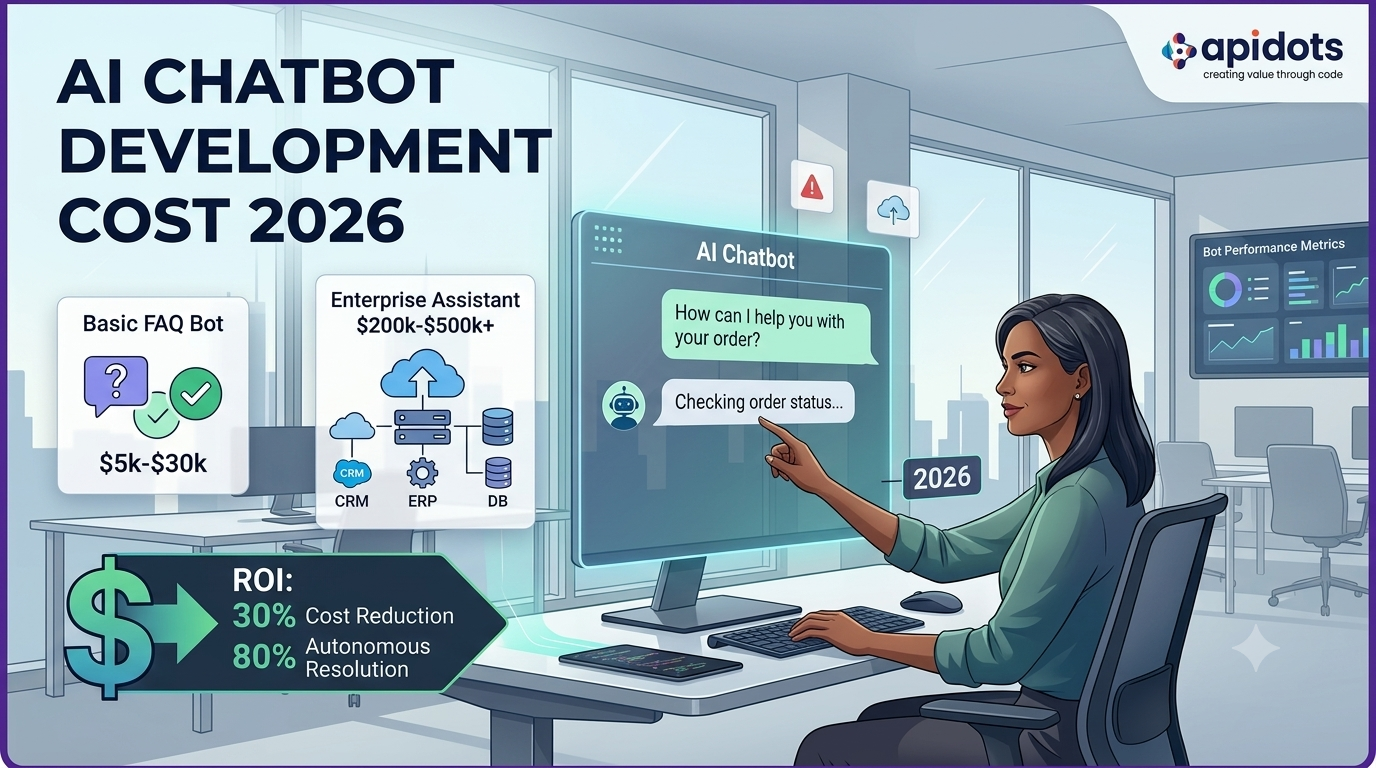
AI chatbot development costs range from $5,000 for a basic FAQ bot to $500,000 or more for an enterprise-grade generative AI assistant. The number that actually matters for your business depends on what the chatbot needs to do, what systems it connects to, how much data it needs to handle, and whether you’re building on top of an existing LLM or evaluating custom model tuning.
This guide breaks it all down: use cases first, then costs, then the ROI data you need to justify the investment internally.
Most businesses underestimate two things when budgeting for an AI chatbot: how much the integration layer costs relative to the AI itself, and how quickly ongoing expenses accumulate once the bot is live. This guide addresses both with real cost ranges, verified ROI data, and an honest breakdown of where the money actually goes.
Before you budget anything, it helps to know which function drives the most value for your specific operation. The ROI profile of a customer support chatbot is different from that of a sales qualification bot or an internal HR assistant. Here’s how the use cases break down across the three main business functions.
The most common deployment. A support chatbot handles common questions, processes returns and refunds, checks order status, and escalates complex queries to human agents. The value is dual: lower cost per interaction and extended availability — no shifts, no sick days, no after-hours gaps.
According to IBM’s customer service analysis, Gartner projects that agentic AI and conversational chatbots could autonomously resolve 80% of common service issues and reduce operational costs by 30% by 2029. Actual savings depend on the containment rate, escalation volume, implementation quality, and the support team’s cost structure.
Handles FAQs, order tracking, returns, billing queries, and escalation routing. Works 24/7 across web, mobile, and messaging channels.
Can lower the cost per resolved routine inquiry
Qualifies inbound leads, books demos, answers product questions, and routes high-intent visitors to sales reps in real time.
Captures leads outside business hours
Answers employee questions about policies and processes, handles IT requests, guides onboarding, and routes expense queries internally.
Reduces internal ticket volume significantly
Patient intake, appointment scheduling, symptom triage, and insurance verification. Requires HIPAA compliance and stricter guardrails.
Higher build cost, significant admin savings
Account queries, transaction explanations, loan-eligibility checks, and fraud-alert handling. Requires regulatory compliance.
High automation potential for routine account queries
Product recommendations, cart recovery, shipping queries, and post-purchase support. High volume, high automation potential.
Automation potential varies by query complexity.
The biggest cost variable isn’t which AI model you use — it’s the complexity of what the chatbot needs to do and what systems it needs to talk to. Here are the four tiers of chatbot development and what you should expect to pay for each.
$5,000 – $30,000(Entry Level)
A scripted chatbot that follows decision trees — it knows the questions it can answer and routes everything else to a human. Good for businesses with predictable, high-volume queries and a limited set of answers.
$30,000 – $100,000(Mid-Range)
Uses natural language processing to understand intent and can handle the same question phrased dozens of different ways. Substantially better user experience than rule-based, especially for varied customer queries.
$80,000 – $250,000(Advanced)
Built on top of a foundation model (GPT-4, Claude, Gemini) with retrieval-augmented generation (RAG) grounding the responses in your business data. Handles nuanced, multi-turn conversations and produces natural, accurate answers across a broad knowledge base.
$200,000 – $500,000 plus(Enterprise)
A fully integrated AI assistant that connects to multiple enterprise systems: CRM, ERP, billing, support desk, data warehouse, with role-based access control, compliance controls, audit logging, and potentially fine-tuned or privately hosted models.
Two chatbot projects with similar conversation volume can have dramatically different development costs. Here’s why.
| Cost Driver | Higher Cost When… | Why It Matters |
| Integration Complexity | Connecting with CRM, ERP, ticketing, payment, or billing systems | Each integration requires API development, authentication, testing, and ongoing maintenance. |
| Channels Supported | Deploying across web, mobile apps, WhatsApp, Slack, Microsoft Teams, or voice assistants | Every channel has unique interfaces, APIs, and user experience requirements. |
| Compliance & Security | Handling regulated data (HIPAA, GDPR, PCI DSS, SOC 2) | Compliance introduces additional security, audit logging, encryption, and validation requirements. |
| Language Support | Supporting multiple languages and regional variations | Multilingual chatbots require localization, additional testing, and ongoing content maintenance. |
| Conversation Complexity | Managing multi-step conversations with memory and context | Advanced conversations require session management, context retention, and more sophisticated AI logic. |
| Hosting & Deployment | Self-hosting or deploying private AI models instead of using managed APIs | Private deployments increase infrastructure, monitoring, scalability, and maintenance costs. |
Cost driver categories based on standard software development scoping practices for AI chatbot projects.
The most underestimated cost: data preparation. Before a generative AI chatbot can answer questions accurately, your knowledge base needs to be clean, current, and structured. If your existing documentation is spread across SharePoint, Notion, PDFs, and email threads — organizing it into a form the chatbot can reliably retrieve from is a project in itself. Budget for this before you budget for the bot.
Development cost is a one-time investment. Ongoing costs are not. A chatbot that’s built and forgotten can degrade its knowledge, go stale, accumulate edge cases, user satisfaction drops, and the initial ROI erodes. Budget for these from day one.
| Ongoing Cost | Rule-Based Bot | NLP Bot | Generative AI Bot |
| AI Model Usage | Not required | Minimal or none | Monthly API costs based on usage and model choice |
| Hosting & Infrastructure | Low | Moderate | Moderate to high, depending on traffic and deployment |
| Knowledge Base Updates | Occasional content updates | Regular content reviews | Continuous updates to keep responses accurate |
| Performance Monitoring | Basic error logs | Analytics and usage tracking | Ongoing monitoring of accuracy, response quality, and escalation rates |
| Maintenance | Minor rule changes | Intent and knowledge base updates | Prompt optimization, guardrail improvements, and model tuning |
A generative AI chatbot at moderate traffic may run from hundreds to several thousand dollars per month once API usage, hosting, observability, and maintenance are included. The actual amount depends heavily on model choice, token usage, traffic volume, response length, caching, and support requirements. Factor this into your total cost of ownership when comparing against SaaS chatbot platforms; their monthly subscription often looks cheaper until you account for what they don’t cover.
The ROI question is the one most business leaders ask first, and most chatbot vendors answer least honestly. Here’s what the data from actual deployments shows.
30% projected reduction in customer service operational costs by 2029 as agentic AI and conversational chatbots become more capable, as summarized in IBM’s customer service analysis. The same source cites Gartner’s projection that these systems could autonomously resolve 80% of common service issues by 2029.
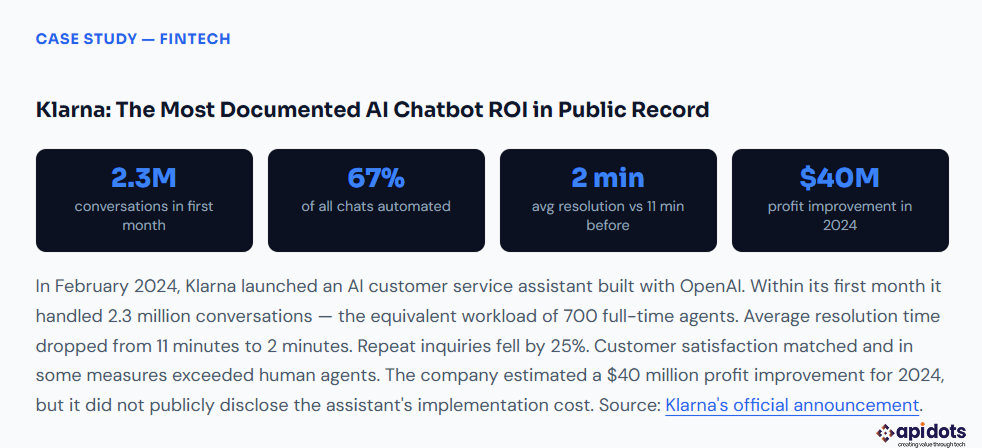
What the Klarna case actually shows for budget-stage decisions: Klarna operates at a scale most businesses do not, so its results should not be treated as a universal ROI benchmark. The useful lesson is that automation economics improve when query volume is high, workflows are well defined, integrations allow the assistant to complete tasks, and human escalation remains available for complex cases.
The same deployment is also documented in OpenAI’s Klarna case study, which reports 2.3 million conversations in the first month, a 25% reduction in repeat inquiries, and resolution times of under two minutes compared with 11 minutes previously. These are company-reported results, so businesses should validate expected performance through a limited pilot using their own support data.
This is the first real decision most businesses face, and the answer depends on your query volume, integration requirements, and the extent to which your workflow deviates from what off-the-shelf tools support.
| Factor | SaaS Chatbot Platform | Custom AI Chatbot |
| Time to Launch | Days to a few weeks | 6 weeks to 6+ months |
| Upfront Cost | Low monthly subscription | Higher one-time development investment |
| Customization | Best for standard workflows | Fully tailored to your business processes |
| Integrations | Pre-built integrations with limited flexibility | Custom integrations with virtually any system or API |
| Data Ownership | Data is stored and managed by the platform provider | Full ownership and control of your data and infrastructure |
| Compliance | Limited to the provider’s supported certifications | Can be designed to meet specific regulatory and security requirements |
| Long-Term Cost | Subscription costs increase as usage grows | Primarily hosting, maintenance, and AI usage costs after deployment |
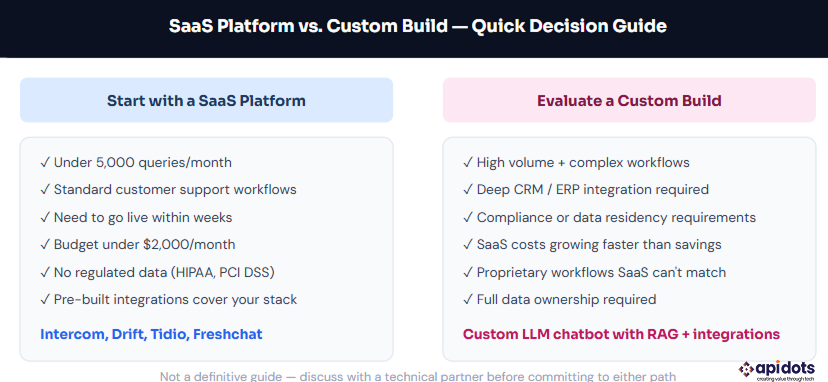
The practical rule: SaaS platforms are often the right starting point when you need to move quickly and your workflows are standard. Custom builds become more attractive when workflow automation, integration depth, compliance, data residency, or proprietary processes matter.
Query volume alone should not determine the decision; compare total ownership cost, implementation risk, and expected business value. Apidots’ AI and ML development services team handles both evaluating what’s right for your business before any code is written and the build itself when custom is the answer.
A chatbot that deflects 80% of tickets in month one and 40% by month twelve hasn’t delivered ROI; it’s degraded. The businesses that see sustained returns do three things consistently that the ones who see the initial numbers and then nothing don’t.
AI chatbot development costs are wide for a reason; the range from $5,000 to $500,000 reflects genuinely different products, not vendor pricing games. A well-scoped FAQ bot and an enterprise AI assistant integrated across six business systems are not the same thing, and they shouldn’t cost the same thing.
The number that matters most isn’t the development cost — it’s the containment rate your bot achieves at scale and whether that rate holds up six months after launch. The businesses seeing the strongest ROI aren’t the ones that built the most sophisticated chatbots. They’re the ones who scoped tightly, integrated deeply, and treated the knowledge base as a living system that needs ongoing maintenance.
If you’re at the budget stage, start with your current support volume, cost per interaction, and integration requirements — then work backward to what tier of chatbot makes financial sense. That’s the conversation worth having before you spec anything.
Methodology note: The cost ranges in this article are planning estimates based on common software-delivery scopes, integration complexity, cloud and model usage patterns, and publicly reported deployments. They are not fixed market prices. Actual budgets vary by vendor rates, geography, security and compliance requirements, data readiness, model architecture, traffic, and service-level expectations.
The cost of developing an AI chatbot typically ranges from $5,000 to over $500,000, depending on its complexity. A basic FAQ chatbot costs the least, while enterprise-grade AI assistants with custom integrations, advanced workflows, and compliance requirements require a significantly larger investment.
The biggest cost drivers include the chatbot’s complexity, integrations with business systems (such as CRM or ERP), AI model selection, deployment channels, security and compliance requirements, multilingual support, and ongoing maintenance. Projects requiring custom workflows and enterprise integrations generally cost more than standard chatbot implementations.
Development timelines vary based on project scope. A simple rule-based chatbot can be completed in 2–6 weeks, while an AI-powered chatbot with integrations typically takes 2–4 months. Large enterprise AI assistants with custom workflows and multiple integrations may require 6 months or longer.
After launch, businesses should budget for AI API usage (if applicable), cloud hosting, infrastructure, knowledge base updates, monitoring, security, and ongoing maintenance. Monthly operating costs vary depending on traffic volume, integrations, and the AI models being used.
A SaaS chatbot platform is ideal for businesses that need a quick, affordable solution with standard features. A custom AI chatbot is a better choice when you require deep system integrations, unique business workflows, enhanced security, regulatory compliance, or complete control over your data and AI capabilities.
We leverage AI, cloud, and next-gen technologies strategically.Helping businesses stay competitive in evolving markets.
Consult Technology Experts
Hi! I’m Aminah Rafaqat, a technical writer, content designer, and editor with an academic background in English Language and Literature. Thanks for taking a moment to get to know me. My work focuses on making complex information clear and accessible for B2B audiences. I’ve written extensively across several industries, including AI, SaaS, e-commerce, digital marketing, fintech, and health & fitness , with AI as the area I explore most deeply. With a foundation in linguistic precision and analytical reading, I bring a blend of technical understanding and strong language skills to every project. Over the years, I’ve collaborated with organizations across different regions, including teams here in the UAE, to create documentation that’s structured, accurate, and genuinely useful. I specialize in technical writing, content design, editing, and producing clear communication across digital and print platforms. At the core of my approach is a simple belief: when information is easy to understand, everything else becomes easier. Reach me at amysbrew.com