
Top
Search
People also search for:

Stay Inspired with Instagram




It’s the first heatwave weekend of the season in Houston. Call volume spikes 300% in six hours. By 9pm, the office voicemail has 14 unheard messages, and the dispatcher who normally fields every call has gone home. Each one of those 14 callers has roughly a two-minute window before they call the next HVAC company in the search results.
That two-minute window is the entire business case behind the AI dispatcher vs HVAC dispatch app question. Both terms get thrown around in contractor forums and vendor pitches like they’re interchangeable. They are not. One answers the phone. The other manages what happens after the phone call ends. Confusing the two — or worse, buying one when you needed the other — is how a heatwave weekend turns into a six-figure revenue leak instead of a record month.
This guide breaks down exactly what separates an AI dispatcher from a dispatch app, walks through how each one actually works, and gives you a 10-factor framework for deciding which to invest in first based on your call volume, technician count, and existing tech stack — not on whichever one a sales rep pitched you last.
What You’ll Learn
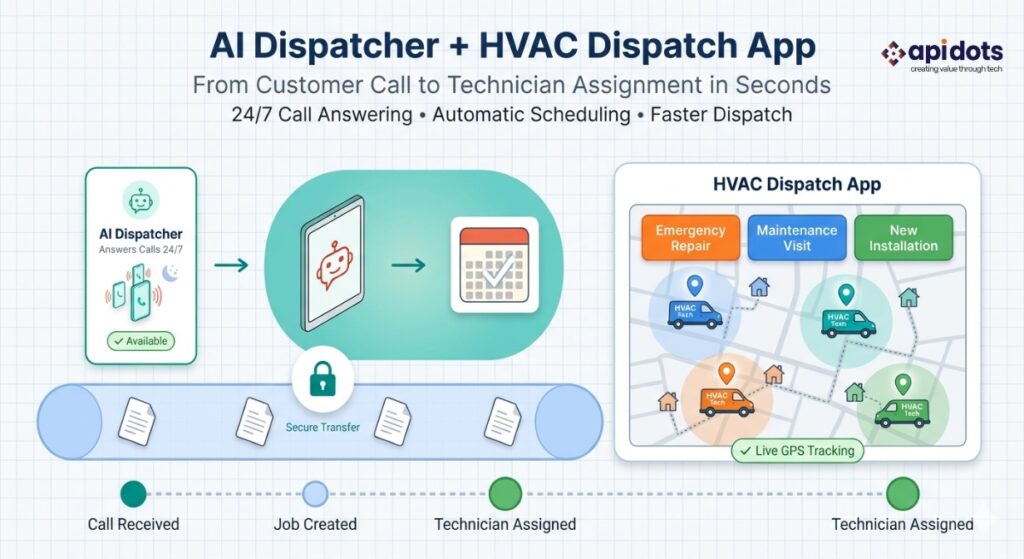
An AI dispatcher is software that answers inbound calls, qualifies the caller’s service need and urgency, and books the job automatically—24/7, with no human on the line. An HVAC dispatch app manages what happens next: assigning the booked job to the right technician, tracking location and skill match, and updating job status in real time. In the AI dispatcher vs HVAC dispatch app comparison, the two aren’t substitutes—one handles intake, the other handles execution, and most growing contractors eventually need both.
That distinction sounds simple written out. In practice, most contractors only discover it the hard way — usually after paying for one system and still bleeding revenue because the other half of the workflow was never built.
The honest answer is that the gap between “this would help” and “we actually did something about it” has gotten too expensive to ignore. Contractors who spent the last few years treating after-hours coverage as a minor inconvenience are now watching competitors capture that same revenue with a system that costs less than one missed commercial contract.
Start with the scale of the problem. Between 35% and 45% of HVAC calls come in outside normal business hours—before 8am, after 5pm, weekends, and holidays, according to Epiphany Dynamics. That’s not a fringe statistic about a handful of midnight emergencies. It’s roughly two out of every five calls a contractor’s office never has a live person available to answer.
What happens to those calls matters more than most owners assume. 78% of callers who reach voicemail call a competitor within two minutes, according to ACHR News, citing Epiphany Dynamics research. Two minutes. Not two hours, not the next morning — two minutes. Meanwhile, roughly 27% of all inbound calls go unanswered industry-wide across HVAC and home service businesses, per Whippy AI research, meaning this isn’t only an after-hours problem—plenty of calls go missed during business hours too, when staff are on other lines or in the field.
The financial scope of the gap is measurable, not theoretical. AI answering services close an estimated 15–25% of total annual bookings that would otherwise be lost to the after-hours call gap, according to US Tech Automations research — meaning for a contractor doing meaningful call volume, after-hours capture alone can represent a material share of total annual job count, not a marginal add-on.
Here’s the part that should bother every operations manager reading this: About 60% of HVAC contractors say they’re familiar with AI, and over 70% see it as relevant to their industry—but only about 12% have actually embedded AI into their workflows, according to a 2026 ServiceTitan survey of more than 1,000 contractors. That’s not a knowledge gap. It’s an action gap. Most operators already know after-hours calls are walking out the door to competitors. Most haven’t built anything to stop it.
The pressure to close that gap isn’t unique to HVAC. Gartner projects that conversational AI will reduce contact center agent labor costs by $80 billion in 2026, as call-handling work that used to require a live person around the clock shifts to automated intake across nearly every service industry. The customer-facing case is just as strong: 84% of IT leaders report that generative AI helps their organization better serve customers and reduce overhead, according to Salesforce’s State of Service Report (5th Edition). HVAC contractors aren’t early adopters chasing a trend here—they’re a few years behind a shift that’s already standard in retail, hospitality, and financial services call centers.
There’s also a booking-channel piece to this that gets overlooked. Service businesses offering online self-booking capture 20–30% more appointments than phone-only businesses, according to research from the U.S. Small Business Administration. An AI dispatcher functionally extends that same logic to the phone channel itself—instead of a caller needing to reach a human to get booked, the booking happens the moment they call, at 2am or 2pm, without a self-service portal being the only path to capture the lead.
This gap between awareness and action is exactly where HVAC dispatch and scheduling automation becomes a competitive decision, not just a technology one.
Want the full picture on HVAC dispatch automation before you decide where to start? Read the complete custom HVAC software development guide.
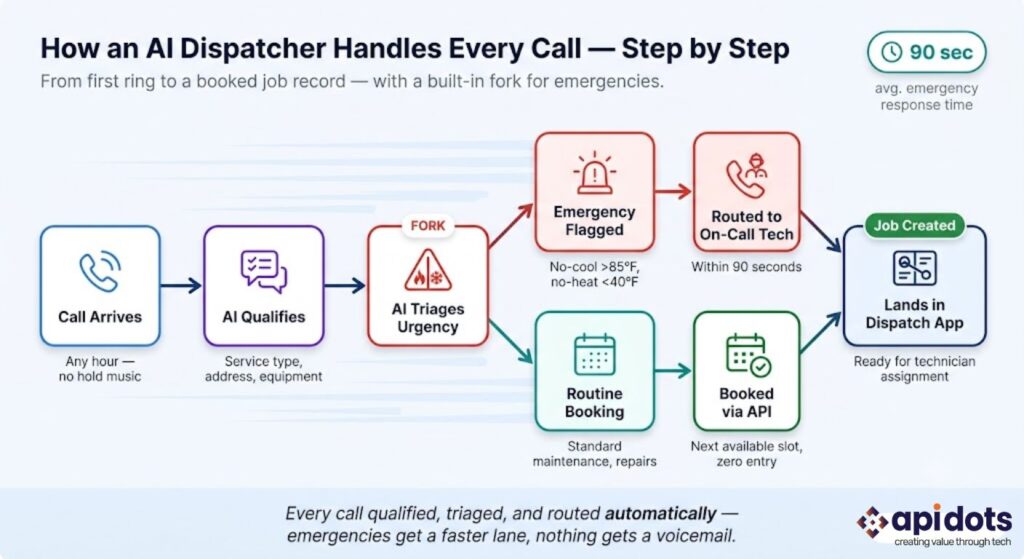
Anyone who has run a dispatch board during a 300% call spike knows the bottleneck isn’t technician availability — it’s how fast someone qualifies and books the call in the first place. Here’s what an AI dispatcher does in that moment, end to end:
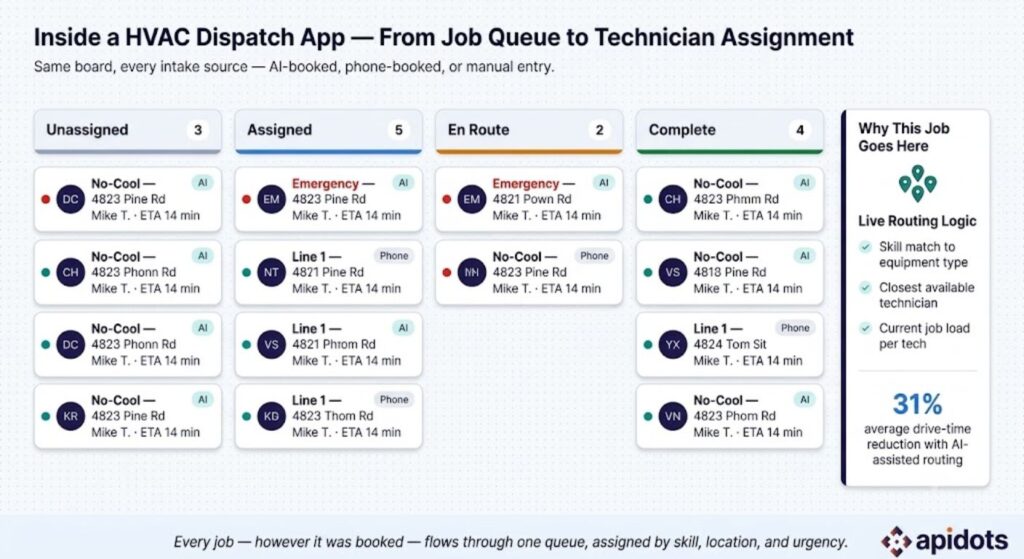
The dispatch app picks up exactly where the AI dispatcher leaves off:
Think of the AI dispatcher as the front door and the dispatch app as the building behind it — one gets the right people inside, the other manages what happens once they are.
This is the part that actually matters for your budget. Ten factors, ten verdicts — not “it depends.”
If after-hours calls go to a voicemail greeting today — full stop, no callback system, no answering service — this is your priority fix regardless of anything else on this list. A contractor losing 38% of calls to off-hours voicemail isn’t missing a “nice to have” feature; they’re actively funding a competitor’s growth. Verdict: AI dispatcher first, before anything else gets touched.
Crew size changes the math. Under 5 technicians, job volume is usually low enough that an owner or office manager can run the dispatch board manually on a whiteboard or a simple spreadsheet—an AI dispatcher alone may be sufficient to capture calls without needing a dedicated app yet, since the queue itself is small enough to track by hand. At 20+ technicians, manual dispatch boards become a bottleneck on their own, independent of how calls come in — a single dispatcher trying to track skill match, location, and availability for 20-plus moving field units in real time hits a hard ceiling on accuracy, regardless of how well the calls were qualified going in. Verdict: small crews need intake fixed first; larger crews need both intake and a real queue system.
Volume determines whether a dedicated AI dispatcher pays for itself. Under roughly 75 calls per month, the ROI math is thin — the per-call cost of a dedicated system can exceed what a part-time answering solution would run, and the missed-call dollar value at that volume usually doesn’t justify a full build. Over 300 calls per month, AI intake becomes essential; manual answering simply can’t scale to that volume without dropping calls, a threshold US Tech Automations research points to directly. Between those two numbers sits a judgment call that depends heavily on average ticket value — a contractor doing 150 calls a month at a $2,000 average commercial ticket has a very different ROI calculation than one doing the same call volume at a $250 residential maintenance ticket. Verdict: volume below 75/month, hold off; above 300/month, treat this as urgent; in between, run the ticket-value math before deciding.
A Houston-style 300% heatwave surge, or a Phoenix-style extreme-heat after-hours emergency wave, doesn’t give a contractor time to hire and train seasonal staff. Human answering capacity is fixed; call volume during a heat dome is not. AI triage capacity scales instantly because it isn’t bound by headcount. Verdict: any contractor in a high-seasonality climate needs AI intake built before the next surge, not during it.
If you’re already running ServiceTitan, Jobber, or Housecall Pro, the question isn’t whether to replace it — it’s whether to add AI call intake on top of what you already have. Most contractors at this stage have already solved the job-management half of the equation. They just haven’t solved the half that happens before a job exists. Verdict: keep your dispatch app, evaluate AI intake as an addition, not a replacement.
A business fielding a high ratio of no-heat and no-cool emergency calls needs triage logic that prioritizes by urgency and severity—not first-in, first-out booking that treats a routine filter-change request the same as a no-heat call at 20°F. Generic booking logic misses this distinction by design, because most off-the-shelf scheduling tools were built around the assumption that every booked slot carries roughly equal urgency. HVAC doesn’t work that way: a no-cool call during a heatwave with an elderly resident in the home is not the same priority as a scheduled annual tune-up, and a triage system that can’t tell the difference will either over-escalate routine work into costly overtime dispatch or under-respond to a genuine emergency. Verdict: high emergency-call-ratio businesses need AI triage logic specifically, not just AI answering.
A Toronto-style franchise operator running several branches needs centralized AI intake that routes each call to the correct branch’s dispatch queue — not one generic intake line that creates a manual sorting step before the job even reaches the right office. Verdict: multi-location operators need AI intake built with branch-routing logic from day one, not bolted on later.
A Dubai high-rise commercial contract or an NYC property management agreement with a guaranteed response window needs both systems working together with a documented audit trail—proof that a call was answered, triaged, and dispatched within the contracted window. Neither system alone produces that record. Verdict: SLA-bound commercial contracts need integrated AI intake and dispatch app reporting, not a single point solution.
Startups and small operators getting organized for the first time often need the dispatch app first — there’s no point automating call intake into a queue that doesn’t exist yet, and a young business usually has enough call volume that an owner or a single office hire can still answer most calls live. Scaling operators who are already organized but losing revenue to missed calls need the AI dispatcher first, because the queue management problem is already solved and the leak is happening earlier in the funnel, before a job ever reaches the dispatch board. The mistake to avoid is buying whichever system a growth-stage peer just bought, rather than mapping your own stage against your own revenue leak. Verdict: get organized before you automate intake; automate intake once organization is already in place and leads are still slipping.
Off-the-shelf AI dispatchers integrate cleanly via API to standard platforms like ServiceTitan or Jobber. But when your dispatch app, CRM, and accounting system don’t follow a standard stack — when you’re running a patchwork of tools that don’t talk to each other — a generic SaaS AI dispatcher has nothing clean to plug into. That’s when custom workflow automation becomes the only option that actually closes the gap instead of creating a new manual reconciliation step. Verdict: standard stack, use SaaS; non-standard or fragmented stack, build custom.
Here’s the full picture in one table, because the two systems genuinely solve different problems and the comparison only makes sense side by side:
| Factor | AI Dispatcher | HVAC Dispatch App |
|---|---|---|
| Primary function | Call intake, qualification, booking | Job queue management, technician routing |
| Operates | 24/7, no human required | Business hours, dispatcher-managed |
| Best for | Capturing after-hours and overflow calls | Managing the day’s job queue and field teams |
| Typical cost | $200–$1,500/month (SaaS) or custom-built | $150–$400/technician/month (SaaS) |
| Examples | AI answering services, conversational AI agents | ServiceTitan, Jobber, Housecall Pro |
| Works alone? | Limited — needs a queue to feed jobs into | Yes, but loses after-hours leads without AI intake |
| Custom-build advantage | Trained on your specific call scripts, service area, and urgency triage rules | Built to integrate with your exact tech stack — no per-seat scaling cost |
Most growing contractors need both systems eventually—this isn’t really an either/or decision long-term. The sequencing question—which to invest in first—should be based on where the bigger revenue leak currently sits in your operation, not on which technology sounds more impressive in a sales call. A contractor with a solid dispatch app and a voicemail-only after-hours line has a clearly different priority than a contractor running a paper schedule with no missed-call problem at all.
Dispatch automation adoption doesn’t look the same everywhere—weather patterns, call volume drivers, and local compliance requirements shape which piece of the stack a contractor needs first.
United States. In Houston and Dallas, summer heatwave call surges routinely produce 300%+ spikes in commercial AC emergency volume within hours, overwhelming any fixed-headcount answering setup built for a normal Tuesday. In Phoenix, extreme heat drives after-hours emergency volume high enough that AI triage logic prioritizing no-cool calls over routine maintenance requests isn’t optional — it’s the only way to avoid life-safety calls sitting in a generic first-in-first-out queue behind a furnace filter replacement request. Miami and Tampa carry year-round call volume with hurricane-season spikes layered on top, requiring intake systems that don’t buckle during a storm-driven surge when staff availability is itself uncertain. New York City commercial property managers increasingly require guaranteed response SLAs on HVAC emergency calls, which pushes contractors toward AI-triaged intake with a documented, timestamped response record rather than a dispatcher’s best recollection of when a call came in. Atlanta sits at the profile this guide’s case study uses directly: a mid-size residential and light-commercial contractor in the 20–40 technician range, running a mainstream dispatch app with no after-hours coverage beyond voicemail. Los Angeles represents the market where the 78% voicemail-abandonment statistic bites hardest, given a combination of high call volume and customers with little patience for a callback the next morning.
Canada. Toronto commercial HVAC contractors are managing maintenance agreement renewal calls alongside emergency intake simultaneously, which means a single intake line has to distinguish between a routine renewal inquiry and an urgent no-heat call without misrouting either one into the wrong queue. Calgary’s winter heating emergency surges require instant AI triage for no-heat calls, where a delayed response carries genuine safety stakes once outdoor temperatures drop well below freezing — this is a market where “we’ll call you back in the morning” is not an acceptable answer for a no-heat call at -25°C.
United Kingdom. London commercial building HVAC engineers regularly field after-hours calls originating from property management companies rather than individual tenants, which changes the qualification questions an intake system needs to ask—building access codes, facilities manager contact details, and contract reference numbers matter more here than a residential address and equipment model.
Australia. Brisbane’s heat-driven residential AC emergency volume mirrors the US Sun Belt pattern closely enough that triage logic built for a Houston or Phoenix contractor transfers with only minor adjustments for local terminology and equipment brands common in the Queensland market.
Middle East. Dubai’s high-rise commercial HVAC contracts typically carry strict SLA response windows written directly into the service agreement, making AI-triaged emergency dispatch less of an efficiency upgrade and more of a contractual necessity—missing a response window isn’t just a lost customer; it’s a potential penalty clause.
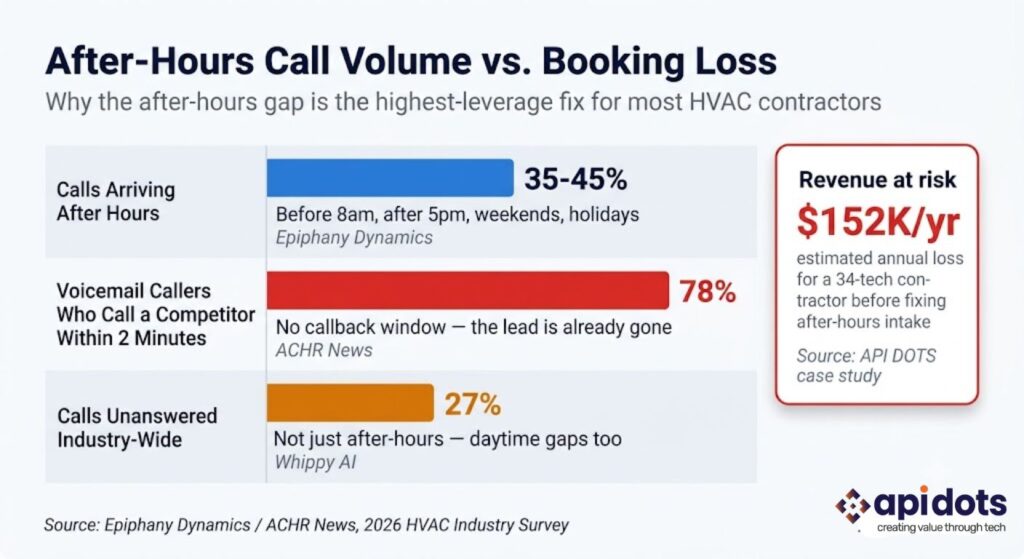
Company Profile. A residential and light-commercial HVAC contractor in the Atlanta metro area, running 34 technicians on Housecall Pro for dispatch and job management. After-hours call coverage consisted of a voicemail greeting — nothing more.
The Problem. Internal call logs showed 38% of inbound calls arrived outside business hours. A review of those after-hours calls found 23% went completely unanswered and were never called back. The estimated impact: roughly 31 lost jobs per month at an average ticket value of $410 — close to $152,000 a year in missed revenue walking out the door through the phone line. Their existing Housecall Pro subscription offered nothing beyond basic voicemail-to-text for after-hours coverage; the platform manages the job queue well, but it was never built to answer a phone.
The speed problem compounded the volume problem. Industry research from Invoca, cited via FieldCamp and QuoteIQ, finds that contractors who respond to a lead within 5 minutes are up to 100x more likely to qualify it than those waiting 30+ minutes—and separate research from Whippy AI puts that figure at up to 21x. Either way, the direction is the same: a callback the next morning isn’t a minor delay; it’s close to a guaranteed lost job, especially once you factor in that 78% of buyers choose the first company that responds to their inquiry, according to industry research on contractor lead response. Every one of this contractor’s 31 monthly missed jobs was a call where a competitor’s number was one search away.
What They Tried First. A shared after-hours answering service used across multiple trades — plumbing, electrical, and HVAC calls all routed through the same generic script. Call qualification was generic by design, and the service frequently misrouted non-emergency calls as urgent, triggering unnecessary overtime dispatch costs on top of the missed-call problem it was supposed to solve.
The API DOTS Solution. A custom-built AI dispatcher trained specifically on this contractor’s service area, equipment types, and urgency triage logic — not a generic shared script. The system integrated directly into their existing Housecall Pro dispatch queue via API, so no platform replacement was needed. Emergency calls — no-cool above 85°F, no-heat below 40°F — were automatically flagged and routed to the on-call technician’s phone within 90 seconds. Routine calls booked directly into the next available service slot with zero human involvement.
Results at 6 Months:
| Metric | Before | After | Change |
|---|---|---|---|
| After-hours calls answered | 62% | 98% | ↑ 36 points |
| Missed bookings/month | 31 jobs | 4 jobs | ↓ 87% |
| Estimated annual recovered revenue | — | $118,000 | Recovered |
| Average response time (emergency calls) | 14+ hours (next morning) | 90 seconds | ↓ 99.8% |
| Overtime dispatch misroutes | 9/month | 1/month | ↓ 89% |
Lesson learned: The dispatch app was never the bottleneck — the phone was. Fixing the front door mattered more than upgrading the building behind it.
If after-hours calls are slipping through your dispatch board the same way, a custom-built AI dispatcher — trained on your service area and integrated with the dispatch app you already run — can close that gap without a platform migration. See How a Custom AI Dispatch Build Works →
For contractors evaluating a fully custom system rather than a SaaS add-on, our complete guide to custom HVAC software development covers the full build process in detail.
Q1: Is an AI dispatcher the same as a HVAC dispatch app?
No — an AI dispatcher handles inbound call intake, qualification, and booking, while a HVAC dispatch app manages the job queue and technician routing after a job is booked. They perform different functions in the same workflow and are typically used together rather than as substitutes for one another.
Q2: Do I need an AI dispatcher if I already use ServiceTitan or Jobber?
Yes, if you’re losing calls outside business hours. ServiceTitan, Jobber, and Housecall Pro manage scheduling and dispatch but don’t answer your phone. An AI dispatcher integrates with these platforms via API, capturing after-hours and overflow calls that would otherwise go to voicemail, and books them directly into your existing dispatch queue.
Q3: How much does an AI dispatcher cost for an HVAC business?
AI dispatcher solutions typically range from $200–$1,500 per month for off-the-shelf SaaS options, depending on call volume. Custom-built AI dispatch systems trained on your specific service area, equipment types, and triage rules carry a one-time development investment but eliminate ongoing per-call or per-seat fees, often paying back within 6–12 months through recovered bookings.
Q4: What’s the ROI of adding AI dispatch to an HVAC business?
AI dispatching ROI often exceeds 500% within the first year when accounting for recovered after-hours bookings, eliminated double-booking errors, and reduced administrative overhead, according to industry analysis from Lithium Marketing. A contractor capturing just 2–3 additional jobs monthly from previously lost after-hours leads typically covers the investment.
Q5: Can an AI dispatcher handle HVAC emergency calls correctly?
Yes, when properly configured — AI dispatchers can be trained to triage no-cool and no-heat emergencies by urgency, temperature thresholds, and customer history, routing critical calls to on-call technicians within seconds. Generic, non-HVAC-specific answering services are more prone to misrouting errors than systems built specifically for HVAC triage logic.
Q6: Should a small HVAC company with 5 technicians invest in AI dispatch?
It depends on call volume — under roughly 75 calls per month, the ROI on a dedicated AI dispatcher is thin, and a dispatch app alone is often sufficient. Once call volume grows or after-hours emergency calls become frequent, even small operators see meaningful returns from automated call capture.
The core distinction holds regardless of company size: an AI dispatcher answers and qualifies calls, a dispatch app manages the work after the call is booked, and the cost of treating them as the same thing — or skipping the first one entirely — shows up directly in the 78% of voicemail callers who call a competitor within two minutes. That’s not a marketing statistic. It’s a measurable, recurring leak in revenue that’s already being generated by your marketing and reputation, just never captured.
The financial case isn’t abstract either. AI dispatching ROI often exceeds 500% within the first year once eliminated double-booking, reduced administrative overhead, and recovered after-hours bookings are all factored in, according to Lithium Marketing’s industry analysis. That’s the kind of number that should change how a contractor prioritizes a software budget — not because the technology is exciting, but because the math on inaction is worse than the math on building the fix.
The bigger picture matters here too. Only about 12% of contractors have actually embedded AI into their workflows, despite more than 70% recognizing it as relevant to the industry, according to the ServiceTitan survey cited earlier. Closing that awareness-to-action gap isn’t about chasing a trend — it’s about building a measurable operational edge while most competitors are still deciding whether to act.
For contractors whose call volume, service area, triage rules, or existing tech stack don’t fit neatly into a generic SaaS AI dispatcher, custom development is the option that actually closes the gap instead of creating new integration headaches. API DOTS HVAC solutions are built around your specific dispatch workflow — not a templated answering script repackaged across every trade. For the full picture on how a complete custom system comes together, the custom HVAC software development guide covers the entire build process in depth.
Whether you’re losing weekend emergency calls in Phoenix, managing seasonal surges in Houston, or running a multi-location operation across Ontario — the fix starts with knowing where the revenue is actually leaking.
Get a Free Dispatch Workflow Audit from API DOTS → We’ll review your current call handling and dispatch setup and show you exactly where automation would have the biggest impact—no commitment required.
We manage and optimize your IT infrastructure end-to-end.Ensuring stability, security, and operational continuity.
Consult IT Experts
I’m a digital marketer with experience in SEO, content strategy, and online brand growth. I specialize in creating optimized content, improving website rankings, building high-quality backlinks, and driving traffic through effective digital marketing strategies. I enjoy helping businesses strengthen their online presence and turn visitors into customers.