
Top
Search
People also search for:

Stay Inspired with Instagram




Claude Code can scaffold a working application in minutes, but turning that output into a secure, production-ready product takes planning, review, and engineering judgment. This guide explains how to build an app with Claude Code, what requirements you need before starting, where Claude Code performs well, where it breaks down, what development costs look like, and when it makes more sense to work with an experienced AI development team.
If you have been looking for a clear guide on how to build an app with Claude Code, this is it. Claude Code is Anthropic’s terminal-based AI coding agent. Unlike the browser chat interface, it runs directly inside your project directory, reads your files, writes code, runs tests, fixes errors, and iterates — all without you switching between windows.
We built three apps with it, documented what worked and what broke, and turned it into this guide. By the end, you will know exactly what Claude Code can do, where it needs human oversight, what the full cost looks like, and when it makes more sense to hand a project to a professional development team.
To build an app with Claude Code, install the Claude Code CLI, create a project folder, define your requirements in a PRD, add a CLAUDE.md file, ask Claude Code to scaffold the project, build features one at a time, review each code change, deploy the skeleton early, and run security checks before launch. Claude Code is useful for prototypes and internal tools, but production apps still need human review, testing, security hardening, and compliance planning.
Claude Code is a command-line AI coding agent built by Anthropic. It is not a chat interface where you paste code snippets. It is an agent that runs inside your terminal, has direct access to your local file system, and can autonomously read, create, edit, and execute code across your entire project.
You give it a task. It reads your existing files for context, plans the work, writes the code, runs it, evaluates the output, and iterates if something breaks. A task that would take a developer 45 minutes to scaffold manually can take Claude Code under three minutes. That speed is genuinely useful. It is also where the risk begins.
Claude Code is fast because it does not stop to question assumptions. It produces what you describe, not necessarily what you mean. If your description is incomplete, the output will be plausible-looking code that misses the actual requirement.
That gap between a working demo and a production-ready application is where most Claude Code projects run into trouble, and it is the gap this guide is designed to help you navigate. The post on debugging AI code covers what happens when AI-generated code reaches production without proper review.
The key principle to hold before you start: Claude Code builds what you describe. Every hour you spend writing a clear specification before you open the terminal saves two hours of debugging code that technically works but does the wrong thing.
The appeal is straightforward. Many recent reports have established that developers are now using or planning to use AI tools in their development workflow more than ever. Claude Code sits at the productive end of that spectrum because it does not just suggest code — it acts on it. For businesses trying to validate an idea, build an internal tool, or produce a demo for investors, that speed advantage is significant.
The risk is equally straightforward. A working demo is not a production application. Security has not been reviewed. Data handling has not been audited. Edge cases have not been tested. Compliance requirements have not been addressed.
For industries like healthcare or fintech, shipping code that has not been through a proper review process is not just a technical risk, it is a legal and regulatory one. The post on AI adoption mistakes covers the broader pattern of businesses underestimating the gap between prototype and production.
Before you run a single command, make sure the following are in place. Skipping any of these causes failures that waste significant time to diagnose.
| Requirement | Minimum Spec | Notes |
|---|---|---|
| Node.js | Version 18 or higher | Claude Code is an npm package. Older Node versions can cause install failures. |
| Claude Code CLI | Latest via npm | Install globally using npm install -g @anthropic-ai/claude-code. |
| Anthropic API key | Active account at console.anthropic.com | Required even on paid Claude plans. Runtime usage is billed separately per token. |
| Third-party API keys | Depends on your app | Define these upfront in your CLAUDE.md. Claude Code cannot guess which credentials you have. |
| GitHub account | Free tier works | Essential for version control. Review every Claude Code commit before merging. |
| Netlify or Vercel account | Free tier works for MVPs | Both support quick deployment for Claude Code-generated apps. Netlify is slightly simpler for first deploys. |
| Operating system | macOS, Linux, or Windows WSL2 | Native Windows terminal may have compatibility issues with Claude Code. |
Setup requirements for Claude Code app development, May 2026. Requirements update with each Claude Code release — check Anthropic’s docs for the latest.
This is the process the API DOTS team used across three separate app builds. It is not the fastest path to a demo. It is the path to a demo that behaves predictably and is recoverable when something breaks.
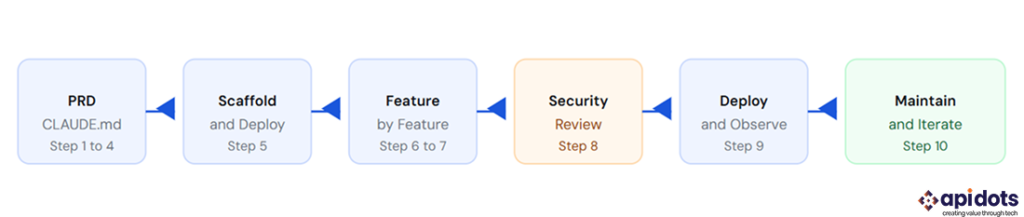
Write a one-page Product Requirements Document before you touch Claude Code. It does not need to be formal. It needs to answer four questions: what does this app do, who uses it, what does success look like, and what does it explicitly not do.
Claude Code will fill gaps in your requirements with plausible assumptions. Every gap it fills is a potential rework. A clear PRD reduces the surface area for those assumptions significantly.
Claude Code will suggest a stack if you do not specify one. It defaults to what is statistically common in its training data, which is not always the right choice for your infrastructure, team, or compliance requirements. Specify your stack explicitly: framework, database, authentication approach, and hosting target. For most MVP builds in 2026, React plus Node.js plus a managed database on Vercel or Netlify is a reasonable default.
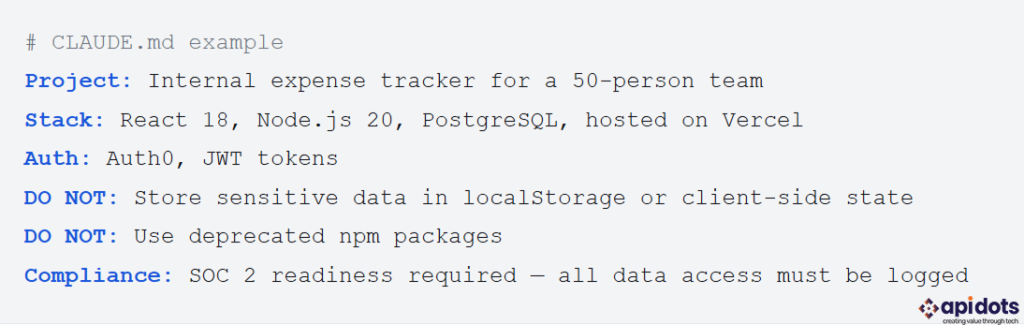
After installing Claude Code, the most important setup step is creating a CLAUDE.md file in your project root. This file is context that Claude Code reads at the start of every session. It should contain your project description, tech stack, naming conventions, what APIs are available, what the app must not do, and any compliance requirements that apply.
A strong CLAUDE.md is the single most effective thing you can do to improve consistency across a multi-session build. Without it, every new session starts from zero context.
Before asking Claude Code to write any code, ask it to produce an architecture outline based on your PRD and CLAUDE.md. Read it. Question any assumptions. This takes ten minutes and catches structural problems before they are embedded in 400 lines of scaffolded code that is painful to refactor.
Ask Claude Code to scaffold the project structure, routing, authentication shell, and database connection — with no features yet. Then deploy it. A deployed empty skeleton proves your infrastructure works before any business logic is written. Discovering a deployment configuration problem at this stage costs minutes. Discovering it after 30 features are built costs days.
Never ask Claude Code to “build the whole app.” Give it one feature at a time, review the diff before accepting it, commit it, and test it before moving to the next feature. Claude Code changes move fast. Without small commits, a breaking change buries itself in a large diff that is difficult to isolate and revert.
Use git diff before every commit. Read the code. You do not need to understand every line, but you should understand what every changed file is doing at a high level.
If your app includes AI features — a chatbot, a recommendation engine, a document analyser — add this layer after the core application is stable. AI features are the component most likely to behave unpredictably in production. Building them into an unstable base makes failures harder to diagnose. The post on AI chatbot guardrails covers the output controls you need before any AI-generated content reaches end users.
Claude Code does not apply security best practices unless you explicitly instruct it to. Run a security review before sharing a build with anyone outside your team. At minimum: check for hardcoded credentials, review data storage decisions, verify that user input is sanitised, and confirm that authentication cannot be bypassed. For healthcare apps, HIPAA requirements apply. For fintech apps, PCI-DSS and SOC 2 standards apply. Claude Code is not aware of these constraints unless they are in your CLAUDE.md.
Deploy to production only when the build has passed your security review and has been tested with real data. After launch, watch error rates, response times, and user behaviour closely for the first two weeks. Claude Code-generated code occasionally contains logic errors that only surface under real usage patterns rather than test conditions.
Claude Code reduces the cost of building. It does not reduce the cost of operating. Every production application requires ongoing maintenance: dependency updates, security patches, performance monitoring, and feature iteration. Budget for this before you launch, not after your first production incident. The post on software development costs covers how to think about total cost of ownership for an AI-built application.
The simplest deployment path for a Claude Code-generated app is Netlify. Here is the process from a finished build to a live URL.
First, push your project to a GitHub repository. Netlify connects directly to GitHub and deploys on every push to your main branch. Sign up at netlify.com, click “Add new site,” and select “Import an existing project.” Connect your GitHub account, select your repository, and confirm the build settings Claude Code used. Netlify auto-detects most common frameworks. If it does not, check your build command and output directory in the Netlify dashboard and match them to what Claude Code generated.
Once your first deploy completes, Netlify assigns a random subdomain. You can update this to a custom subdomain in the site settings, or connect a custom domain via your DNS provider. The whole process from first deploy to live custom URL takes under 15 minutes for a standard React or Next.js app.
For apps with a backend API, Vercel is the better choice. It supports full-stack deployments including serverless functions and has tighter integration with Next.js, which Claude Code frequently uses for full-stack projects.
Claude Code and ChatGPT are not direct replacements for each other. Claude Code is better for working inside an active project, while ChatGPT is better for planning, reviewing, explaining, and refining the development approach. For most app development workflows, the strongest setup is to use ChatGPT to define the product, architecture, and risks, then use Claude Code to execute the build inside the codebase.
| Comparison Point | Claude Code | ChatGPT | Best Use |
|---|---|---|---|
| Main purpose | Works directly inside your codebase from the terminal | Helps with planning, explanations, debugging, and code guidance through chat | Use Claude Code for execution and ChatGPT for thinking, planning, and review |
| Codebase access | Can read, edit, and create files inside your project | Cannot directly access your local files unless you paste code or upload files | Claude Code is better for active development |
| App scaffolding | Strong for generating project structure, routes, components, and basic logic | Useful for planning the structure before development begins | Use ChatGPT first, then Claude Code |
| Debugging | Can run commands, inspect errors, and apply fixes inside the project | Better for explaining why errors happen and suggesting possible fixes | Use both together for faster debugging |
| Architecture planning | Can suggest architecture, but may move too quickly into implementation | Better for comparing architecture options and thinking through trade-offs | ChatGPT is better before writing code |
| Documentation | Can create README files, setup notes, and inline project documentation | Better for writing clearer technical documentation, guides, and explanations | ChatGPT is better for polished documentation |
| Security review | Can check code if instructed clearly | Better for reviewing risks, asking security questions, and creating checklists | Human review is still required |
| Best for non-technical users | Risky if the user cannot review generated code | Easier for understanding concepts and planning requirements | ChatGPT is safer for early planning |
| Best for developers | Very useful for speeding up hands-on coding | Useful as a senior thinking partner for planning and review | Use both together |
| Biggest limitation | It may generate working code that misses business, security, or compliance requirements | It cannot directly modify your full codebase unless integrated into a workflow | Neither should be trusted blindly for production apps |
Claude Code is not the only AI coding tool businesses are evaluating in 2026. If you are comparing it against IDE-based tools like Cursor, GitHub Copilot, or Windsurf, read our full Claude Code vs Cursor vs GitHub Copilot vs Windsurf breakdown before choosing a workflow for your team.
Claude Code can move fast when the product scope is clear. It can scaffold interfaces, create backend routes, connect APIs, and generate working prototypes in hours instead of days. However, the real test is not whether the app runs. The real test is whether the app is secure, reliable, usable, and ready for real users.
To understand where Claude Code helps and where it needs human oversight, let’s look at three realistic app scenarios.
An AI meeting notes app records meeting transcripts, summarizes key points, extracts action items, and sends follow-up notes to team members.
Claude Code can handle the core workflow well. It can create the dashboard, upload interface, transcript viewer, summary page, and basic AI integration for generating meeting summaries. It can also connect with APIs such as calendar tools, transcription services, or email providers if the credentials and documentation are clearly provided.
The problem usually appears around privacy and accuracy. Meeting transcripts often contain sensitive business information, client conversations, financial details, or internal strategy. If the app stores transcripts without proper access control, encryption, or retention settings, it becomes a security risk. The summaries may also miss context, assign the wrong action item, or make a confident but incorrect interpretation.
Lesson: Claude Code can build the workflow, but it cannot decide your privacy policy, data retention rules, access permissions, or acceptable accuracy thresholds. AI meeting tools need strong security, role-based access, and human review for high-stakes summaries.
A real estate lead matching app connects buyers or tenants with suitable properties based on budget, location, property type, and preferences.
Claude Code can generate a polished search interface, property cards, filters, saved listings, and even a basic recommendation system. For an MVP, it can quickly create the structure needed to test the idea.
The issue is matching quality and data reliability. If the app recommends unavailable listings, outdated prices, or properties outside the user’s stated budget, users lose trust quickly. Claude Code may also build a simple filtering system and label it as “AI matching,” even though the actual logic may be basic keyword or rule-based matching.
Lesson: Claude Code can create the product interface, but real estate apps need clean listing data, availability checks, proper CRM integration, and transparent matching logic. The business value comes from reliable data and conversion flow, not just a working UI.
The same idea applies to SaaS growth workflows, where lead scoring and personalization depend on clean data, reliable qualification logic, and well-defined automation rules.
An AI customer support chatbot answers customer questions, searches the company knowledge base, and escalates complex issues to a human agent.
Claude Code can build the chat interface, message history, admin panel, and basic AI response flow. It can also connect the app with a vector database or documentation source if the technical requirements are clearly written.
The risk is hallucination and poor escalation. If the chatbot gives wrong refund information, invents policy details, or fails to escalate an angry customer, it can damage customer trust. Claude Code may generate the chatbot logic, but it will not automatically understand brand tone, legal boundaries, support policies, or when the bot should stop answering.
Lesson: AI chatbot apps need strict guardrails, approved knowledge sources, fallback responses, escalation rules, and response monitoring. Claude Code can build the system, but it cannot be trusted to define support policy on its own.
Claude Code can help you move from idea to prototype faster. But if the app needs real users, secure data handling, integrations, backend architecture, compliance review, or long-term scalability, the prototype needs engineering discipline.
API DOTS helps startups and businesses turn AI-generated prototypes into production-ready software. Our team reviews the codebase, improves the architecture, strengthens security, integrates reliable APIs, adds observability, and prepares the application for real-world usage.
Claude Code is a productivity multiplier for developers who already know what a production application requires. For teams without that baseline, the limitations are significant enough to produce expensive problems. Here is where Claude Code consistently falls short without explicit guidance.
Security defaults are weak. Claude Code reaches for convenient patterns rather than secure ones when both options solve the stated problem. LocalStorage over encrypted server-side storage, plain text credentials in environment variables without rotation guidance, missing input sanitisation in form handlers. None of these are bugs. They are choices that make sense in a tutorial context and create vulnerabilities in a production one.
Compliance awareness is zero without instruction. HIPAA, PCI-DSS, GDPR, and SOC 2 requirements do not exist in Claude Code’s decision-making unless they are explicitly written into your CLAUDE.md and reinforced in individual prompts. This is the single most dangerous gap for businesses in regulated industries.
Business logic requires explicit specification. Claude Code models technical correctness, not product intent. The movie picker API key problem is a small example of a pattern that repeats at every scale. The larger your application, the more business logic gaps accumulate unless you are actively catching them in each review cycle.
Observability is not built in by default. A Claude Code-generated app will not have error tracking, performance monitoring, or structured logging unless you ask for it specifically. Deploying without these means the first time you know something has broken in production is when a user tells you.
What does it actually cost? The answer splits into two parts: Claude Code subscription cost and the total cost to build something production-ready.
| Claude Plan | Monthly Cost | Best For |
|---|---|---|
| Claude Pro | $20 per month | Solo developers building simple MVPs, internal tools, and small Claude Code projects |
| Claude Max | $100 to $200 per month | Developers working on intensive multi-session builds, larger codebases, and heavier Claude Code usage |
| Claude for Teams | Starts around $25 to $30 per seat per month | Small teams collaborating on Claude-assisted development projects |
| Enterprise | Custom pricing | Organizations needing SSO, admin controls, security governance, data controls, and larger-scale deployment support |
| API Runtime Costs | Usage-based, billed separately | Required when Claude is used inside a deployed application. Costs depend on model choice, input/output tokens, traffic, and caching strategy |
Claude subscription plans help developers use Claude and Claude Code during the build process, but they should not be confused with runtime API costs. If your application uses Claude inside the product after launch, API usage is billed separately based on token consumption. For most MVPs, this may stay manageable at low traffic, but production AI apps need usage limits, caching, monitoring, and cost controls from the beginning.
Claude Code reduces development time significantly. It does not reduce the total cost of building a production application, because most of that cost is not in writing code. It is in architecture decisions, security review, testing, compliance work, and ongoing operations.
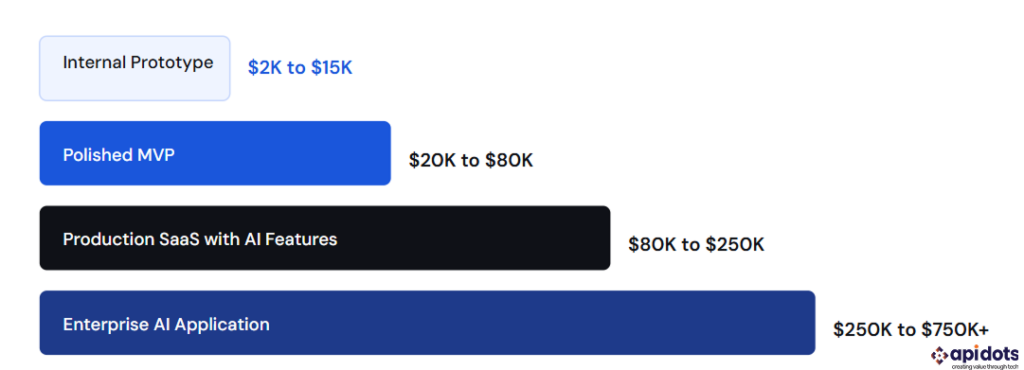
Realistic AI app development cost ranges across project types, 2026. Claude Code reduces prototype costs significantly. Production and enterprise costs are driven by security, compliance, and infrastructure requirements that AI tools do not reduce.
An internal prototype — a working demo for a single team with no external users — can genuinely be built with Claude Code for $2,000 to $15,000 in developer time. A polished MVP with real users, authentication, data persistence, and basic security costs $20,000 to $80,000 because the security review, testing, and infrastructure work is not something Claude Code handles adequately without significant oversight. Production SaaS and enterprise applications cost more because they require everything above plus SOC 2 readiness, penetration testing, accessibility compliance, observability infrastructure, and ongoing operations.
For a full breakdown of what drives costs at each stage, the post on software development costs covers the variables in detail.
Claude Code is the right tool for a specific set of situations: internal tools with limited scope, prototypes for investor validation, and simple applications where the developer has the judgment to review what Claude Code produces. Outside those situations, the economics and risk profile shift significantly.
Hire a development team when your application handles sensitive user data, when it needs to meet compliance requirements, when it will serve more than a small internal audience, or when your team does not have the engineering background to evaluate AI-generated code critically. The post on choosing an AI company covers how to evaluate development partners for projects that have moved past what Claude Code alone can reliably deliver.
The pattern that creates the most expensive problems is using Claude Code to build something that looks production-ready and treating it as though it is. A polished UI does not mean a secure backend. A working demo does not mean a compliant product.
For healthcare and fintech applications specifically, the gap between a Claude Code prototype and a production system that can legally serve users is measured in months of engineering work, not hours of prompting. The post on AI in banking covers what production-grade compliance looks like for fintech AI applications.
Yes, Claude Code can help build a full app, especially for prototypes, MVPs, dashboards, internal tools, and AI-assisted workflows. However, production apps still need human review for security, scalability, compliance, user experience, and long-term maintenance.
Claude Code is useful for accelerating production development, but it should not be treated as a replacement for experienced developers. AI-generated code can contain weak security defaults, missing error handling, poor observability, and incomplete business logic.
You can use Claude Code with limited coding experience, but you still need enough technical understanding to review its output. If you cannot evaluate the code, architecture, database decisions, authentication flow, and security risks, you should involve a developer before launching.
Your CLAUDE.md should include the project goal, tech stack, folder structure, coding conventions, API keys required, security rules, compliance requirements, database decisions, features to avoid, and instructions for how Claude Code should handle changes.
Claude subscription costs may be low, but the real cost depends on the app’s complexity. A simple prototype may cost a few thousand dollars in development time, while a production-ready AI app can cost significantly more because of testing, security, infrastructure, compliance, and maintenance.
You should hire AI developers when the app handles sensitive data, requires compliance, needs a scalable backend, serves external users, integrates multiple systems, or needs to become a commercial product rather than just a prototype.
We leverage AI, cloud, and next-gen technologies strategically.Helping businesses stay competitive in evolving markets.
Consult Technology Experts
Hi! I’m Aminah Rafaqat, a technical writer, content designer, and editor with an academic background in English Language and Literature. Thanks for taking a moment to get to know me. My work focuses on making complex information clear and accessible for B2B audiences. I’ve written extensively across several industries, including AI, SaaS, e-commerce, digital marketing, fintech, and health & fitness , with AI as the area I explore most deeply. With a foundation in linguistic precision and analytical reading, I bring a blend of technical understanding and strong language skills to every project. Over the years, I’ve collaborated with organizations across different regions, including teams here in the UAE, to create documentation that’s structured, accurate, and genuinely useful. I specialize in technical writing, content design, editing, and producing clear communication across digital and print platforms. At the core of my approach is a simple belief: when information is easy to understand, everything else becomes easier. Reach me at amysbrew.com