
Top
Search
People also search for:
Stay Inspired with Instagram




Building AI-native SaaS is not about adding a chatbot to your dashboard. It means designing your entire product around intelligence from the first line of code. This guide tells you exactly how to do that, what it costs, and where most teams go wrong.
The phrase “AI-native SaaS” gets thrown around constantly in 2026. Most of the time, it means someone added a GPT wrapper to their existing product and updated their homepage. That is not AI-native. AI-native SaaS development means building a product where intelligence is the architecture, not an afterthought bolted on after the product has already shipped.
The difference matters more than it sounds. A product with AI features can be copied in a weekend. A product with AI built into its data model, its workflows, its feedback loops, and its user experience is genuinely hard to replicate. That is what creates the moat. And in a market where every SaaS competitor is racing to add the same OpenAI integration, the question is not whether to use AI. The question is whether your team understands what it actually means to build with AI at the core.
This guide covers exactly that. Here is what you will find inside: the real definition of AI-native versus AI-enabled, the five architectural layers every AI-native SaaS needs, a comparison of the three main AI integration approaches, a stack decision framework with real tradeoffs, common mistakes teams make when building AI products and how to avoid them, a cost breakdown specific to AI-native builds, and what the data says about how AI affects retention and revenue. By the end, you will know whether your product is genuinely AI-native or just AI-decorated, and what to do about it either way.
Related reading:
This blog is part of our broader SaaS application development guide, which covers the full product lifecycle from ideation to scale. If you are earlier in the planning process, start there. This post goes deep specifically into the AI architecture layer.
Most SaaS products being sold as “AI-powered” in 2026 are AI-enabled at best. The distinction is architectural, not cosmetic, and it determines whether your AI creates defensible value or just adds cost.
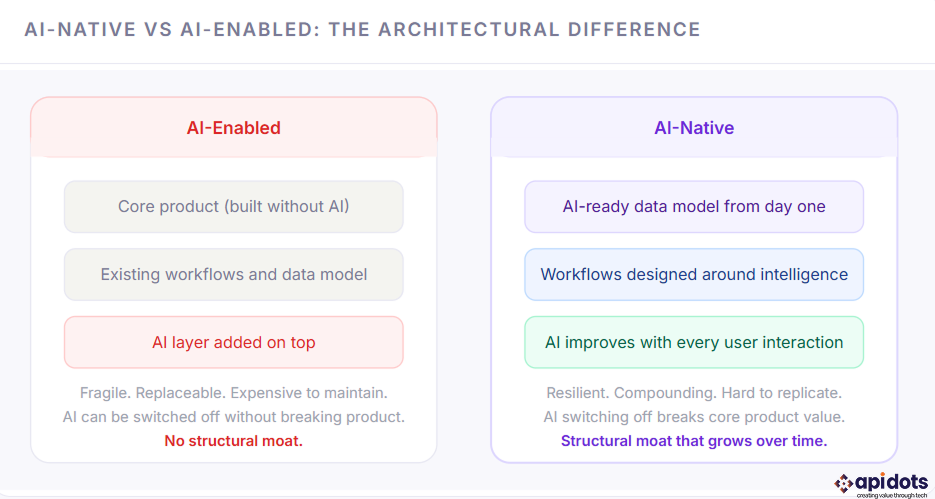
The test is simple: if you removed the AI features from your product tonight, would users notice a fundamental change in how the product works? If the answer is no, you have built AI-enabled, not AI-native. The goal of this guide is to show you what it takes to build the kind of product where the answer is yes.
Every AI-native product, regardless of category or industry, is built on five layers. These are not optional extras you add after launch. They are the foundation. Getting them wrong at the start is expensive to fix later, which is why understanding the right multi-tenant architecture before you write a line of code matters more in AI-native builds than in traditional SaaS.
AI is only as good as the data it learns from. For most SaaS products, the data model was never designed with AI in mind. Columns are named inconsistently, events are not logged in a structured format, user interactions are stored but never enriched, and there is no mechanism for the system to learn from outcomes. Building AI-native means starting with a data model that captures intent, not just actions. Every workflow step becomes a training signal. Every user decision becomes feedback. That requires deliberate schema design from day one, including decisions about structured vs. unstructured data storage, which most teams do not think about until they are already in production.
This is where raw data becomes insight. The intelligence pipeline ingests events from your product, runs them through models, and produces outputs that either drive UI changes or feed back into the data layer. In practice, this means feature engineering, embedding generation, model inference, output validation, and result routing. For most SaaS teams, this is the layer they underestimate most. It is not just calling an API. It is a mini-system with its own reliability requirements, latency budgets, and failure modes.
What separates AI-native products from AI-enabled ones is that AI improves the more people use it. That only happens if you have built a feedback loop. Every time a user accepts or rejects a recommendation, edits an AI-generated output, or completes or abandons an AI-suggested workflow step, that signal needs to be captured, labeled, and fed back into the model. Most teams skip this entirely in their MVP. The ones who build it from the start find that their product compounds in value over time in a way their competitors cannot easily replicate. Understanding how to implement this correctly is covered in our breakdown of AI integration strategies.
AI outputs are not deterministic. They can be wrong, biased, or confidently incorrect. Every AI-native product needs guardrails: output validation, confidence scoring, fallback logic for low-confidence predictions, rate limiting on inference calls, and model drift monitoring. If you are building in a regulated industry, this layer also needs to address explainability, meaning you can explain to a user or auditor why the model made a specific recommendation. Teams that treat safety as an afterthought end up with expensive post-launch incidents and enterprise deals that fall apart during security reviews.
The best AI features are invisible. Users should not feel like they are interacting with AI. They should feel like the product just understands them. That requires deliberate UX design around AI outputs: surfacing recommendations at the right moment, framing suggestions in plain language, making it easy for users to override AI without friction, and never letting AI slow down the core workflow. The UX design principles for AI products are meaningfully different from standard SaaS UX, and most teams discover this the hard way.
As AI-native products reshape how software is built, they are also changing how buyers discover it, i.e., how AI search engines cite and surface SaaS content, is now as important as traditional SEO for your go-to-market strategy
There is no single right way to bring AI into a SaaS product. The right approach depends on your team’s technical depth, your product’s data volume, your latency requirements, and how differentiated the AI needs to be. Here is how the three main paths compare.
| Approach | How it works | Time to implement | Cost level | Differentiation | Best for |
|---|---|---|---|---|---|
| API-based integration | Call models like OpenAI, Anthropic, or Google via API. No training required. | 2 to 6 weeks | Low upfront | Low | Fast MVPs, non-core AI features, content generation |
| Pre-trained model embedding | Deploy open-source models like LLaMA or Mistral on your infrastructure and fine-tune with your data. | 6 to 16 weeks | Medium | Medium | Domain-specific use cases, privacy-sensitive data, reducing long-term API costs |
| Custom model development | Train proprietary models from scratch or heavily fine-tune on large internal datasets. | 6 to 18 months | High | Highest | Deploy open-source models such as LLaMA or Mistral on your infrastructure and fine-tune them with your data. |
Most early-stage SaaS products start with API-based integration, and that is fine. The mistake is treating it as a permanent architecture rather than a starting point. As your product matures and your dataset grows, the teams that win will be those who have built the infrastructure to move toward embedded or custom models. The role of AI in modern SaaS has shifted from optional to structural, and your architecture needs to reflect that trajectory even if you are not there yet.
The stack decisions for an AI-native product are meaningfully different from a standard SaaS build. You are not just picking a frontend framework and a database. You are also choosing how to store and retrieve embeddings, how to manage model versioning, how to handle asynchronous inference, and how to monitor AI output quality at scale.
| Layer | Recommended options | What to avoid | Notes |
|---|---|---|---|
| Frontend | Next.js, React | Heavy SPAs with slow hydration | Streaming AI responses require progressive rendering and partial hydration support |
| Backend / API | FastAPI, Node.js, Django (async views) | Synchronous-only frameworks | Async handling is critical for non-blocking inference and better throughput |
| Primary database | PostgreSQL with pgvector | Pure document stores for structured data | Combines relational queries with vector similarity search in one system |
| Vector database | Pinecone, Weaviate, Qdrant | Using relational DB alone for large-scale vector search | Needed for semantic search, RAG pipelines, and high-performance similarity queries |
| Model serving | OpenAI API, Amazon Web Services Bedrock, Replicate | Single-provider dependency | Build an abstraction layer to switch providers without refactoring your core system |
| AI observability | LangSmith, Weights & Biases, Helicone | Standard APM tools alone | Track token usage, latency, hallucinations, and output quality, not just system metrics |
| Queue and async | Redis, BullMQ, Amazon SQS | Synchronous inference in request path | Offload long-running AI tasks to queues to keep UX fast and responsive |
| Infrastructure | Amazon Web Services, Google Cloud, Microsoft Azure (GPU-enabled) | CPU-only infra for model serving | GPU pricing and availability vary widely, design for flexibility and scaling |
Most of these are not technical mistakes. They are planning and prioritization mistakes that show up as technical problems six months after launch. Understanding them up front is significantly cheaper than learning them through experience.
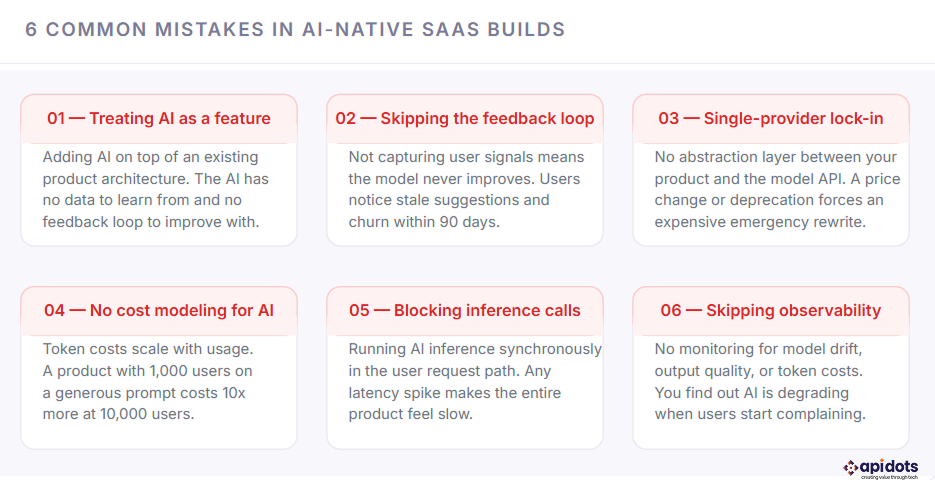
Most of these mistakes share a root cause: teams plan for the AI feature but not for the AI system. A feature is something you build once. A system is something you design, monitor, and evolve. The teams that build AI-native products successfully treat AI as the latter from day one. Our piece on AI adoption mistakes goes deeper into the organizational patterns behind these failures, which is worth reading before you structure your team.
“Adding AI to a SaaS product after it has shipped is like adding foundations to a building that is already standing. It can be done. It is just very expensive and very risky.”
AI-native products cost more to build and more to operate than standard SaaS. The additional cost is real, and it is worth understanding before you commit to the architecture. The good news is that most of the cost premium is in infrastructure and model operations, not in engineering time, which means it scales more predictably than headcount.
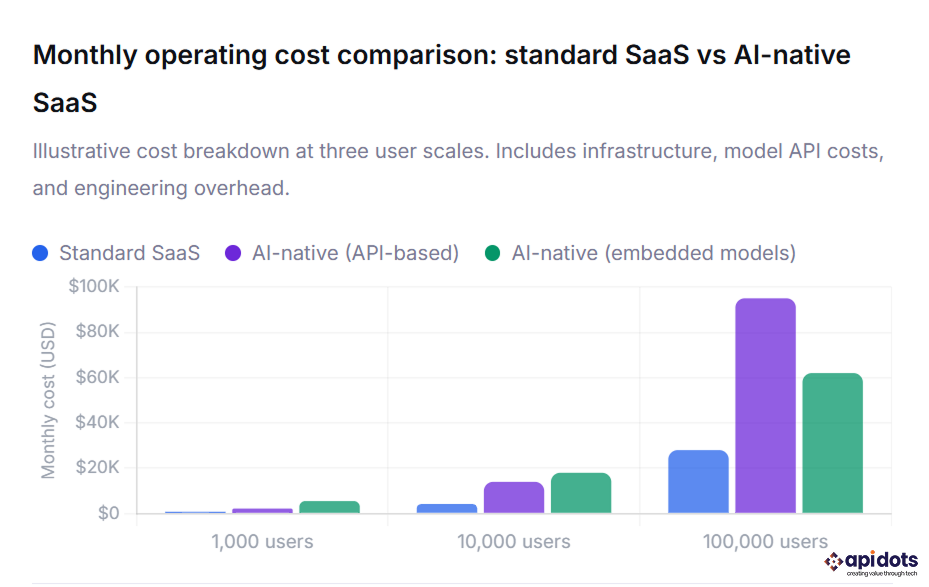
How to read this chart: The blue bars show standard SaaS infrastructure costs at 1K, 10K, and 100K users. The purple bars show the same product with API-based AI integration, where token costs grow linearly with usage. The green bars show embedded model architecture, which has a higher upfront infrastructure cost but a lower per-user marginal cost at scale. Notice that above roughly 10,000 users, embedded models become more cost-efficient than API-based integration, which is the point at which most teams should plan their architecture migration. All figures are monthly operational costs and exclude engineering salaries.
The cost of AI-native development at the build stage is covered in detail in our SaaS pricing models breakdown, which includes how to structure your pricing to absorb AI infrastructure costs without compressing your margins. The short version: usage-based pricing tiers work significantly better for AI-native products than flat-rate subscriptions, because your costs scale with usage and your pricing needs to reflect that.
The business case for building AI-native rather than AI-enabled is ultimately a retention argument. Products where AI gets better with use create switching costs that compound over time. Users who have trained the product on their behavior, their preferences, and their data do not want to start over with a competitor. That is a structural advantage that flat feature sets cannot create.
The retention numbers above are why the investment in AI-native architecture pays back. A 15 to 20 percentage point improvement in six-month retention does not just reduce churn. It dramatically changes your LTV, your payback period, and your ability to invest in growth. The SaaS market trends data confirms that AI-native products are commanding higher NPS scores, faster deal cycles, and stronger expansion revenue than their AI-enabled counterparts across every vertical.
You do not have to rebuild everything from scratch to move toward AI-native. The path forward depends on where your product is right now. Here is how to think about it depending on your stage.
Start with the data model. Before you write your first API route or design your first UI screen, document every event your product will generate and every outcome you want to predict. Build your schema to capture these from day one. Choose your database architecture with embeddings in mind. Integrate an AI observability tool before you integrate your first model. The cost of doing this at the start is two to three weeks of design work. The cost of retrofitting it later is three to six months of engineering time.
Start with the feedback loop. You almost certainly have behavioral data you are not using. Identify the single workflow in your product where AI would create the most obvious value, build a minimal feedback capture mechanism around it, and ship a narrow AI feature there first. Do not try to add AI everywhere. Prove the loop works in one place, measure the retention impact, and then expand. This is the approach we recommend for any team going through what amounts to a product rearchitecting process.
Ask them three things. First, how do you design a data model for an AI-native product versus a standard SaaS? Second, how do you handle model drift and output degradation in production? Third, what is your approach to AI cost modeling at scale? If they cannot answer all three with specifics, they are not the right partner for this build. Our SaaS development services are specifically structured around these questions, because getting them right at the architecture stage is what determines whether the AI actually compounds in value over time.
AI-native SaaS is software built with artificial intelligence at its core. Unlike traditional SaaS, AI drives the product’s data model, workflows, and user experience, enabling the system to continuously learn and improve from user interactions.
AI-native SaaS is designed around AI from the start, while AI-enabled SaaS adds AI features later. If removing AI breaks the product’s core functionality, it is AI-native; if not, it is AI-enabled.
AI-native SaaS relies on five core layers: a structured data foundation, an intelligence pipeline, a feedback loop, a safety and reliability system, and an AI-driven user experience. These layers are essential for scalability and long-term value.
AI-native SaaS costs more than traditional SaaS due to model usage and infrastructure. API-based AI has lower upfront costs but scales with usage, while embedded models require a higher initial investment but reduce long-term costs at scale.
Start with a data model designed for AI, capture user interactions as feedback, and launch a narrow AI feature in a high-impact workflow. Prove the feedback loop works, then expand AI capabilities across the product.
{ “@context”: “https://schema.org”, “@type”: “FAQPage”, “mainEntity”: [{ “@type”: “Question”, “name”: “1. What is AI-native SaaS?”, “acceptedAnswer”: { “@type”: “Answer”, “text”: “AI-native SaaS is software built with artificial intelligence at its core. Unlike traditional SaaS, AI drives the product’s data model, workflows, and user experience, enabling the system to continuously learn and improve from user interactions.” } },{ “@type”: “Question”, “name”: “2. What is the difference between AI-native and AI-enabled SaaS?”, “acceptedAnswer”: { “@type”: “Answer”, “text”: “AI-native SaaS is designed around AI from the start, while AI-enabled SaaS adds AI features later. If removing AI breaks the product’s core functionality, it is AI-native; if not, it is AI-enabled.” } },{ “@type”: “Question”, “name”: “3. What are the key components of AI-native architecture?”, “acceptedAnswer”: { “@type”: “Answer”, “text”: “AI-native SaaS relies on five core layers: a structured data foundation, an intelligence pipeline, a feedback loop, a safety and reliability system, and an AI-driven user experience. These layers are essential for scalability and long-term value.” } },{ “@type”: “Question”, “name”: “4. How much does AI-native SaaS cost to build and run?”, “acceptedAnswer”: { “@type”: “Answer”, “text”: “AI-native SaaS costs more than traditional SaaS due to model usage and infrastructure. API-based AI has lower upfront costs but scales with usage, while embedded models require a higher initial investment but reduce long-term costs at scale.” } },{ “@type”: “Question”, “name”: “5. How do you start building an AI-native SaaS product?”, “acceptedAnswer”: { “@type”: “Answer”, “text”: “Start with a data model designed for AI, capture user interactions as feedback, and launch a narrow AI feature in a high-impact workflow. Prove the feedback loop works, then expand AI capabilities across the product.” } }] }We engineer robust, future-ready software solutions.Built using modern architectures and proven development practices.
Hire Developers
Hi! I’m Aminah Rafaqat, a technical writer, content designer, and editor with an academic background in English Language and Literature. Thanks for taking a moment to get to know me. My work focuses on making complex information clear and accessible for B2B audiences. I’ve written extensively across several industries, including AI, SaaS, e-commerce, digital marketing, fintech, and health & fitness , with AI as the area I explore most deeply. With a foundation in linguistic precision and analytical reading, I bring a blend of technical understanding and strong language skills to every project. Over the years, I’ve collaborated with organizations across different regions, including teams here in the UAE, to create documentation that’s structured, accurate, and genuinely useful. I specialize in technical writing, content design, editing, and producing clear communication across digital and print platforms. At the core of my approach is a simple belief: when information is easy to understand, everything else becomes easier. Reach me at amysbrew.com
Comments are closed.
1 Comment
[…] is where a React native development service can become relevant for businesses that need mobile applications for both iOS and Android without […]