
Top
Search
People also search for:

Stay Inspired with Instagram





Every morning, a finance manager at a mid-sized distribution company in New York opens three spreadsheets, logs into two vendor portals, and spends the first two hours of her day copying invoice data from one system to another. She’s done it for three years. She’s good at it. She also hates it.
An RPA bot configured by API DOTS completed the same task in 4 minutes—with zero errors—on the first day it went live.
Robotic Process Automation (RPA) is software that uses digital bots to perform repetitive, rule-based tasks across your existing business applications—exactly as a human would, but faster, cheaper, and without mistakes.
This guide covers everything you need to make a confident automation decision: how RPA works, which industries are using it, real implementation costs, the honest challenges, and what separates an RPA project that delivers 200% ROI from one that stalls in month three.
Robotic Process Automation (RPA) is a technology that uses software robots—called bots—to automate repetitive, rule-based tasks across digital systems. Bots interact with applications exactly as a human would: clicking, reading, typing, and moving data. They require no changes to your existing software infrastructure and can be deployed within weeks.
That definition matters because it sets RPA apart from every other automation technology. You don’t replace your ERP. You don’t rebuild your CRM. You don’t write custom API integrations for every system. An RPA bot sits on top of what you already have and does the boring, high-volume work that currently consumes your team’s most productive hours.
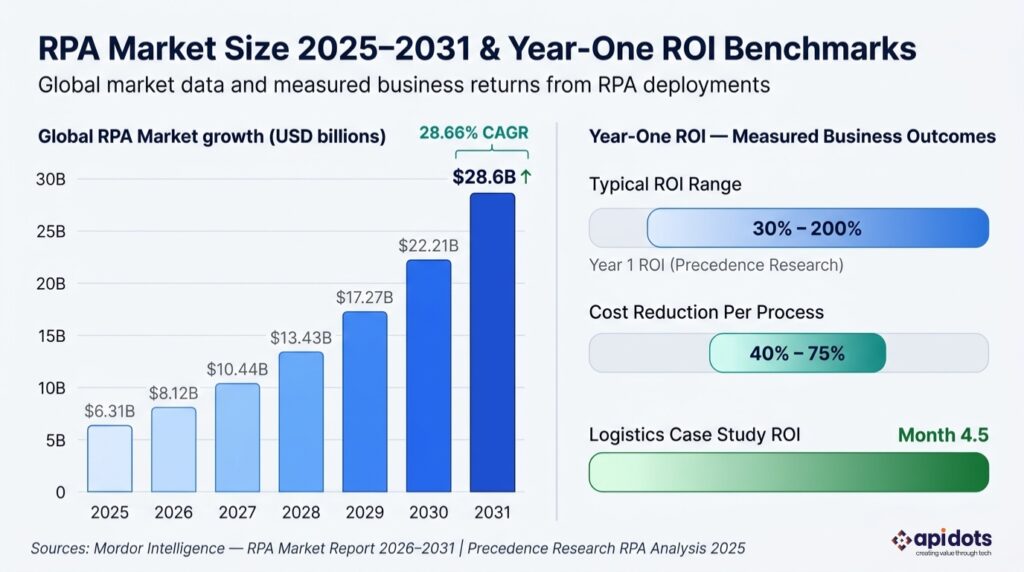
According to Mordor Intelligence, the global RPA market was valued at $6.31 billion in 2025 and is projected to reach $28.6 billion by 2031, growing at a 28.66% CAGR. Businesses aren’t adopting RPA because it’s trendy. They’re adopting it because the math is undeniable.
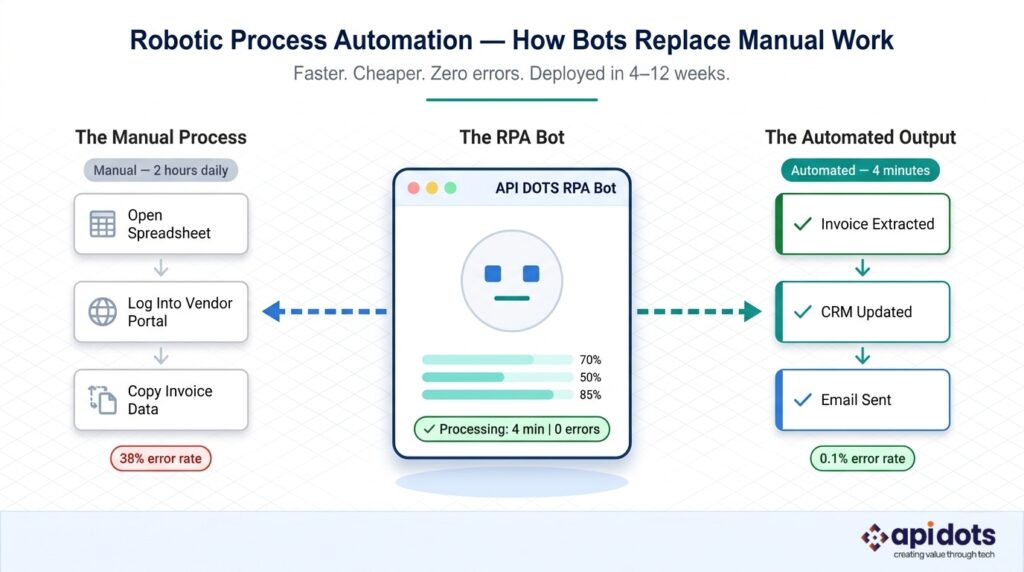
RPA works by recording and replicating human interactions with software — then executing those interactions at machine speed, at any hour, across any volume.
Here’s the five-step process from a business operations perspective:
1. Process Identification and Mapping The first step is identifying which tasks are genuinely automatable. The best candidates are high-volume, rule-based, and involve structured data—think invoice processing, employee onboarding forms, data migration between systems, and compliance reporting. Before any bot is built, every step, exception, and edge case in the process gets documented in detail. Skipping this step is the leading cause of failed RPA projects.
2. Bot Design and Configuration Once the process map is complete, your RPA developer builds the bot using a platform like UiPath, Automation Anywhere, or a custom framework. The bot is configured to navigate application interfaces, extract data, make rule-based decisions, and input information—mirroring exactly what a human operator does, just without the coffee breaks.
3. Testing in a Controlled Environment Every bot runs through rigorous testing in a sandbox environment before it touches live systems. This stage catches UI-level exceptions, edge cases the process map missed and performance issues under volume. A bot that processes 50 transactions without error needs to process 50,000 without error before it goes live.
4. Deployment and Monitoring Once testing passes, the bot deploys into your production environment. A Control Room or Orchestrator — the management layer of your RPA platform—schedules bot runs, monitors performance in real time, and alerts your team if a bot encounters an exception it can’t resolve.
5. Continuous Optimization Bots aren’t set-and-forget. Application updates, process changes, and business growth all require bot maintenance. Treating your RPA deployment like a software product — with regular reviews, version updates, and expansion planning — is what separates companies that automate one process from companies that run 300 bots across their entire operation.
💡 The simplest analogy: Think of an RPA bot as a digital employee who logs into your ERP, opens a spreadsheet, copies the data, pastes it into your CRM, sends a confirmation email, and logs out — but does it in 11 seconds instead of 18 minutes, and never transposes a digit.
Understanding the four core components of RPA tells you exactly what you’re buying — and what to ask any vendor before you sign.
Bot Runner The Bot Runner is the execution engine. It’s the component that actually carries out the automation — logging in, navigating screens, reading data, entering information. In unattended deployments, Bot Runners operate silently in the background. In attended deployments, they activate when a human triggers them during a live workflow.
Bot Creator / Designer This is the development environment where automation workflows are built. Modern platforms like UiPath Studio and Automation Anywhere’s AARI use visual, low-code interfaces that allow business analysts — not just developers — to design basic bot workflows. For complex, multi-system automations, you’ll still need experienced RPA developers (which is where a partner like API DOTS adds significant value).
Control Room / Orchestrator The Orchestrator is your command center. It schedules bot runs, manages credentials securely, routes exceptions to human handlers, logs every action for audit purposes, and provides real-time dashboards on bot performance. For businesses operating in regulated industries — banking in New York, healthcare in Illinois, financial services in Toronto — the audit trail the Orchestrator produces is as valuable as the automation itself.
AI/ML Layer Traditional RPA handles structured data: fields, forms, databases, spreadsheets. The AI/ML layer extends that capability to unstructured data — PDFs, emails, scanned documents, natural language. When you add OCR (optical character recognition), NLP (natural language processing), and machine learning models to an RPA workflow, you get what the industry calls Intelligent Automation — the technology that processes a handwritten insurance claim the same way it processes a clean digital form.
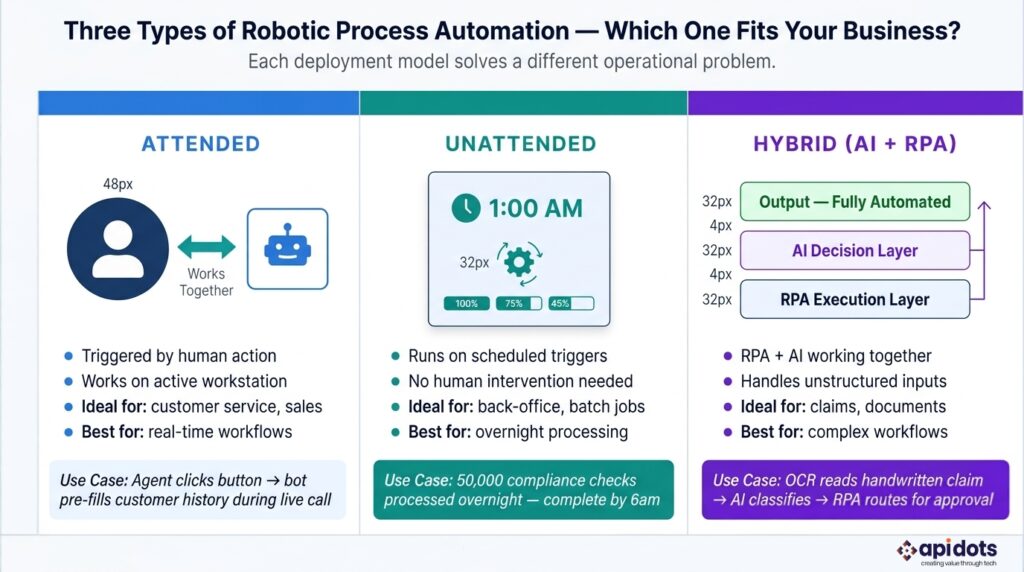
Not every automation problem requires the same solution. There are three distinct RPA deployment models, and choosing the wrong one is an expensive mistake.
Attended Automation: Attended bots work alongside human employees, activated by a trigger — usually a button click or a specific event within an application. A customer service agent at a London-based financial institution uses attended automation to handle inbound calls: as she speaks to the customer, the bot automatically pulls up account history, fills in call notes, and queues the follow-up action — all while she focuses entirely on the conversation. Attended automation is ideal for customer-facing roles where human judgment and machine speed need to work simultaneously.
Unattended Automation: Unattended bots run independently, scheduled or triggered by system events, with no human in the loop. A Wall Street investment bank runs unattended bots overnight to process over 50,000 transaction compliance checks — work that would require a full team of analysts and wouldn’t be complete until noon the following day. Unattended automation delivers the highest volume throughput and the most dramatic cost reductions, making it the model of choice for back-office operations.
Hybrid (Intelligent) Automation Hybrid automation combines RPA’s execution speed with AI’s ability to handle exceptions and unstructured inputs. A Singapore-based insurer uses hybrid automation to process handwritten claims forms: an OCR model reads the handwriting and converts it to structured data, an AI classifier validates the claim type, and then an RPA bot routes it through the approval workflow — all without human intervention unless the AI confidence score falls below a set threshold. This model is where the market is heading, and it’s the fastest-growing segment within enterprise automation.
Businesses that implement RPA correctly achieve ROI ranging from 30% to 200% in the first year alone, according to Precedence Research—a return that very few technology investments can match at comparable deployment speed.
1. Significant Cost Reduction RPA typically reduces the cost of automated processes by 40% to 75%. A single software bot costs a fraction of a full-time employee and operates continuously. For a 200-person operations team spending 30% of their time on manual data tasks, that translates to hundreds of thousands of dollars in annual savings without a single redundancy.
2. Near-Zero Error Rates Human error on repetitive tasks is inevitable—studies consistently put data entry error rates between 1% and 5%. Bots don’t misread a field, transpose a number, or miss a step when they’re tired on a Friday afternoon. An invoice processing bot that handles 10,000 invoices per month with a 0.1% error rate versus a human team at 2.5% error rate saves a mid-market business significant reconciliation costs and customer trust.
3. 24/7 Operations Without Overtime Bots don’t sleep. A batch processing job that your team starts at 5pm and finishes by midnight can be configured to run automatically at 1am, complete by 3am, and have clean results waiting in your dashboard when the team arrives at 8am. No overtime budget. No weekend shift premiums.
4. Elastic Scalability Volume spikes—seasonal demand, acquisition integration, and new client onboarding—no longer require emergency hiring. A financial services firm in Toronto scaled from 3 RPA bots to over 300 across their operations within 18 months, absorbing a 40% growth in transaction volume without adding headcount to their back-office team.
5. Audit-Ready Compliance Every action a bot takes is logged with a timestamp, user ID, input value, and outcome. For businesses operating under Germany’s GDPR requirements, UAE Central Bank regulations, or US HIPAA compliance frameworks, this audit trail isn’t just convenient — it’s a regulatory requirement that used to require dedicated compliance staff to maintain manually.
6. Employee Productivity and Retention Staff in the Chicago-area healthcare network that automated patient intake didn’t lose their jobs — they moved from eight hours of data entry per day to higher-value patient coordination work. Automation consistently improves employee satisfaction because people aren’t hired to copy data between systems. They’re hired for judgment, creativity, and relationships.
7. Faster Path to Full Digital Transformation RPA is often the most practical entry point into enterprise-wide digital transformation. It delivers measurable ROI in weeks, builds internal confidence in automation, and creates the data infrastructure that AI and machine learning models need to function. Companies that start with RPA reach full intelligent automation significantly faster than those attempting to implement AI directly on broken manual processes.
Wondering how much RPA could save your business? API DOTS offers a free automation discovery session to map your highest-impact workflows and estimate your Year 1 ROI. Get Your Free Automation Audit →
Manufacturing operations run on data — purchase orders, quality control logs, supplier invoices, inventory updates, compliance certificates. The problem is that data lives in multiple systems: an ERP here, a supplier portal there, a quality management platform that doesn’t talk to either. RPA bridges those systems without costly integration projects.
Munich-based automotive suppliers are using RPA to auto-generate compliance documentation across 14 separate ERP systems, reducing the compliance reporting cycle from two weeks to two days. Every time a production run closes, bots extract quality data, cross-reference it against supplier certifications, and compile the documentation packet automatically.
Manufacturing also benefits enormously from combining RPA with predictive planning. RPA works best in manufacturing when paired with AI-powered demand forecasting — bots handle the data movement while AI models anticipate what’s coming next, allowing procurement teams to act on signals rather than react to shortages.
Healthcare RPA is growing at 18.80% CAGR — the fastest of any industry — driven by the crushing administrative burden that consumes clinical staff time. Patient registration, insurance eligibility verification, prior authorization requests, claims submission, appointment scheduling: none of these require medical training, but all of them currently consume trained medical staff hours.
A hospital network across the Chicago metro area automated patient intake across eight facilities using attended and unattended RPA bots. Patients who previously waited 22 minutes at registration now wait under 6 minutes. The 34% reduction in intake processing time freed clinical coordinators to focus on care transitions and discharge planning — work that actually requires their expertise.
The BFSI (banking, financial services, and insurance) sector accounts for 36.52% of global RPA revenue in 2025 — a dominance driven by the combination of high transaction volume, strict regulatory requirements, and legacy system infrastructure that is expensive to replace.
Wall Street firms are running unattended bots to process over 100,000 KYC (Know Your Customer) and AML (Anti-Money Laundering) compliance checks nightly. What once required an overnight analyst team now runs autonomously, with exceptions flagged and queued for human review by 6am. The cost reduction is substantial; the compliance quality improvement is often more valuable.
In Toronto, Ontario, financial institutions are deploying multi-technology automation stacks that combine RPA with machine learning and natural language processing to handle everything from loan origination document review to regulatory filing preparation — a model that positions them well as the Canadian RPA market tracks toward $248 million by 2030.
Insurance operations are document-heavy, exception-prone, and deadline-sensitive — which makes them a natural fit for RPA. Claims intake, policy document validation, renewal processing, fraud flag generation, and underwriting data collection all follow defined rules and involve moving structured data between systems.
A London-based insurer reduced their claims processing cycle from five business days to under four hours by deploying an RPA workflow that ingests the claim, validates it against policy data, routes it to the correct adjuster queue, and sends the claimant an acknowledgment — all within minutes of submission. Their adjuster team went from spending 60% of their time on administrative processing to 85% of their time on actual claims assessment.
Retail automation isn’t just for enterprise chains. The margin pressure that affects every retailer — from a 12-store regional chain in Victoria, Australia to a global e-commerce operation — makes operational efficiency a survival issue, not just an optimization opportunity.
A Melbourne-based retail chain automated SKU-level inventory reconciliation across 200 stores using RPA bots that run nightly. Bots pull inventory counts from each store’s POS system, compare them against the warehouse management system, flag discrepancies above a threshold, and generate the morning exception report. The process that required a 4-person overnight reconciliation team now runs completely autonomously, with the team repurposed to manage vendor relationships and promotional planning.
Logistics operations run on documentation: bills of lading, customs declarations, freight invoices, proof of delivery, carrier rate confirmations. Each document flows through multiple parties — shipper, carrier, broker, customs authority, receiver — and manual data entry at any touchpoint creates delays, errors, and cost.
A Miami-based logistics operator automated port clearance documentation, reducing processing time by 68% and eliminating the customs delays that were adding $90,000 annually in demurrage charges. Bots extract shipment data from the TMS, populate customs forms, submit them to the CBP portal, and update the customer portal with status — all without a human keystroke.
Similar efficiency gains are emerging across the energy supply chain. Read how AI is transforming oil and gas operations to understand how automation is reshaping the entire energy logistics workflow.
Oil and gas operations generate enormous volumes of field data — equipment maintenance logs, safety inspection records, production reports, regulatory compliance filings, invoice processing across complex vendor networks. The manual effort required to manage this data across disparate systems is a significant operational cost.
A Houston-based energy company automated regulatory compliance filings across operations in Texas, Louisiana, and New Mexico. Bots pull production data from the SCADA system, format it to the state regulatory template, and submit filings automatically — a process that previously required a dedicated compliance analyst team and still missed deadlines during high-volume periods.
For a deeper look at how automation and AI are converging in the energy sector, our detailed guide on AI in the oil and gas industry covers the full landscape of what’s now possible.
Traditional automation—writing custom scripts, modifying application code, building bespoke integrations—was how enterprises automated before RPA existed. It worked, but it was slow, expensive, and brittle.
| Factor | Traditional Automation | Robotic Process Automation |
|---|---|---|
| Setup complexity | High—requires code changes to core systems | Low—operates at the UI layer, no system changes |
| System disruption | High—modifies existing applications | Zero—works on top of existing systems |
| Implementation time | 6–18 months | 4–12 weeks |
| Cost | Very high — requires developer-level engineering | Moderate—business analysts can configure basic bots |
| Scalability | Limited—each new process needs new code | High—new bots can be deployed in days |
| Maintenance | Heavy IT involvement required | Business-team manageable with CoE governance |
| Risk of disruption | High—changes affect production systems | Low—bots can be paused or rolled back instantly |
The practical implication: a mid-market company in British Columbia can deploy RPA across their order management process in six weeks without touching a single line of code in their ERP. That same project using traditional integration would take eight months and a $250,000 development budget.
RPA and AI are not the same technology, and they’re not in competition. Understanding what each does—and what each can’t do — is essential for building an automation strategy that actually scales.
| Factor | Robotic Process Automation | Artificial Intelligence |
|---|---|---|
| Data type handled | Structured, rule-based data | Structured and unstructured data |
| Decision-making | No—follows predetermined rules only | Yes—learns patterns and adapts |
| Setup requirement | Low-code, deployable in weeks | Requires training data, ML expertise, longer timelines |
| Best use case | High-volume repetitive tasks | Complex decisions, predictions, language understanding |
| Works independently | Yes — highly effective alone | Best combined with RPA for execution |
| Learning capability | None — static rules | Continuous improvement with new data |
| Typical first ROI | 4–12 weeks | 6–18 months |
The future isn’t RPA or AI—it’s RPA and AI together. This combination is what Gartner terms hyperautomation: a unified automation fabric that combines RPA for execution, AI for decision-making, process mining for discovery, and low-code platforms for rapid deployment. The market is moving decisively in this direction, accelerated by UiPath’s 2025 agentic automation platform and Automation Anywhere’s AI-native cloud architecture.
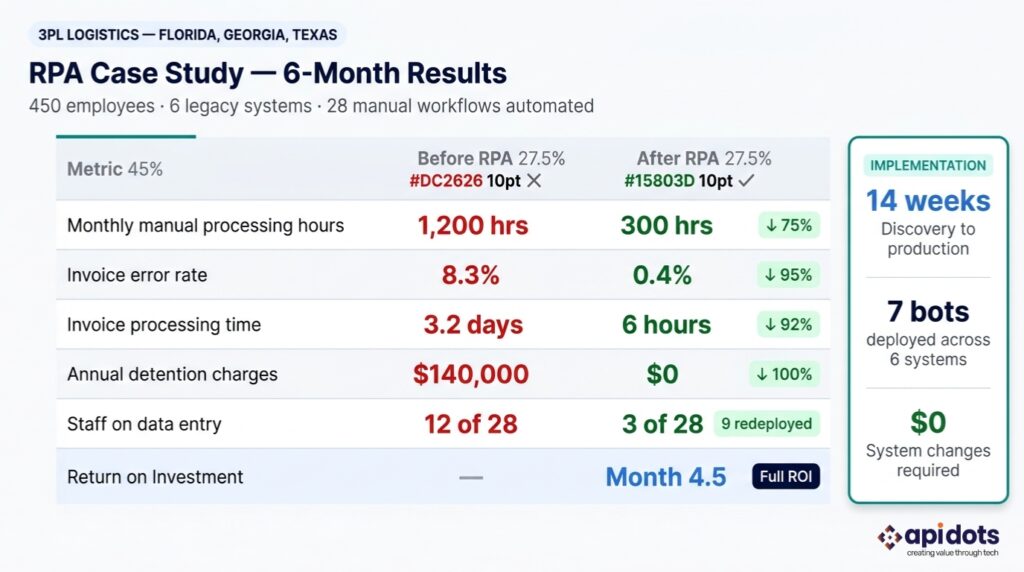
A third-party logistics (3PL) provider operating across Florida, Georgia, and Texas — 450 employees, managing freight brokerage, customs clearance, carrier invoicing, and shipment status updates for over 200 clients. Their operations ran across six legacy systems: a TMS, a WMS, a customs filing platform, QuickBooks, a carrier portal, and a client-facing tracking dashboard. None of them talked to each other.
The operations team was spending 1,200+ staff hours per month manually copying shipment data between systems. Every status update required a human to log into the TMS, extract the data, open the WMS, update the corresponding record, then update the client portal. An invoice required data from three separate platforms.
The numbers told the full story:
They had tried to solve it twice. First, they hired four additional data entry staff — which reduced delays temporarily but didn’t address accuracy. Then their IT team built a series of Excel macros to partially automate the reconciliation process. The macros broke every time a carrier updated their portal interface.
API DOTS began with a two-week process discovery audit — mapping all 28 manual workflows, categorizing them by volume, error rate, and staff time consumed. Eleven workflows qualified for immediate automation. Seven were prioritized for the first deployment phase based on ROI impact.
The solution architecture used a hybrid attended/unattended model:
All seven bots integrated across the TMS, WMS, QuickBooks, and carrier portals using a combination of UI automation and API-level connections — without modifying any of the six legacy systems.
| Phase | Weeks | Activity |
|---|---|---|
| Discovery & Design | 1–3 | Process mapping, bot architecture, exception handling design |
| Development | 4–7 | Bot build, internal unit testing, integration validation |
| User Acceptance Testing | 8–10 | Live testing with operations team, edge case resolution |
| Phased Deployment | 11–14 | Live deployment: 2 bots Week 11, 3 bots Week 12, 2 bots Week 14 |
| Metric | Before | After | Change |
|---|---|---|---|
| Manual processing hours/month | 1,200 hrs | 300 hrs | ↓ 75% |
| Invoice error rate | 8.3% | 0.4% | ↓ 95% |
| Invoice processing time | 3.2 days | 6 hours | ↓ 92% |
| Annual detention charges | $140,000 | $0 | ↓ 100% |
| Staff time on data entry | 12 of 28 staff | 3 of 28 staff | 9 redeployed |
| ROI achieved | — | Month 4.5 | — |
The nine team members freed from data entry moved into client success, carrier relationship management, and business development roles. Within six months of deployment, the company had onboarded three new enterprise accounts that the operations team previously didn’t have bandwidth to service.
Key lesson from this project: “Start with the process that costs you the most — not the one that seems easiest to automate.” The invoice processing workflow wasn’t the simplest to build. It had the most exceptions and required the most testing. It was also responsible for 60% of the total ROI.
Results like these aren’t unique to logistics. API DOTS has delivered comparable automation outcomes for businesses in healthcare, financial services, manufacturing, and energy across the US, UK, UAE, Australia, and beyond.
Schedule a Discovery Call → We’ll map your highest-impact workflows in 60 minutes and give you a realistic ROI estimate — no obligation.
A successful RPA implementation follows a defined sequence. Companies that skip steps—particularly steps 1 and 4 — are the ones writing cautionary case studies about failed automation projects.
Step 1: Identify Automation Candidates List every repetitive, rule-based task your team performs that involves moving structured data between systems. High-volume processes with clear rules and structured inputs are ideal candidates. Processes that require judgment, exceptions are frequent, or the rules change often are poor candidates — at least until you add an AI layer.
Step 2: Prioritize by ROI Potential Build an effort-versus-impact matrix. Plot each candidate process by implementation complexity (x-axis) and business value (y-axis). Start with the high-value, lower-complexity quadrant. Deliver two or three quick wins within 60 days to build executive confidence before scaling.
Step 3: Choose the Right Platform Platform choice depends on your existing technology stack and scale objectives. UiPath leads in enterprise deployments requiring complex orchestration. Microsoft Power Automate is the natural choice for businesses already running on Microsoft 365 and Azure. Automation Anywhere’s cloud-native architecture suits organizations prioritizing scalability over on-premise control. For businesses with highly unique workflows or legacy systems that standard platforms can’t handle, custom RPA development — API DOTS’s core offering — delivers better long-term outcomes than trying to force a standard tool to work.
Step 4: Map the Process in Exhaustive Detail Document every single step. Every click. Every conditional branch. Every exception. “The system sometimes sends the data in a different format” is the kind of edge case that breaks bots in production if it’s not accounted for in design. The thoroughness of your process documentation directly predicts the stability of your bot.
Step 5: Build and Test in a Sandbox Never develop directly in production. Build your bot in a controlled test environment that mirrors your production systems, run it through every scenario — including the edge cases from Step 4 — and achieve stable performance at 10x the expected production volume before moving forward.
Step 6: Run User Acceptance Testing with Business Users The people who perform the task daily will catch issues that developers and project managers miss. A UAT phase where operations staff run the bot through their real daily workload — not a sanitized test dataset — is non-negotiable for production readiness.
Step 7: Deploy in Phases Launch one or two bots first. Monitor them for two to four weeks. Resolve any production exceptions. Then deploy the next batch. Phased deployment reduces risk and allows your team to build operational confidence with RPA before the full portfolio is live.
Step 8: Monitor, Optimize, and Expand A deployed bot is a software product. Application updates from your vendors can break UI-level automations. Process changes require bot updates. Performance should be reviewed quarterly. Companies with a formal Center of Excellence (CoE) — a small internal team responsible for RPA governance, standards, and expansion — consistently outperform those treating RPA as a one-time IT project.
For companies already using data-driven supply chain planning, integrating AI-powered demand forecasting alongside RPA creates fully autonomous supply chain workflows — where bots execute transactions while AI models anticipate what those transactions should be before they’re triggered.
Every technology has failure modes. RPAs are well-documented and entirely avoidable with the right preparation.
Challenge 1: Automating a Broken Process → How to avoid it: RPA amplifies what exists. A flawed, inconsistent process becomes a faster, more consistent version of that flaw. Fix the process logic first—document the ideal workflow, eliminate the redundant steps — then automate the optimized version.
Challenge 2: No Internal Executive Buy-In → How to avoid it: Deliver one high-visibility quick win within 60 days. Choose a process that an executive directly experiences — expense reporting, board pack preparation, customer renewal reminders. When the CFO sees her team’s monthly close process complete in half the time, the budget conversation for Phase 2 becomes significantly easier.
Challenge 3: Change Management Resistance from Staff → How to avoid it: The narrative matters. RPA doesn’t automate people—it automates tasks. Staff who understand that bots handle the work they find most tedious, freeing them for work they find more meaningful, become advocates rather than resistors. Frame automation as a capability upgrade for your team, not a headcount reduction strategy.
Challenge 4: Scaling Without Governance → How to avoid it: Build your Center of Excellence before you hit 10 bots. Without centralized governance—standards for bot naming, credential management, exception handling, change management — a portfolio of 50 bots becomes an unmanageable liability. Companies in Paris and Frankfurt learned this during early RPA adoption waves and have since published governance frameworks the industry now follows.
Challenge 5: Over-Dependence on UI Automation → How to avoid it: UI-level automation (scraping screens, clicking buttons) breaks every time a vendor updates their application interface. Where APIs are available, use them. API-level integration is more stable, faster, and less maintenance-intensive. API DOTS builds both UI-level and API-level automation and always recommends the API approach where the system supports it.
The RPA market in 2025 is at an inflection point. The technology that started as “screen scraping on steroids” is evolving into the execution layer of the entire enterprise automation stack.
1. Agentic Automation: The most significant shift in the market right now is the move from rule-based bots to AI agents that make contextual decisions. UiPath’s 2025 agentic platform — combining Agent Builder, Agentic Orchestration, and Autopilot — signals a new model where software agents perceive context, reason about options, and act autonomously on complex objectives. The bot that could only follow a script can now navigate ambiguity.
2. Hyperautomation: Gartner’s term for the strategic combination of RPA + AI + process mining + low-code into a unified automation fabric is becoming operational reality. Enterprises in Germany and France are deploying hyperautomation platforms that use process mining to identify automation opportunities, RPA to execute them, and AI to handle exceptions — creating a self-improving automation loop.
3. Cloud-Native RPA: The shift from on-premise bot servers to cloud-deployed RPA is accelerating. Cloud-native deployments reduce infrastructure costs, enable global scaling, and allow businesses in Sydney, Singapore, and Riyadh to access the same automation capabilities as enterprises in New York or London—without a local data center.
4. RPA + Generative AI: Large language models are solving the unstructured data problem that traditional RPA could never address. An RPA bot can now be paired with a generative AI model to process email threads, extract action items from PDF contracts, summarize call transcripts, and route complex customer requests—capabilities that simply didn’t exist in the RPA toolkit three years ago.
5. Government and Public Sector Adoption: Saudi Arabia’s Vision 2030 digital transformation agenda has identified RPA as a core component of public sector modernization. Singapore’s government-backed automation grant programs for SMEs have accelerated adoption across the Southeast Asian market. Scotland’s NHS has launched RPA pilots for appointment scheduling and patient record management. Public sector adoption at this scale will drive the next wave of RPA market growth through the end of the decade.
In high-stakes industries where operational precision is non-negotiable, this convergence of RPA and AI is already producing measurable results. Explore how AI is transforming oil and gas operations for a detailed look at what full automation maturity looks like in a complex industrial environment.
Not all RPA vendors are equal — and the distinction between a tool configuration partner and a true automation development company matters enormously for your long-term outcomes.
Evaluate any RPA partner against these six criteria before you commit:
1. Custom development vs. tool configuration Some vendors configure existing RPA platforms (UiPath, Power Automate) and call it development. Others build custom automation solutions tailored to your specific workflows, including legacy systems that standard platforms struggle with. Know which one you’re hiring.
2. Systems integration depth Can they integrate your bot with your actual systems — not just the ones listed in their case studies? Ask specifically about your TMS, ERP, CRM, and any legacy platforms. A partner who hasn’t integrated with your stack before will learn on your timeline and budget.
3. Post-deployment support and bot maintenance Who maintains the bots after go-live? Application updates from your vendors will break UI automations. Process changes will require bot updates. A partner with a formal managed services offering is worth more than one that disappears after deployment.
4. Industry-specific experience An RPA partner who has delivered automation in your industry knows the exception patterns, the compliance requirements, and the system quirks that a generalist partner will discover — and charge you for — during your project.
5. Verifiable ROI from past projects Ask for case studies with specific numbers: hours saved, error rates before and after, time to ROI. Vague claims like “significantly improved efficiency” are a signal that verifiable results don’t exist.
6. Regional compliance knowledge GDPR in Germany and France, HIPAA in the United States, PDPA in Singapore, DIFC regulations in Dubai — your automation partner needs to understand the compliance framework in your operating region, not just the automation technology.
Most companies in the RPA market sell you a platform license and a configuration service. API DOTS builds automation — custom, from the ground up, around your specific workflows, your specific systems, and your specific business objectives.
API DOTS is not a UiPath reseller or a Power Automate consultant. The company’s engineering team builds bespoke automation solutions that operate at both the UI level and the API level — meaning bots that work reliably even when vendor interfaces change, and integrations that connect systems standard platforms can’t reach. This matters most for businesses running legacy infrastructure — the ERP installed in 2008, the industry-specific platform with no API documentation, the franken-stack that three acquisitions created.
The client portfolio spans logistics companies in Florida and Texas, healthcare networks in Illinois and New York, financial institutions in Toronto and London, manufacturers in Germany, energy companies in the UAE, and technology firms in Singapore and Bangalore. Each engagement begins with the same process discovery audit that identified the $140,000 in recoverable losses for the logistics client in this guide. The methodology scales from a 10-person operations team to a 5,000-employee enterprise.
What makes the difference isn’t the technology — every competent RPA partner works with the same platforms. What makes the difference is the process intelligence: knowing which workflows to automate first, how to design exception handling that doesn’t require constant human intervention, and how to build a bot portfolio that grows with your business rather than becoming technical debt. API DOTS brings that intelligence from 40+ countries of deployment experience to every new engagement.
1. What is the difference between RPA and AI?
RPA follows predefined rules to automate structured, repetitive tasks — it executes exactly what it’s programmed to do. AI learns from data and makes decisions on problems it hasn’t seen before. RPA cannot handle unstructured data (emails, PDFs, natural language) without an AI layer. Combined, they form Intelligent Automation: RPA executes the workflow, AI handles the exceptions and decisions that rules alone can’t resolve. Most enterprises implement RPA first for faster ROI, then layer in AI as their automation maturity grows.
2. How much does RPA implementation cost?
RPA implementation costs typically range from $15,000–$50,000 for a single-process deployment to $150,000–$500,000+ for enterprise-wide programs with multiple bots and integrations. Platform licensing (UiPath, Automation Anywhere) adds $5,000–$30,000 per year depending on the number of bot runners. Custom RPA development — as opposed to platform configuration — costs more upfront but typically delivers better long-term stability. Most organizations recover implementation costs within 4–12 months through labor savings and error reduction.
3. How long does it take to implement RPA?
A single RPA bot on a well-documented process can go live in 4–8 weeks. Complex multi-system deployments covering 5–10 workflows typically take 12–16 weeks from discovery to production. Enterprise programs deploying 20+ bots across multiple departments are typically planned in 6-month phases. The timeline is most often extended by incomplete process documentation (Step 4 in this guide) and delayed access to test environments — both of which are controllable with proper project governance.
4. What processes are best suited for RPA?
The best RPA candidates share four characteristics: they are high-volume, rule-based, involve structured data, and are currently performed manually by people. Ideal examples include invoice processing, employee onboarding data entry, regulatory filing compilation, CRM data updates, inventory reconciliation, customer order confirmation emails, and HR report generation. Processes with frequent exceptions, unstructured inputs, or logic that changes regularly are poor RPA candidates without an AI layer.
5. Can small businesses use robotic process automation?
Yes — SMEs are the fastest-growing RPA adopter segment, with a 34.7% CAGR according to Mordor Intelligence. Modern cloud-native RPA platforms and subscription pricing models have eliminated the capital cost barrier. A 15-person accounting firm automates bank reconciliation. A 30-person logistics broker automates freight quote generation. The minimum viable RPA project for a small business is often a single bot costing under $20,000 to deploy, returning its cost within three to six months.
6. What RPA tools are most popular in 2025?
UiPath holds approximately 35% global RPA market share and leads the Gartner Magic Quadrant for the seventh consecutive year in 2025. Automation Anywhere is the leading cloud-native RPA platform, particularly strong in financial services. Microsoft Power Automate commands 8–12% market share with rapid SME adoption driven by Microsoft 365 integration. Blue Prism (now SS&C Blue Prism) remains strong in regulated enterprise environments. For businesses with complex legacy systems or unique workflow requirements, custom-built RPA solutions often outperform any single platform.
7. What is the ROI of robotic process automation?
Businesses implementing RPA achieve ROI of 30% to 200% in the first year, according to Precedence Research — a range driven by process selection quality and implementation methodology. Labor savings on automated processes typically run 40%–75% per process. Error reduction eliminates reconciliation costs, compliance penalties, and rework. Speed improvements unlock revenue that delayed processing was blocking. The logistics company profiled in this guide achieved full ROI at 4.5 months — driven primarily by $140,000 in eliminated detention charges and a 95% reduction in invoice errors.
8. Is RPA replacing jobs?
RPA replaces tasks, not jobs. No significant wave of RPA-driven layoffs has been documented in enterprise deployments. The consistent outcome across industries — logistics, healthcare, banking, manufacturing — is that staff previously performing manual data tasks are redeployed to higher-value work: client relationships, analysis, exception handling, strategic projects. Deloitte’s 2024 global RPA survey found that 74% of enterprises that deployed RPA at scale saw no reduction in workforce headcount. The competitive risk isn’t that RPA replaces your staff — it’s that your competitors deploy RPA and their staff becomes more productive than yours.
9. What is attended vs unattended RPA?
Attended RPA runs on a user’s workstation and is triggered by human action — a button click, a keyboard shortcut, an event in an open application. It works alongside people during live workflows. Unattended RPA runs autonomously on a server, scheduled or event-triggered, with no human in the loop. Unattended bots are ideal for batch processing, overnight runs, and high-volume back-office tasks. Hybrid deployments use both: unattended bots handle overnight processing while attended bots support staff during business hours.
10. How does RPA work with existing software systems?
RPA bots interact with existing software at the user interface layer — they use the same screens, menus, and data fields that human operators use. This means they work with any application: legacy ERPs from the 1990s, modern cloud platforms, web portals, desktop applications, and mainframes. No changes to the underlying application are required. Where applications offer API access, experienced RPA developers (like API DOTS) build API-level integrations alongside UI automation for greater speed and stability. The practical result: your existing systems stay exactly as they are, and the bot does the manual work in between.
The global RPA market is growing at 28.66% annually for one reason: it works. Manual processes that cost businesses $50,000 to $500,000 per year in labor, errors, and delays are being replaced by software bots that pay for themselves in months and run indefinitely. According to Mordor Intelligence, the market reaches $28.6 billion by 2031 — and the companies capturing that value aren’t waiting for the technology to mature further. It’s already mature. The opportunity cost now is inaction.
The trajectory of automation is clear. RPA is the foundation, AI is the intelligence layer, and hyperautomation—the combination of both — is where every serious enterprise is heading. Companies that start building their automation capability today arrive at intelligent automation six to eighteen months ahead of competitors who wait for a perfect moment that never comes. Digital transformation is not a destination. It’s a compounding advantage that starts with the first bot you deploy.
Whether you’re a logistics company in Florida, a financial institution in Toronto, a manufacturer in Germany, or a healthcare network in Sydney — manual workflows are costing you money every single day.
API DOTS builds custom RPA solutions that integrate with your existing systems, deliver measurable ROI within 90 days, and scale as your business grows.
Book a Free RPA Consultation with API DOTS →
No commitment. No sales pitch. Just a clear map of what automation can do for your business — and what it’s costing you not to act.
We leverage AI, cloud, and next-gen technologies strategically.Helping businesses stay competitive in evolving markets.
Consult Technology Experts
I’m a digital marketer with experience in SEO, content strategy, and online brand growth. I specialize in creating optimized content, improving website rankings, building high-quality backlinks, and driving traffic through effective digital marketing strategies. I enjoy helping businesses strengthen their online presence and turn visitors into customers.