
Top
Search
People also search for:
Stay Inspired with Instagram




Artificial intelligence is now part of everyday programming. Tools like GitHub Copilot, ChatGPT, Claude, and many others suggest code, explain errors and even write tests for us. This shift is more than a new feature in your IDE. It introduces new workflows that change how we design, implement, and review software. Done well, AI workflows can lighten your workload and free you to think bigger. Done poorly, they can add friction and risk.
This guide shows developers and team leaders how to get the most from modern AI coding practices.
By the end of 2025, I can say with confidence that AI is no longer a novelty. Surveys also show that 41 % of all code written worldwide is AI-generated or AI-assisted. More than 76 % of professional developers either use AI coding tools or plan to adopt them soon. Tools that started as autocomplete helpers are now partners that write, test and review code. For many teams, they speed up repetitive tasks and make it easier to explore alternatives.
The growth is striking. Developers save 30–75 % of their time on coding, debugging and documentation when they use AI assistants. Users of GitHub Copilot complete 126 % more projects per week than manual coders. Even large companies such as Google report that 21 % of their code is now AI-assisted. Almost 84 % of programmers have tried at least one AI code generation tool. Younger developers adopt them at twice the rate of older colleagues. These numbers underline a major change in how software is made.
Vendor reports and marketing highlight big speedups. According to a 2025 study by Index.dev, AI coding assistants increase individual developer output by 20–40 %. The same report notes that to turn those individual gains into faster releases, organizations must improve their processes; faster drafts only matter if reviews, CI/CD and QA move at the same pace. This gap between writing code and shipping it explains why some teams see little improvement despite widespread AI usage.
Other data paint a more nuanced picture. A randomized controlled trial in July 2025 recruited experienced open-source maintainers and let them work on real issues with or without AI tools. Surprisingly, participants took 19 % longer when allowed to use AI.
Developers predicted AI would make them 24 % faster and still believed it had sped them up, even after the slowdown. This result highlights the “productivity placebo”: AI feels productive because it gives immediate feedback, but you may spend more time reviewing and debugging its output.
Quality problems also surface. Some teams note that AI coding assistants promise less boilerplate and faster iteration, which is great for quick prototypes, but they often increase the time needed to make code production-ready. In surveys, 66 % of respondents said the most common frustration with AI is that the code is almost right but not quite, and 45.2 % point to time spent debugging AI-generated code.
Clearly, AI is neither a magic wand nor a 10× productivity hack. AI tools should only be implemented if you have thoroughly considered how they will be integrated.
The way to leverage these assistants without getting caught in the productivity paradox is by designing workflows with intent.
When treating AI as a partner in development, developers will find they can get the most benefit from these tools.
Developers have been known to accept the first response generated by an AI tool. Best practice guidelines suggest thinking of AI as more of a Junior Partner rather than an Autopilot. Always take the time to fully evaluate each line of the generated code prior to approving it, and discourage the practice of using the AI tool as an automatic approval process.
Treat your AI assistant like an additional developer who is coding next to you, and understand that while the AI tool can generate initial drafts of code based on previous experiences, it does not have the level of context and domain knowledge that you as a developer possess; therefore, ultimately, you are accountable for ensuring that the final product is of the highest quality.
Different AI tools are developed with different purposes in mind. Some tools are designed to assist developers with inline suggestions, boilerplate code, and repetitive code generation. Other AI tools allow for more complex functionalities, where you can interact directly with your underlying codebase for refactoring of larger sections of code. Other tools are geared more towards giving architectural recommendations, debugging resources, or drafting documentation. Using the right tool based on the specific purpose of your code will eliminate any frustration when using AI tools for coding and provide more value from the AI resource.
Maintain a tight feedback loop in the form of generating code in small increments and testing immediately following the generation of new code. AI-generated code has the potential to become very hazardous if copied and pasted into your code without doing any unit testing.
AI models often produce functions that work on common cases but break with edge values or duplicates. To avoid these traps, write tests before integrating AI-generated functions and ask the assistant to list potential edge cases. Run linters and static analyzers (ESLint, Pylint, SonarQube) on all generated code.
Another risk is inconsistent style. AI tools may produce different naming conventions or error-handling strategies. Designate your project’s common standards and use these standards when providing information. Apply formatting standards and enforce them through your CI/CD pipeline to avoid code becoming different over time.
AI applications can create unsafe code that is prone to threats such as SQL injection and poor password security. It is therefore necessary to inspect AI-generated code for these types of vulnerabilities and use security linters such as Bandit or npm audit to identify hard-coded secrets and other forms of insecurity in the code.
Keep critical logic (authentication, encryption and payments) under close human review. Experts warn that because models are trained on vast amounts of public code, they may reproduce insecure patterns. It is recommended to write security-focused prompts to reduce these risks and remind developers that AI needs human guidance.
AI can draft documentation, but generic comments often lack nuance. Use models for first drafts of docstrings, READMEs or inline comments, then refine them with your reasoning. You can also ask AI to explain its own suggestions—for example, “Explain this function step by step. What assumptions is it making?”. Explanations often reveal hidden assumptions or errors that are easy to miss when skimming code.
No matter how much AI you use, peer reviews remain essential. Another developer’s perspective will catch inconsistencies, design problems or readability issues that a model won’t flag. Treat AI-generated code like any other contribution: require PR reviews and encourage reviewers to think about long-term maintainability.
AI coding tools evolve rapidly. Stay updated on new capabilities, evaluate how each tool affects your velocity and code quality, and share your findings with the team. Developers who master prompt techniques and integrate models responsibly will stand out in 2025.
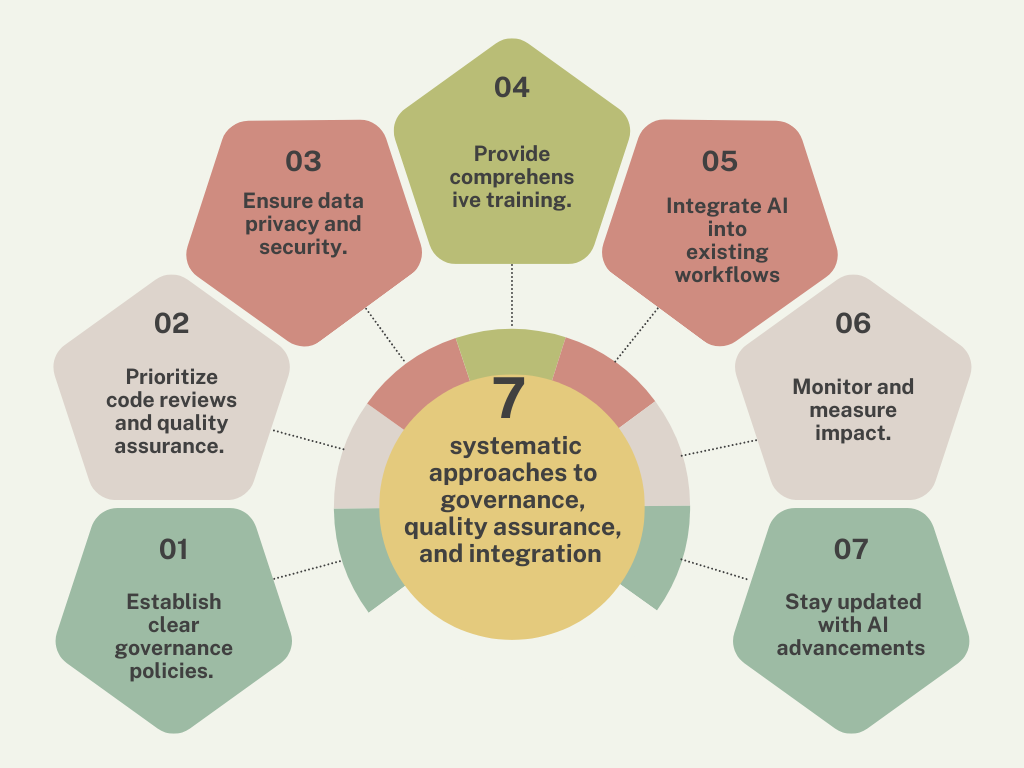
AI coding isn’t only a developer task; it’s an organizational challenge. Research shows that successful teams build systematic approaches to governance, quality assurance, and integration rather than simply installing the latest AI assistant. The adoption challenge is organizational, not just technical.
Developing software is mentally challenging. When you spend a lot of time writing code to fix problems with a “boilerplate” (standardized format), reading through documentation, and fixing merge conflicts, it becomes stressful and might eventually harm your ability to function.
However, using AI tools in the right way allows developers to eliminate duplicate tasks and save time for more thoughtful and creative solutions. Instead of working hours just to get a build script configured, developers can use an assistant to set it up quickly and then modify the end product as needed. There is still a need for reviewing and testing; however, a lot of the work was already done for you.
You are also able to use these AI tools to find out how to learn new languages and frameworks in a much faster timeframe. They can summarise docs, translate pseudocode into working functions and suggest best practices. This reduces cognitive load when exploring unfamiliar territory, making your work less stressful. With the right governance and practices, AI workflows can actually give you more time to relax. Whether that means an evening walk or enjoying HempandBarrel’s wellness products is up to you.
AI coding workflows offer real benefits, but they’re not magic. They require discipline, governance and training. Treat the AI as a junior partner, create tight feedback loops, maintain rigorous code review and invest in secure prompts.
At an organizational level, set clear policies, prioritize quality assurance, protect privacy and measure impact. Embrace emerging agentic loops and multi-agent systems, but always keep humans in control. With these practices, AI can transform how you build software—freeing you to think creatively, reduce stress, and maybe even enjoy a moment of relaxation.
What are AI coding workflows?
The AI code workflow(s) essentially create machine learning models that fit within the software development process (lifecycle). The AI code workflows include everything from generating boilerplate code to explaining the code created by you; to refactoring your code; writing test cases; and even providing feedback on your pull request(s). The AI allows you to do less work, but also allows you to work more closely with other developers, and it also allows them to work more efficiently.
How can I use AI coding tools safely?
Treat AI as a pair programmer. Review every suggestion, test frequently and avoid pasting large chunks blindly. Define clear governance for when and how to use AI. Run security linters and limit the sensitive information you share with external models. Always keep human reviewers in the loop.
What skills do developers need to work with AI?
Aside from programming skills, developers need prompt design skills—knowing how to frame questions to get useful answers. Training on meta-prompting and prompt chaining can make AI more effective. You will also need familiarity with AI’s limitations, have security awareness, and have good testing skills.
Can AI take over for human coders?
The answer is no. AI tools serve to accelerate coding, but they are not a substitute for human coders. They do not understand the business context of the code being produced, and they do not have the capacity to reason about the architecture of an entire system and/or the long-term implications of that architecture. AI is capable of producing code snippets and conducting code refactoring tasks. However, while the code produced by AI is very helpful, it will be the best developers who know when to trust AI and when to step in and do additional work to refine and correct that code. Human judgment remains essential.
What is the future of AI coding workflows?
The future lies in agentic loops and multi-agent systems. Instead of one-off prompts, developers will orchestrate agents that plan, implement, test and iterate automatically. Quality internal platforms, rich context and clear policies will enable these agents to handle most of the routine coding work. Developers will focus on designing systems, setting goals and reviewing outputs rather than writing every line.
We leverage AI, cloud, and next-gen technologies strategically.Helping businesses stay competitive in evolving markets.
Consult Technology Experts
Hi! I’m Aminah Rafaqat, a technical writer, content designer, and editor with an academic background in English Language and Literature. Thanks for taking a moment to get to know me. My work focuses on making complex information clear and accessible for B2B audiences. I’ve written extensively across several industries, including AI, SaaS, e-commerce, digital marketing, fintech, and health & fitness , with AI as the area I explore most deeply. With a foundation in linguistic precision and analytical reading, I bring a blend of technical understanding and strong language skills to every project. Over the years, I’ve collaborated with organizations across different regions, including teams here in the UAE, to create documentation that’s structured, accurate, and genuinely useful. I specialize in technical writing, content design, editing, and producing clear communication across digital and print platforms. At the core of my approach is a simple belief: when information is easy to understand, everything else becomes easier.