
Top
Search
People also search for:

Stay Inspired with Instagram




Claude Code can inspect, edit, test, and help configure a codebase, but it does not create a special kind of “Claude Code app.” The deployable artifact is still a normal web application, API, worker, container, or static site. That distinction matters because the correct hosting target depends on runtime behavior, not on the tool used to generate the code.
If you are still in the development stage, start with a clear build process before thinking about hosting. This guide on how to build an app with Claude Code explains how to move from an idea to a working application before preparing it for deployment.
Do not infer the architecture from a single filename. Read the framework configuration, build and start scripts, route handlers, background jobs, database client, and deployment files together.
| Workload | Typical clues | Good starting options | Operational requirement |
| Static site or SPA | Build creates HTML, CSS, and JavaScript assets; no runtime server is required | Netlify, Vercel, Render Static | CDN hosting and client-side routing configuration |
| Framework app with server rendering or route handlers | Next.js, Nuxt, SvelteKit, Astro SSR, or framework server functions | Vercel, Netlify, Render | Supported adapter/runtime, function limits, region, and database strategy |
| Always-on web service or API | npm start, Gunicorn/Uvicorn, a listening port, long-lived process, or custom server | Railway, Render, Fly.io | Persistent process, health checks, graceful shutdown, and scaling |
| Worker, scheduler, or queue consumer | Job processor, cron command, queue listener, or other non-HTTP process | Railway, Render, Fly.io | Retry policy, idempotency, monitoring, and durable state |
| Database-backed application | PostgreSQL, MySQL, MongoDB, or Redis client; migrations, schema, or connection URL | Any compatible compute platform plus a managed database | Connection management, migrations, backups, restore testing, and data locality |
Practical check: Inspect package.json scripts, framework configuration, Dockerfile, process definitions, database migrations, and files such as netlify.toml, vercel.json, railway. toml, render.yaml, or fly.toml. Run the production build locally before selecting a host.
| Platform | Best for | Free entry | Server model | Databases | Billing |
| Netlify | Static sites, web frameworks | 300 credits/month | Functions and edge functions | Built-in tools and integrations | Credit-based usage |
| Vercel | Next.js and frontend apps | Hobby for personal use | Serverless functions and workflows | Marketplace databases, Blob | Allowances, then usage |
| Railway | Persistent apps and services | Trial, then $1/month credit | Long-running services, jobs, cron | PostgreSQL, MySQL, Redis, MongoDB | Minimum plan plus usage |
| Render | Web apps, workers, cron | Limited free compute | Persistent services and workers | PostgreSQL and Key Value | Service and usage pricing |
| Fly.io | Regional container apps | Short trial | Machines and containers | PostgreSQL, volumes, partners | Pay as you go |
| AWS / GCP / Azure | Enterprise and advanced infrastructure | Service-specific free offers | Serverless, VMs, containers, Kubernetes | Broad managed database options | Usage-based pricing |
Verified from official documentation on July 7, 2026. Exact allowances and prices are intentionally summarized here; consult the source links before purchasing.
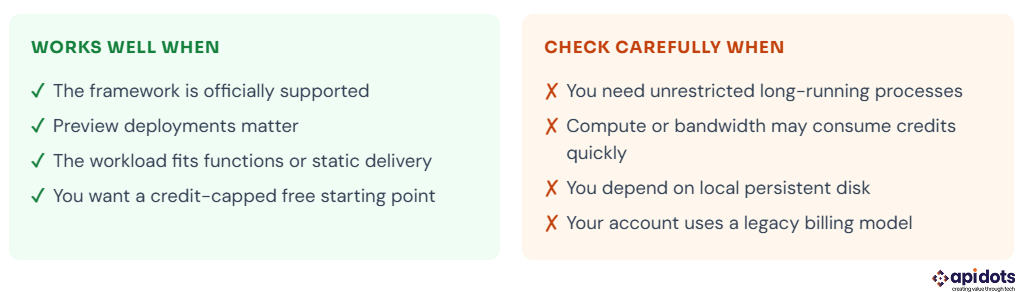
Best for: static sites, SPAs, and Netlify-supported framework deployments
Netlify’s current credit-based Free plan includes 300 credits per month with a hard limit. Official documentation currently lists 15 credits for each successful production deploy, 20 credits per GB of web bandwidth, 2 credits per 10,000 web requests, and 10 credits per GB-hour of compute. Deploy Previews and branch deploys do not consume production-deploy credits.
Accounts created before September 4, 2025, can remain on legacy plans. The documented legacy Free/Starter allowance includes 100 GB of monthly bandwidth and 300 monthly build minutes, but the account’s dashboard is the authoritative record, as older legacy variants may differ.
Netlify is not limited to static files: it supports serverless, scheduled, and background functions, and its Background Functions can run for up to 15 minutes. Netlify also now offers Netlify Database on credit-based plans, so the old blanket statement that Netlify has “no database” is no longer accurate.
Boundary to understand: functions remain platform-managed and bounded. A custom daemon, indefinite socket process, or application that assumes a permanently running local filesystem is usually a better fit for Railway, Render, Fly.io, or a cloud container/VM service.
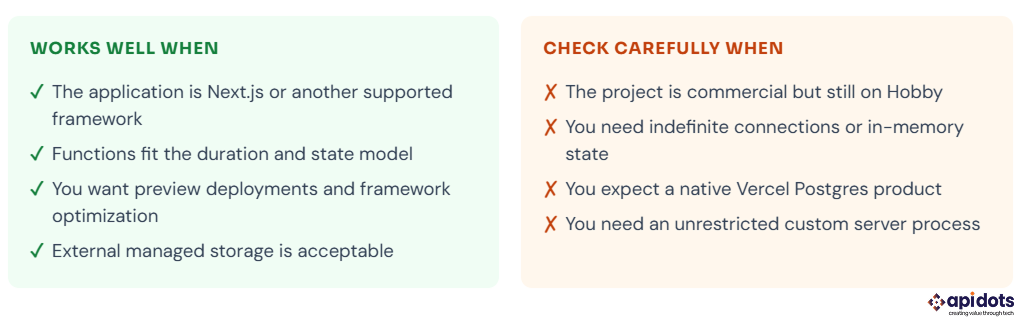
Best for: Next.js and framework-aware applications using Vercel Functions
Vercel automatically detects Next.js and many other frameworks, builds server routes as Vercel Functions, and deploys each push from a connected Git repository. The Hobby plan is free, but Vercel’s official fair-use rules restrict it to personal, non-commercial use. A commercial client project should normally use an appropriate paid plan.
Current Function limits are materially different from older guides: Hobby functions can run for up to 300 seconds. Pro and Enterprise default to 300 seconds and can be configured to 800 seconds, with an extended 1,800-second maximum in beta for supported runtimes.
Vercel now supports WebSockets in beta on all plans. Connections are still subject to Function duration, and clients should reconnect; persistent rooms, presence, and coordination state should live in an external data store.
Database correction: Vercel Postgres is no longer available as a native product. Existing databases were moved to Neon in 2024. New projects connect Postgres, Redis, NoSQL, and other providers through the Vercel Marketplace. Standalone Edge Functions are also deprecated in favor of Vercel Functions with the Node.js runtime; Routing Middleware continues to use the edge runtime where applicable.
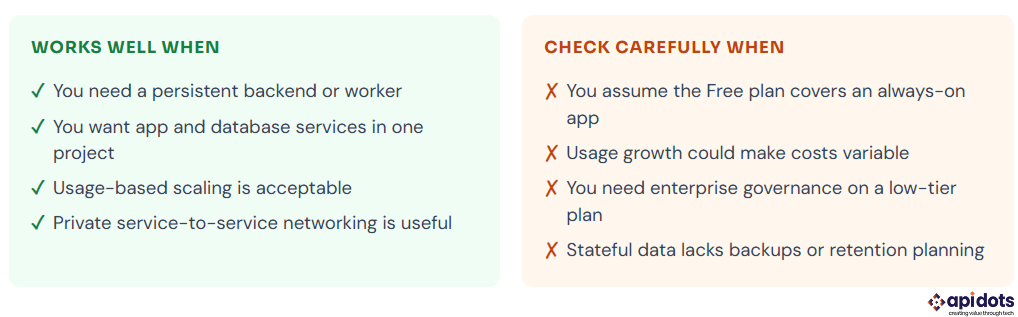
Best for: persistent services, databases, jobs, and multi-service prototypes
Railway deploys long-running application processes and data services from Git or the CLI. It supports common runtimes and Docker, private networking, variables, volumes, cron jobs, and databases including PostgreSQL, MySQL, Redis, and MongoDB.
Pricing correction: new users receive a one-time $5 trial that lasts up to 30 days. When the trial expires, or the credit is used, the account reverts to a Free plan with $1 of non-rollover credit each month. The Hobby plan is $5 per month, and that $5 acts as a minimum usage commitment covering the first $5 of resource usage.
The Free plan is useful for very small or intermittent workloads, but $1 of monthly credit is not equivalent to an always-on production server. Estimate the service’s actual CPU, memory, storage, and egress use before promising a fixed monthly cost.
Deployment check: make sure the service listens on the platform-provided PORT, has the correct start command, handles SIGTERM, and does not rely on ephemeral filesystem data unless a volume is attached.
Best for: web services, workers, cron jobs, static sites, and managed Postgres
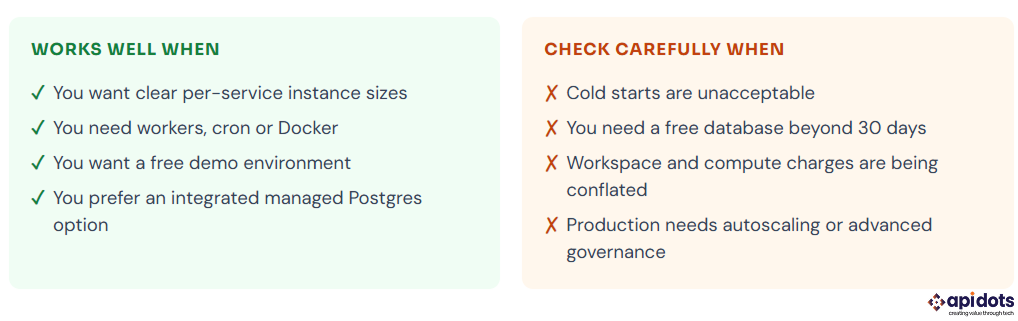
Render supports web services, private services, background workers, cron jobs, static sites, Docker, managed Postgres, and a Redis-compatible key-value service. Its 2026 pricing separates the workspace plan from service compute and metered features.
The Hobby workspace is $0 per month plus compute; Pro is currently $25 per month plus compute. A Free web service is available, while the paid Starter web service instance starts at $7 per month.
Free web services spin down after 15 minutes without inbound traffic and generally take about a minute to start again. Free Render Postgres currently has a 30-day limit, so it should not be presented as a permanent free production database.
Best for: containerized apps needing machine-level and regional placement control
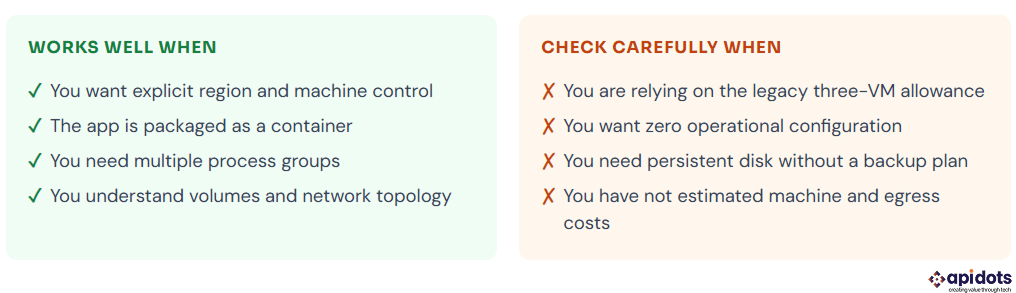
Fly.io runs applications as Fly Machines and gives developers more direct control over machine size, regions, process groups, volumes, and networking than typical frontend platforms.
Free-tier correction: the old allowance of up to three small shared VMs is a legacy benefit for qualifying older organizations. New users currently receive a trial of 2 VM hours or 7 days, whichever comes first. After the trial, a payment method is required, and billing is pay-as-you-go.
Fly.io is a strong fit when the application is already container-friendly and regional placement matters, but it has a higher operational learning curve than one-click framework hosts. Managed Postgres is available; the older self-managed Fly Postgres product is documented as unsupported.
AWS, Google Cloud, and Azure are not automatically “too complex,” and smaller platforms are not automatically unsuitable for production. The decision should be based on requirements: identity and access integration, private networking, organization policies, data residency, managed service selection, contractual support, compliance scope, and internal operating expertise.
This is also where teams often start comparing traditional DevOps responsibilities with managed platforms and NoOps-style workflows. If your goal is to reduce operational burden, it is worth understanding whether NoOps can replace DevOps and where human oversight is still required for deployment, monitoring, security, and incident response.
Large clouds become compelling when you need a service or control that is materially better aligned with the project—for example, organization-wide IAM, private connectivity to existing systems, a specific managed AI/data service, multi-account governance, or a negotiated enterprise agreement. Smaller platforms such as Render also publish SOC 2 and ISO capabilities, so compliance claims must be checked plan by plan rather than treated as exclusive to the large clouds.
For an early application with no special cloud requirement, a focused platform can reduce setup work. Migration later is possible, but only if the application avoids unnecessary platform lock-in and stores state in portable, backed-up systems.
Claude Code can help add every item below when asked. The risk is assuming generated code is complete, correctly configured, or appropriate for your threat model without review. This is especially important because different AI coding tools behave differently; teams comparing Claude Code, Cursor, GitHub Copilot, and Windsurf should evaluate not only coding speed but also reviewability, test coverage, maintainability, and deployment risk.
| Claude Code can help create | You must verify in production |
| ✓ Application logic and UI | □ Secret storage and rotation |
| ✓ API routes and schemas | □ Authentication and authorization |
| ✓ Tests and validation code | □ Migrations, backups, and restore tests |
| ✓ Deployment configuration | □ Logs, traces, metrics, and alerts |
| ✓ Security-control scaffolding | □ Abuse controls and rate limits |
| ✓ Build and runtime scripts | □ Health, shutdown, and rollback behavior |
| ✓ Documentation drafts | □ Headers, CORS, and browser policies |
Secrets and environment separation. Search the full Git history—not just the current files—for exposed credentials. Store secrets in the platform’s secret manager, rotate anything that was committed, maintain separate development/preview/production values, and add secret scanning.
Authentication and authorization. Test access-control decisions on the server. Authentication proves identity; authorization decides what that identity may do. Review password reset, session expiry, token validation, tenant isolation, and administrator paths.
CORS and browser security policy. Configure CORS only when the browser calls a different origin, allow the minimum required origins/methods/headers, and test credentials behavior. Add appropriate security headers and a Content Security Policy that matches the application rather than blindly copying a preset.
Abuse controls. Apply rate limits, quotas, payload limits, authentication, and bot controls according to endpoint risk. A single in-memory limiter may not work correctly across multiple instances; use a shared store or platform control when global enforcement is required.
Observability. Keep structured application logs, but remember that console.log output is still collected by many platforms. Add request correlation, error reporting, metrics, uptime checks, and alerts that someone will actually receive.
Health and lifecycle behavior. Add liveness/readiness endpoints where the chosen platform supports health checks. Listen on the provided port, handle shutdown signals, stop accepting new work during termination, and verify rollback behavior.
Database migrations, backups, and recovery. Make migrations deterministic and safe for rolling deploys. Define who runs them, prevent two deploys from racing, enable backups, document retention, and perform a restore test before relying on the backup.
Dependencies, runtime, and supply chain. Pin an actively supported runtime, commit lockfiles, review licenses, scan dependencies and container images, remove unused packages, and rebuild after security updates. As of July 2026, Node 24 is the latest LTS line; use the version actually supported by your dependencies and platform.
For a deeper look at review practices, testing, and production safeguards, read this guide on debugging AI-generated code before shipping anything generated or heavily assisted by AI.
Connecting Netlify, Vercel, Railway, or Render to a Git repository gives you automatic deployment, but a separate GitHub Actions workflow triggered on a push to main does not automatically stop the hosting platform from deploying that same push. Both systems can start at the same time.
The reliable, simple pattern is: run CI on pull requests, protect main, require the CI status check, block direct pushes, and let the hosting platform deploy only after the tested pull request is merged.
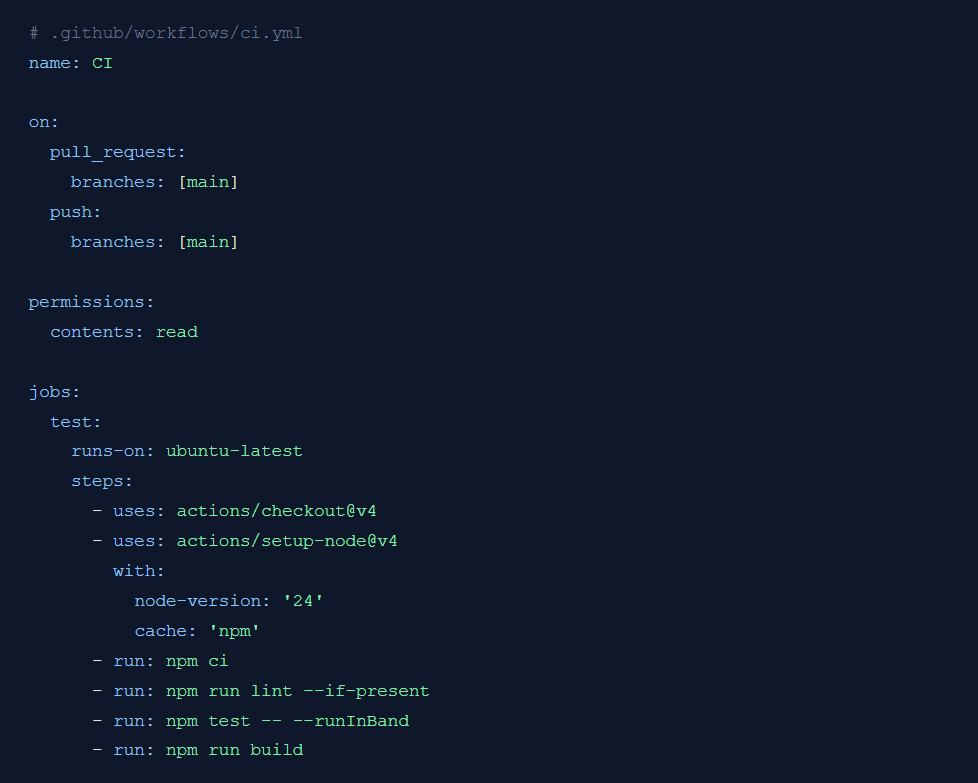
Repository settings required: create a branch rule or ruleset for main, require pull requests, and require a CI/test status check before merging. For higher-risk deployments, deploy from a dedicated GitHub Actions job after tests pass, or use protected deployment environments and approvals.
Generated-code review: prioritize authentication, authorization, database queries, file uploads, webhooks, payment paths, tenant isolation, server-side request handling, and any code that executes user-controlled input. Automated scans help, but they do not replace application-specific review.
AI-assisted development can make teams faster, but only when the workflow includes review, testing, deployment controls, and clear ownership. This broader guide on AI tools for software development explains how engineering teams can use AI coding tools without weakening quality, security, or accountability.
Use Netlify when the workload fits its static/framework and function model; use Vercel when Next.js or Vercel Functions are the natural fit; use Railway or Render for persistent services and integrated data workloads; use Fly.io for container and regional machine control; and use AWS, GCP or Azure when their specific governance, network or managed-service capabilities justify the added platform surface.
Do not ship on the strength of a successful local demo alone. Verify access control, secrets, migrations, backups, observability, lifecycle behavior, abuse controls, dependency support, and a tested rollback/recovery path.
Can I deploy an app built with Claude Code for free?
Yes. Hosting requirements depend on the application architecture, not whether Claude Code helped create it. Static React or Vite sites can often use a free hosting plan.
Netlify currently includes 300 monthly credits on its Free plan. Vercel Hobby is free but restricted to personal, non-commercial projects. Databases, background workers, commercial applications, or higher traffic may require a paid plan.
Should I use Netlify or Vercel for a React app?
Both platforms work well for standard React and Vite applications. Choose Vercel when your project uses Next.js heavily, because Next.js is maintained by Vercel and has zero-configuration deployment there.
Choose Netlify for static-first React sites or when you prefer its deployment workflow. Netlify also supports React, Vite, and major Next.js features through its OpenNext adapter.
Where should environment variables and secrets be stored?
Store environment variables in your hosting platform’s project settings or a managed secrets service. Use separate values for development, preview, and production environments.
Never commit API keys, database passwords, tokens, or production .env files to Git. Keep secrets out of browser bundles, restrict access, rotate credentials regularly, and redeploy after changing production variables.
My app works locally but fails after deployment. What should I check first?
Start with the deployment build logs and runtime logs. Then run the exact production build command locally.
Check the Node.js or runtime version, build command, output directory, environment variables, case-sensitive file imports, dependency lockfile, routing rules, database connectivity, and external API permissions. These checks usually reveal differences between the local and production environments.
Can Vercel handle WebSockets and long-running functions?
Yes, but Vercel Functions still have execution limits. WebSocket connections close after reaching their maximum duration, so applications should include reconnection handling.
Function duration can be configured within the limits of the selected plan and runtime. Use a persistent hosting platform for indefinite WebSocket connections, always-on workers, queue consumers, or unrestricted long-running processes.
When should I hire a professional engineering or DevOps team?
Consider professional support when your application handles payments, customer credentials, sensitive or regulated data, complex database migrations, high traffic, or uptime commitments.
Expert help is also valuable when you need monitoring, automated backups, disaster recovery, security reviews, scaling, compliance, incident response, or reliable rollback procedures. AI can accelerate implementation, but the team operating the application remains responsible for production security and reliability.
We build and deploy end-to-end AI software solutions for businesses. Accelerating efficiency, automation, and intelligent decision-making.
Get AI Development Services
I’m a digital marketer with experience in SEO, content strategy, and online brand growth. I specialize in creating optimized content, improving website rankings, building high-quality backlinks, and driving traffic through effective digital marketing strategies. I enjoy helping businesses strengthen their online presence and turn visitors into customers.