
Top
Search
People also search for:

Stay Inspired with Instagram



Like many developers today, we at API DOTS lean on AI coding tools to scaffold projects, explore unfamiliar APIs, and quickly prototype for client engagements. This trend is becoming increasingly common as teams adopt AI-powered software to accelerate development workflows.
Yet that magic comes with risks: AI‑generated code often compiles and runs but can hide subtle bugs, security vulnerabilities, or inefficient patterns. Overreliance on AI can also create a false sense of confidence, leading to fragile solutions slipping into production.
In this post, we are sharing how our team debugs and refines AI‑generated code in real client projects. We’ll walk you through the practices we use, from crafting system prompts to performance testing and handling hallucinations.
To show the process, we have included a simple example of AI‑generated code that needs fixing. These are the lessons we apply every day as we integrate AI into our development workflows at API DOTS.
Every AI session starts with context. When we first began experimenting with coding assistants, we would drop into a chat with only a short task description and be disappointed when the output missed the mark.
We’ve since learned that system prompts (predefined instructions placed in the project root) provide the tool with the necessary context. Our system prompt reminds the assistant to:
By setting these expectations up front, we save time and reduce the number of corrections required later. Just as importantly, everyone on our team benefits from consistent behavior across sessions. This kind of structured setup is something we also apply when building custom web and mobile applications for clients, clear requirements and constraints defined early always lead to cleaner, more maintainable code.
AI tools are helpful on their own, but connecting them to existing systems makes them far more powerful, particularly when teams focus on AI integration within their SaaS platforms.
We adopted the Model Context Protocol (MCP) after reading about Anthropic’s open standard. With an MCP server wired to our Git repository and agile board, we can ask the AI to:
With MCP, the AI becomes a true teammate rather than a toy. When we ask for a fix, it can open the relevant branch, scan the commit history, and update the task on our board. This context reduces hallucinations and increases productivity.
Even when AI produces code that appears correct, we never merge it without automated scanning. Several tools have become staples in our workflow:
These scanners act as guardrails. They highlight suspicious code paths before humans review the pull request, which is especially valuable when AI‑generated code introduces outdated patterns or hidden issues.
Performance validation is particularly important in modern systems where scalability is expected from day one, especially when building software tailored to real business workflows and long-term growth.
One of our biggest surprises when shipping AI‑generated code was discovering that “working” solutions sometimes fell apart under load. We now treat performance as a core requirement for any AI‑assisted feature. Our process includes:
We’re continually amazed by how much tuning is required even for small AI‑generated functions. Treating performance testing as a first‑class citizen prevents unpleasant surprises when the code scales.
AI models sometimes generate code that looks plausible but is wrong — known as hallucinations. We’ve found that iterative development mitigates this risk. Instead of dropping a huge chunk of AI code into production, we:
This agile approach means that if the AI misinterprets a requirement, we catch it quickly. Working in small increments also makes it easier to debug and fix issues.
While the steps above come directly from our day‑to‑day work, the broader development community has learned additional lessons in 2026. Among the most important trends are:
By combining these emerging practices with the fundamentals of scanning and testing, we’ve built a workflow that harnesses AI’s strengths while guarding against its weaknesses.
To illustrate, here’s a simple bug we encountered during a client project at APIDOTS. We asked our AI assistant to write a function that computes the average of a list. The generated code looked reasonable:
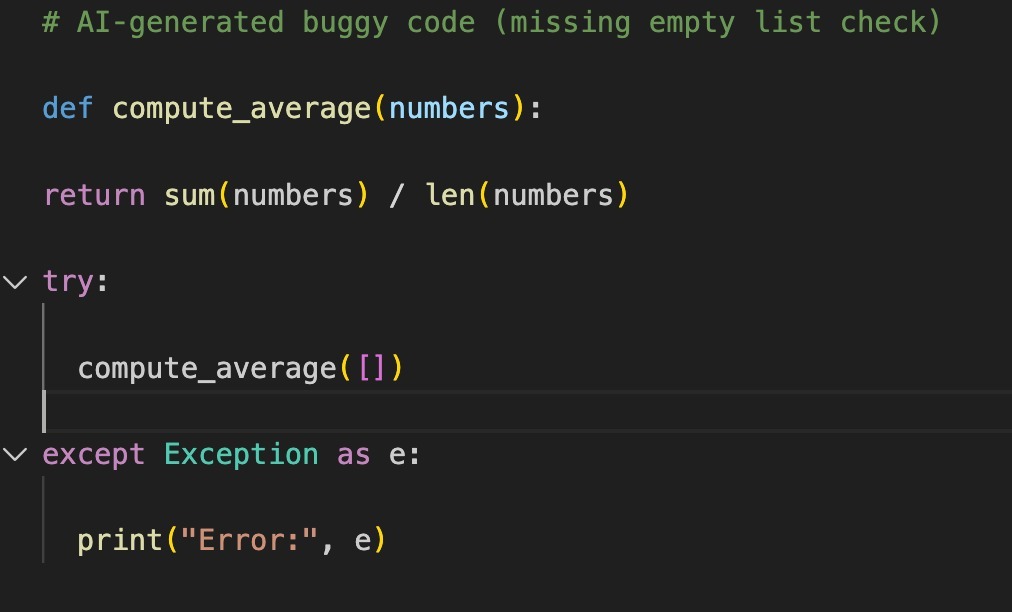
At first glance, this seemed fine, but when we called compute_average([]) it threw a ZeroDivisionError because the list is empty. This is an example of a subtle edge case that the AI overlooked—a common issue when tools generalise typical patterns but miss corner cases.
Our fix was straightforward:
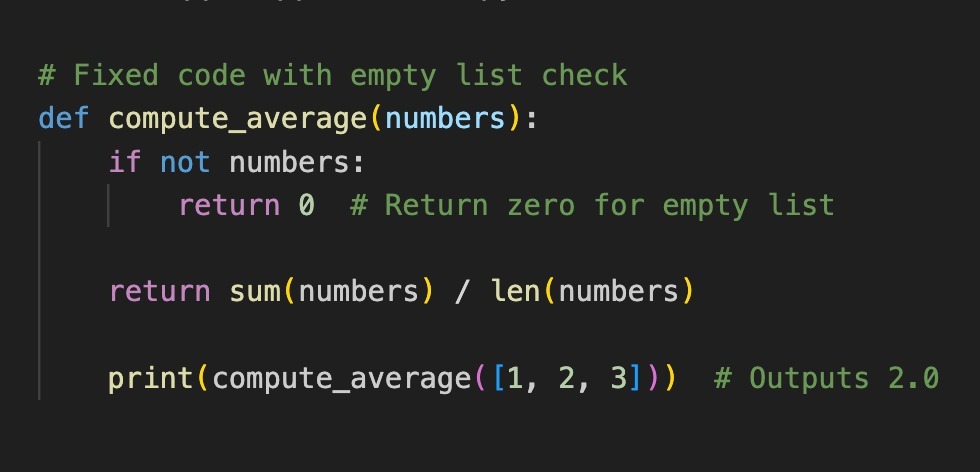
Below is a screenshot showing both the AI‑generated code, the error, and our fix. Creating this image helped us document the issue for our team and client:
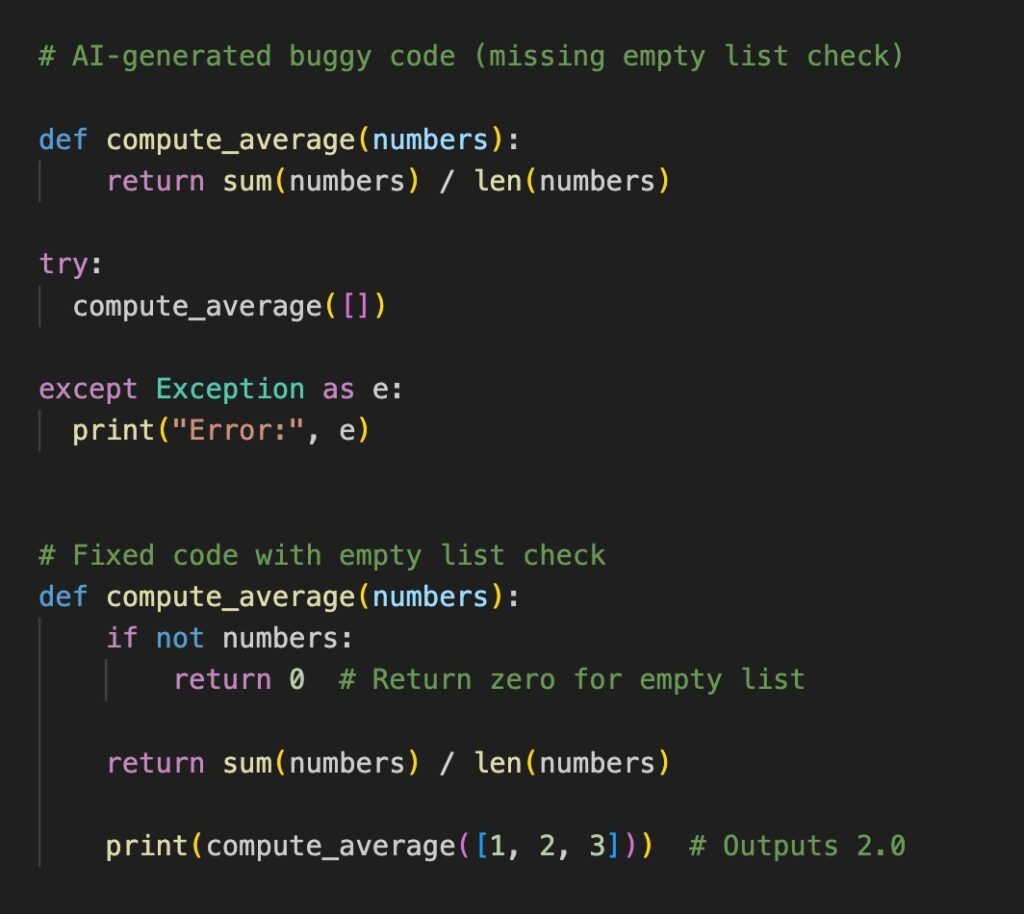
Capturing errors visually, through screenshots of the AI-generated code, the error, and our fix, makes it easy to share context and remember what went wrong. In larger codebases, we take similar screenshots for trickier bugs and include them in pull requests for clarity. This documentation habit also feeds directly into our UI/UX design reviews, where we ensure error states are handled gracefully at the interface level, not just in the backend logic.
AI tools accelerate development, but they still require oversight. By setting clear system prompts, integrating with workflow servers, scanning for vulnerabilities, testing performance, working iteratively, and embracing modern AI‑development practices, we can reap the benefits of AI while avoiding its pitfalls.
The human element remains critical; our judgment, intuition, and contextual knowledge steer the AI toward useful outcomes.
We hope this team journey through our AI‑assisted workflow at API DOTS helps you refine yours. Feel free to adapt these patterns and share your own experiences. Happy debugging!
For more insights on modern development, AI tools, and software engineering practices, explore the latest articles on our engineering blog.
We engineer robust, future-ready software solutions.Built using modern architectures and proven development practices.
Hire Developers
Hi! I’m Aminah Rafaqat, a technical writer, content designer, and editor with an academic background in English Language and Literature. Thanks for taking a moment to get to know me. My work focuses on making complex information clear and accessible for B2B audiences. I’ve written extensively across several industries, including AI, SaaS, e-commerce, digital marketing, fintech, and health & fitness , with AI as the area I explore most deeply. With a foundation in linguistic precision and analytical reading, I bring a blend of technical understanding and strong language skills to every project. Over the years, I’ve collaborated with organizations across different regions, including teams here in the UAE, to create documentation that’s structured, accurate, and genuinely useful. I specialize in technical writing, content design, editing, and producing clear communication across digital and print platforms. At the core of my approach is a simple belief: when information is easy to understand, everything else becomes easier. Reach me at amysbrew.com