
Top
Search
People also search for:

Stay Inspired with Instagram



Summary:
UX design trends for 2026 are less about flashy visuals and more about making digital products feel helpful, human, and responsible. Interfaces are becoming smarter and more flexible, using voice, text, gestures, and AI together so users can interact in the way that suits them best. AI is showing up as a “co-pilot” inside apps, helping people write, plan, summarise, and make decisions faster. At the same time, personalisation is becoming more advanced, with products adapting to user behaviour and context in real time, while placing greater emphasis on privacy, transparency, and user control.
Digital products today compete not just on features, but on experience. Users expect apps to be intelligent, responsive, private, accessible, and even emotionally aware. But many businesses still design interfaces as static screens instead of adaptive systems.
So what will truly define modern UX?
From AI co-pilots embedded inside apps to legally mandated accessibility, UX design is evolving beyond aesthetics into responsibility and intelligence. In this blog, you’ll discover the key UX trends shaping digital products, what they mean for product teams, and how to apply them strategically in web, mobile, and SaaS platforms.
Voice-controlled assistants have evolved from only being available on smart speakers to now being accessed via many different devices. Touch, while still an important component of an interface, is just one aspect of how users will interact with technology in the future.
By 2026, UX designers will design for interfaces that provide an integrated blend of input methods through voice, gesture, text, and biometry. Users will be able to create a voice memo and then switch to typing mid-sentence while still capturing all of the intonational differences between their voice recording and typed input.
Additionally, users may be able to receive less frequent notification alerts from their devices when an intelligent assistant detects a high level of stress in that user’s voice or body language. Ambient intelligence and emotion-aware sensors are transforming screens into collaborators rather than static surfaces.
A voice-only interface can be limiting when you’re in a noisy café, and a text-only input doesn’t help if you’re cooking dinner. Multimodal experiences let you pick the channel that suits your context. Multimodal design makes information more accessible for those individuals with physical or mental limitations, older adults and any individual using technology in a potentially hazardous environment by providing multiple means of accessing information.
Multimodal design requires you to consider audio prototyping, conversation design, and what occurs when you use gestures, voice, and text. Also, when considering designing apps that make use of user privacy, such as an app that monitors for stress signals, you must first create the opportunity for users to decide what information they will share and when.
By crafting experiences that respond to multiple inputs and that feel alive to human needs, designers can create richer, more intuitive products.
Generative AI isn’t just for writing code or creating art; it’s ready to become your personal co-pilot embedded in every interface. Think of a project management tool that drafts status updates, summarises meeting notes and suggests next steps – all on the device, without sending data to the cloud. Advances in on-device AI chips (like Apple’s latest processors and Qualcomm’s Snapdragon series) enable private, real-time AI interactions that feel like another person sitting beside you.
These intelligent “co-pilots” or “virtual assistants” can greatly improve the efficiency of teams in the workplace. AI can assist in email drafting, design suggestions, and filling out forms automatically, therefore saving valuable time for individuals who are trying to juggle numerous projects at work.
For teams that are working on several projects and have deadlines approaching, AI technology can be the deciding factor in whether they miss their deadline or get their project completed on time.
However, there is one major concern surrounding the usage of AI technology in today’s world: trust. As AI becomes more proactive in scheduling appointments, purchasing items online, and booking travel for users, it is imperative that designers create interfaces that allow users to give their consent, understand what an AI is doing and how it is doing it, and provide means to correct the AI’s actions.
Also, on-device AI offers a privacy advantage by keeping data local, but designers must still reassure users that their information isn’t being misused.
Done right, AI co-pilots transform apps into dynamic collaborators. Done wrong, they become unpredictable and intrusive. Striking that balance is one of the most critical UX design trends of this era.
Ready to integrate AI responsibly into your product?
Explore how APIDOTS builds AI-powered digital experiences that balance automation with user trust.
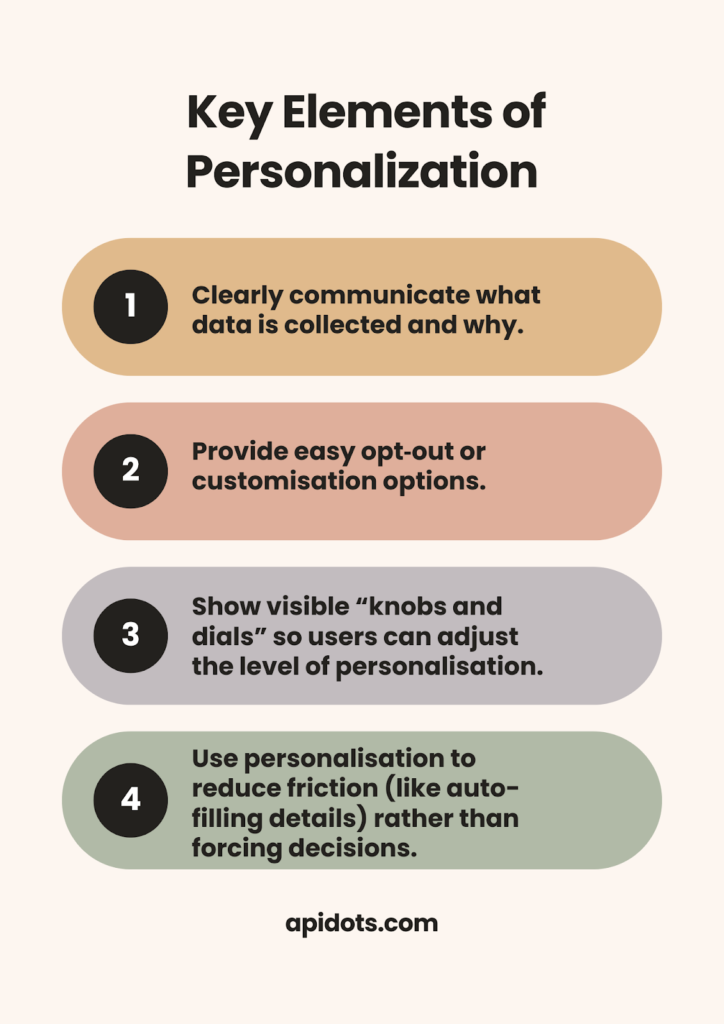
Personalisation isn’t new, but we’ve reached a point where experiences can adapt in real time to your context, location, mood, and even micro-behaviours. Imagine an e-commerce app that rearranges product categories depending on whether you’re commuting, at home or on holiday. Or a fitness app that understands you slept poorly and suggests a lighter workout. The data and AI capabilities exist to do this.
There are compelling business reasons for hyper-personalisation: studies show that consumers prefer tailored recommendations, and companies that personalise well generate significantly higher revenue than those that don’t. But there’s an ethical line. Gathering data without consent erodes trust. Over-personalisation can feel manipulative or invasive, turning delight into discomfort.
When implementing these UX design trends in real products, execution matters more than theory. At APIDOTS, we help teams translate ideas like AI co-pilots, accessibility compliance, and scalable UX systems into production-ready designs that work across web, mobile, and SaaS platforms.
In the past, accessibility standards have always been thought of as something nice to have. However, this is quickly changing. The European Accessibility Act (EAA), which will be fully in force as of June 2025, has established the requirement for inclusive design by law for most digital products and services across the entire EU. Companies will face fines if their websites, apps, or e-commerce platforms aren’t usable by people with disabilities. Similar legislation is expanding in the U.S. and beyond.
The shift in regulatory expectations means that accessibility is now an integral part of design, not just something that you consider after your first draft. As such, designers should be mindful of the WCAG standards (Web Content Accessibility Guidelines), as well as contrast ratios, keyboard navigation, image alt text, and screen reader-compatible forms.
Additionally, they should take into account both cognitive accessibility, or designing for neurodiversity, and internationalisation, which includes accommodating cultural differences and right-to-left (RTL) languages. Accessibility is also good business – more than one billion people globally live with disabilities; inclusive products have a broader reach.
Forward-thinking designers embrace these requirements as an opportunity to build better products. As compliance becomes non-negotiable, inclusive design practices become a core competency – another essential facet of UX design trends.
We’ve all been on websites with so many bells and whistles that we’re left dizzy. In 2026, design will focus on functional minimalism. Functional Minimalism is about stripping things down to only the essentials. It’s about using micro-animations and mini-interactions to direct and engage users.
Functional Minimalism does not have to look cold or uninviting. Rather, Functional Minimalism should make clear what the primary action is. Secondary details can be hidden behind “progressive disclosure.” White Space becomes a key element of design, allowing for breathing room. When you reduce the amount of information presented to the user (cognitive load), you will reduce frustration and increase conversions.
Micro-animations and mini-interactions are the little things (animations, sounds, tactile actions) that make the interface responsive and feel alive. For example, when the toggle switch animates smoothly, or a button ripples when tapped, the user experiences confirmation and emotional feedback. When used minimally, these features help establish a personality and build trust with users. Overused, they can distract or slow down the experience.
To rise above the market’s noise and make your product unique, embrace functional minimalism. Enable micro-interactions, such as engaging users with small, frequent interactions within an application or website.
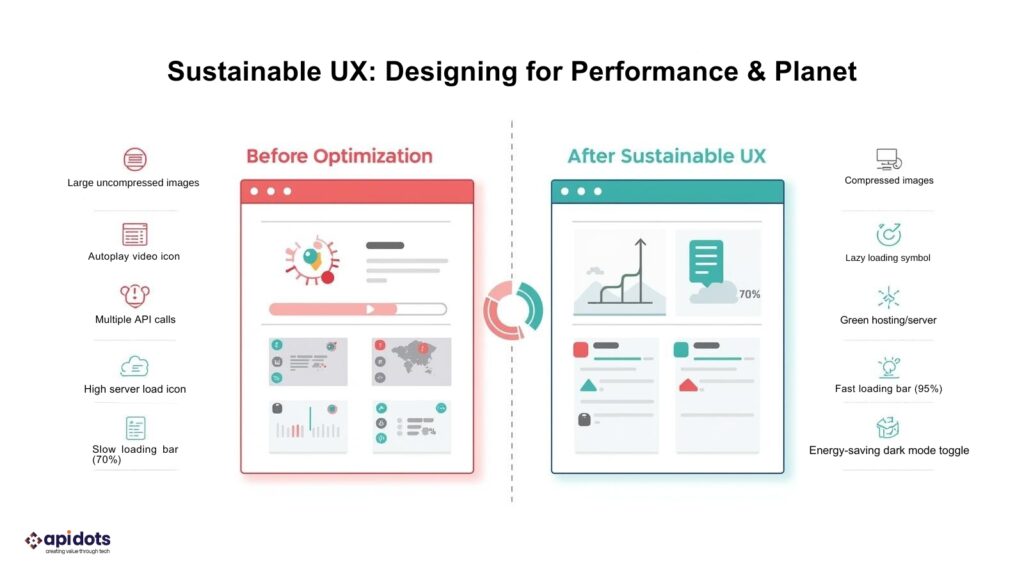
Digital technologies are typically viewed as abstract, but the production and transmission of every pixel, API call, and server request is driven by energy. The rapid growth of data centres and devices, as well as their continuing expansion, means that they are contributing to a dramatically increased percentage of worldwide CO2 emissions.
The increasing awareness about this issue is also driving up demand for sustainable UX design practices and sustainable technology. The W3C (World Wide Web Consortium) has published the WSG (Web Sustainability Guidelines), which offer recommendations to help reduce the environmental impact of digital products by reducing the weight of web pages, using renewable-powered hosting, optimising images, disabling video auto-play, and designing for longevity and repairability.
There are two reasons Sustainability UX is important: First, it’s moral to create products that do not contribute to the climate crisis; and second, Sustainability is beneficial for users and Businesses. Lightweight pages load faster and lead to improved user satisfaction and increased search ranking. Efficient operations typically lower infrastructure costs.. Companies increasingly cite green credentials as a differentiator; being able to show your site’s low carbon footprint can attract eco-conscious users.
Making sustainability a design priority leads to products that are both modern and responsible—now an essential part of UX.
The last trend focuses on our often-overlooked relationship with technology. Even a short break from social media can lower anxiety, depression, and insomnia. Major platforms are responding. Instagram, for example, has features like “Your Activity,” “Daily Reminder,” and “Mute Push Notifications” to help users track their time and set boundaries. These features apply proven behaviour change techniques to nudge people toward healthier usage patterns.
More designers are making digital well-being a core part of their products, offering features like:
Designing for well-being doesn’t mean making your app less engaging – it means aligning engagement with what’s good for users. It’s about trust. If people feel that your product respects their health and boundaries, they’re more likely to stick around.
Digital well-being is now a responsibility. As products become more immersive, we need to help users take breaks. Encouraging healthy behaviours is both a smart business move for app developers and a way to build loyalty among their users by providing a source of motivation to keep returning to their applications.
The way these questions are answered will determine not only the usefulness of the product but also its significance to humanity in the future.
There will be numerous potential opportunities and challenges for designers to develop user experience (UX) and interface (UI) designs in 2026. These include multi-modal experiences, artificial intelligence (AI) as an assistant or co-pilot, hyper-personalised designs, accessible designs for all people, minimalist designs, environmentally sustainable designs, and designs promoting health and well-being.
Each trend has its own subset of needs and skills to achieve. You will need new skills, such as designing for voice and gesture interaction, shaping how an AI behaves, understanding legal compliance requirements, reducing carbon footprint, and being able to consider a user’s mental health.
All of these new challenges require an increase in your level of empathy; to see that technology is just a piece of a complex puzzle of a person’s life, and they have many different emotions, abilities, and contexts to work with.
Some of the questions you might ask yourself when developing a product will include: How can I design to make my product smarter and more sensitive? How will I balance personalisation and the protection of the user’s right to privacy? Am I creating something that improves the quality of life for users or simply adding to the distractions in their lives?
If you’re planning your next product upgrade, let APIDOTS help you build future-ready UX that is intelligent, accessible, and sustainable.
1. What are the most important UX design trends right now?
AI integration, accessibility compliance, hyper-personalization, sustainability, and digital wellbeing are leading UX priorities.
2. Is accessibility legally required for digital products?
Yes. Regulations like the European Accessibility Act require many digital services to meet WCAG standards.
3. How can AI improve user experience?
AI can automate repetitive tasks, provide contextual recommendations, and act as an intelligent assistant inside applications.
4. What is sustainable UX design?
Sustainable UX focuses on reducing digital carbon footprint through optimized performance, lightweight pages, and responsible hosting.
5. How does hyper-personalization affect privacy?
Personalization must be transparent and consent-driven to avoid privacy violations and loss of trust.
We modernize legacy systems and business workflows. Using cloud, AI, and data-driven transformation strategies.
Start Digital Transformation
Hi! I’m Aminah Rafaqat, a technical writer, content designer, and editor with an academic background in English Language and Literature. Thanks for taking a moment to get to know me. My work focuses on making complex information clear and accessible for B2B audiences. I’ve written extensively across several industries, including AI, SaaS, e-commerce, digital marketing, fintech, and health & fitness , with AI as the area I explore most deeply. With a foundation in linguistic precision and analytical reading, I bring a blend of technical understanding and strong language skills to every project. Over the years, I’ve collaborated with organizations across different regions, including teams here in the UAE, to create documentation that’s structured, accurate, and genuinely useful. I specialize in technical writing, content design, editing, and producing clear communication across digital and print platforms. At the core of my approach is a simple belief: when information is easy to understand, everything else becomes easier. Reach me at amysbrew.com